
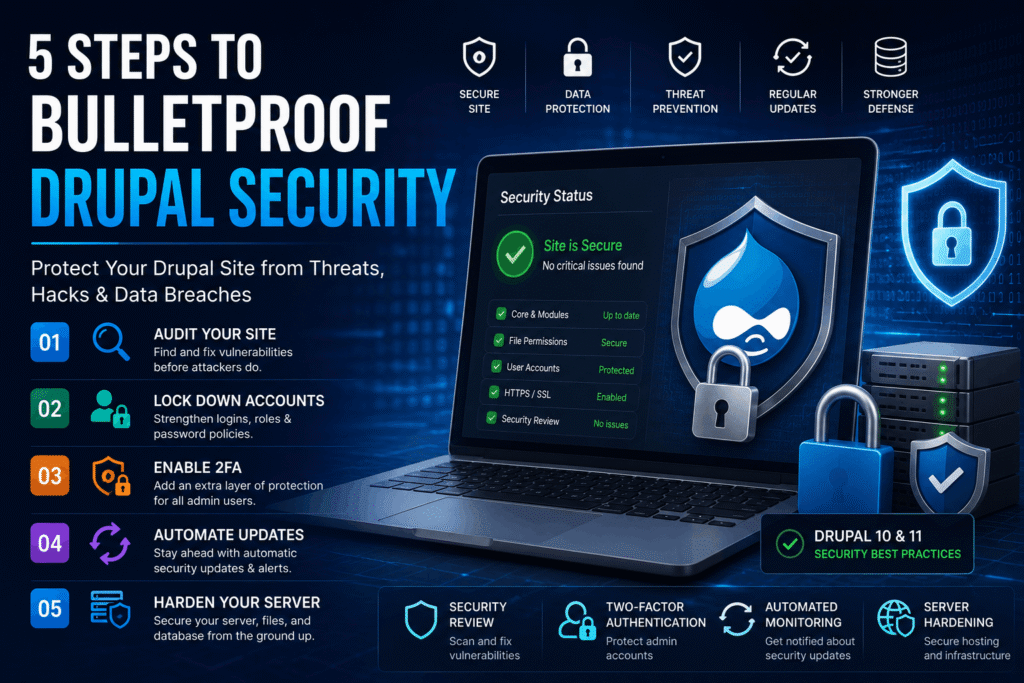
A single overlooked vulnerability in your Drupal site can hand attackers your customer data. Your reputation, and days of painful cleanup. You’ve probably heard horror stories about sites that got hacked.
Because an admin skipped a minor update. The threat is real.
It’s not just hypothetical. Drupal 7 reached its final end of life on January 5, 2025. That’s a significant gap. Not exactly what you’d expect.
That’s no patches, no fixes. Any site still running on it’s a sitting duck. **The awesome news? You can lock down your site step by step, even.**This tutorial gives you a concrete plan. No fluff, just actions that make your Drupal (depending entirely on the context) site a fortress.
TL; DR
- Keep Drupal core and contributed modules updated immediately after Wednesday security releases; automated monitoring prevents you from missing critical patches.
- Enable two-factor authentication (2FA) for all admin accounts and disable the default UID 1 user; this stops 99% of brute-force login attacks.
- Run the Security Review module every other week and schedule composer audit checks via cron; catching misconfigurations early saves sites from becoming headlines.
Key Point
- Most hacked Drupal sites share one mistake: ignoring the built-in Update Manager until it’s too late.
- Because the Drupal Security Team’s weekly cycle is predictable, attackers also know exactly when new flaws become public—don’t give them a head start.
- 2FA takes maybe 10 minutes to set up and instantly raises the difficulty for anyone trying to access your admin panel.
- Running a scanner like Security Review will often expose incorrect file permissions or leftover test accounts you forgot existed.
Table of Contents
- What You’ll Build
- Prerequisites
- Step-by-Step Hardening Overview
- Step 1: Audit Your Current Security
- Step 2: Lock Down User Accounts
- Step 3: Set Up Two-Factor Authentication
- Step 4: Automate Update Monitoring
- Step 5: Harden the Server Infrastructure
- Verification: Testing It Works
- Next Steps
- People Also Ask
- FAQs
What You’ll Build
By the end of this guide, you’ll have a Drupal site with reliable defenses: automated security scanning alerts. Look at the metrics. Two-factor authentication on every admin account, a disabled default admin user. Aggressive password policies, and weekly update monitoring. You’ll also have configured basic server-level protections like secure file transfer. If applicable, a web application firewall.
Prerequisites
You need a working Drupal installation (version 10 or 11 is ideal; Drupal 7 isn’t supported anymore) with administrative access. Access to the command line via SSH is helpful, but not strictly required for some steps. You should’ve Composer installed because it’s the recommended way to manage modules and run security audits — basic familiarity with Drupal’s admin interface is enough to follow along.
Step-by-Step Hardening Overview
Here’s the full security routine laid out as a quick sequence. Walk through these cards before diving into each detailed step.
Step 1: Audit Your Current Security
Yet, moving on to something related. An awesome audit starts with the Security Review module. Because it automates a dozen checks that would take you hours to handle manually. Install it via Composer, then run the report to see where you stand.
- SSH into your server and run:
composer require drupal/security_review
- Enable the module through the admin interface (Extend) or via Drush:
drush en security_review. - Navigate to Administration > Configuration > Development > Security Review and click “Run review.”
Does that hold up? The report will tell you if file permissions are too open, if database errors are displayed, or if untrusted roles can access dangerous input formats — which is why address each issue as it appears. Phpis writable, change permissions to444`.
Expected result: The Security Review report shows zero “Untrusted” or “Warning” items. File permissions for sites/default/files should be 755 for directories and 644 for files.
How can I quickly test if my file permissions are correct?
Use Drupal’s built-in status report atReports > Status report. If you see a red warning about sites/default being writable, — well, actually, that’s a clear sign an attacker could alter configuration files.
Step 2: Lock Down User Accounts
For the average user, basically, what that means is: blocksep matters. The default administrator account (UID 1) is a honeypot for attackers. You want to disable it fully, and use a separate account with administrator privileges instead.
Combine that with brute-force protection, and strong password rules to shut down the easiest attack vectors.
- Create a new user with the administrator role and give it a different username, never “admin.”
- Log in as the new admin, then edit the original UID 1 account and change its status to “Blocked.”
- Install the Login Security module:
composer require drupal/login_security
- Go to Configuration > People > Login Security and set Maximum number of failed login attempts to 5 with a block time of 1 hour.
- Install Password Policyand force at least 12 characters with mixed case, numbers, and symbols.Expected result: The original UID 1 user cannot log in. Any IP that fails five login attempts gets temporarily blocked. New user passwords meet the complexity rules you configured.
Step 3: Set Up Two-Factor Authentication
Yet, add a second verification layer so that even. If a password leaks, a hacker still can’t get in. Supporting time-based one-time passwords (TOTP) via apps like Google Authenticator. Or hardware keys, the TFA module.
- Install the TFA module:
composer require drupal/tfa
- Enable it and go to Configuration > People > Two-factor Authentication.
- Set “Required for roles” to include administrator and any other high-privilege roles.
- Instruct each admin to visit their profile edit page, scan the QR code with an authenticator app, and enter the 6-digit code to activate.
Expected result: Any admin login now requires both a password and a valid time-based code. If someone tries to log in without the code, access is denied.
What if an admin loses their phone?
Taking a different approach here, set up backup codes during the first TFA enrollment. Plus, each user gets 10 single-use codes they can store offline, and let me tell you, the site admin can also reset TFA settings for a user in an emergency.
Step 4: Automate Update Monitoring
Across the board, generally speaking. That means every week there’s a small window where known exploits can spread. You need to catch updates the moment they drop.
- Enable the core Update Manager module (if not already on).
- Go to Reports > Available updates > Settings. Check “Check for updates daily” and enter your email address for notifications.
- Set up a cron job to run Drush commands that check for security releases:
drush pm:security
- Also schedule
composer auditvia cron. For example, add to your crontab:
0 6 * * * cd /path/to/drupal && composer audit --format=json | mail -s "Composer audit report" you@example.com
Expected result: You receive an email whenever a security update is available. The composer audit output flags vulnerable packages, so you can patch them fast.
Step 5: Harden the Server Infrastructure
Basically, what that means is: blocksep matters. The web server.
Database layer craft a separate set of risks. If you’re on shared hosting, you should know a different site on the same server can sometimes affect you.
There are concrete steps you can take.
- Always transfer files using SFTP on port 22, never plain FTP.
- Enforce HTTPS for the entire site with a valid SSL certificate. Many hosts offer free Let’s Encrypt certificates.
- If you’re on a VPS or dedicated server, isolate your Drupal user from other services and restrict file permissions system-wide.
- Consider adding a web application firewall (WAF). Cloud-based options like Cloudflare or Sucuri can filter malicious traffic before it reaches Drupal.
Expected result: All connections to the site are encrypted, file transfers are secure, and external attack traffic is filtered by a WAF if you set one up.
Does shared hosting make Drupal security worse?
Yes, often. Overcrowded servers and shared IPs can expose your site to risks from other tenants; if you must use shared hosting, pick a provider that isolates accounts well and offers a built-in WAF.
Verification: Testing It Works
You’ve configured the defenses. Now it’s time to prove they actually work.
- Log out and try to access the admin panel as the blocked UID 1 user. You should be stopped.
- Attempt a normal login. After entering credentials, the 2FA prompt must appear before dashboard access.
- Run the Security Review module again. All checks should be green.
- Deliberately fail five logins from a different IP using a VPN or mobile hotspot; you should get blocked for 1 hour.
- Check your email inbox for any recent update notifications; if you haven’t received one, trigger a manual update check from Reports > Available updates.
Once these tests pass. You can be confident the a big deal hardening layers are in place.
- Install Security Review — Run it weekly so new misconfigurations are caught right away.
- Enable 2FA for all admins — Eliminate the risk of stolen credentials alone giving access.
- Block UID 1 today — If you haven’t already, do it before you close this tab.
- Set up composer audit cron — Automate vulnerability detection for contributed packages.
Next Steps
Once this baseline is solid, extend your defenses further:
- Integrate a dedicated WAF (Cloudflare or Sucuri) and enable DDoS protection.
- Set up centralized logging by forwarding Drupal’s watchdog logs to a tool like the ELK stack so you can spot attack patterns.
- Create a deployment checklist that includes re-running the Security Review and manually verifying 2FA after every major change.
“The key to security is eternal vigilance. Updating code, both within Drupal and across your hosting infrastructure, is a necessary process to make sure you stay secure.” — Drupal Wiki Guide
People Also Ask
What is Drupal security?
Drupal security refers to the practices, modules, and configurations that protect a Drupal site from unauthorized access, data breaches, and code injection. The platform ships with strong built-in platforms like role-based access control. And a dedicated security team that issues weekly patches. This becomes way more relevant in a moment.
How often are Drupal security updates released?
The Drupal Security Team publishes security releases every Wednesday. In reality, site administrators should apply these updates within 24–48 hours to avoid exposure.
Do I need a security audit for my Drupal site?
Yes, which means regular audits, using the Security Review module. Or external apps like OWASP ZAP, find configuration mistakes that automated updates don’t fix.
What is two-factor authentication for Drupal?
Two-factor authentication adds an extra login step. Usually a time-based code from an app, after the password. The TFA module enables it and is the easiest (at least based on current observations) way to stop brute-force attacks.
Can I still use Drupal 7 safely?
Circling back for a moment, no. Fair enough. 2025 and gets no further security patches. Not exactly what you’d expect. Any Drupal 7 site is a high-risk target.
What is the Drupal Security Team?
It’s a group of volunteer experts who coordinate vulnerability reports, develop patches, and publish official security advisories every Wednesday.
FAQs
What security modules are essential for Drupal?
Security Review, Login Security, Password Policy, and TFA form the core stack. These automate auditing; brute-force protection, password complexity, and two-factor authentication.
How do I check if my Drupal site is secure?
And sure enough, run the Security Review module. And review the status report atReports > Status report. Any red or orange items need immediate attention.
Is Drupal more secure than WordPress?
At a high level. Both can be secure with proper maintenance. Drupal’s granular role-based access control and strict coding standards give it an edge for complex sites, but the most key factor is (and rightly so) how quickly you apply updates. You’ll want to remember this for what’s coming next.
What should I do if my Drupal site gets hacked?
Take the site offline immediately. Restore from a clean backup, reset all passwords, re-run Security Review. Audit the server logs to find the entry point.
🔍 Research Sources
Verified high-authority references used for this article

Comments (0)