

B2B website speed isn’t just about how quickly your homepage appears. It affects what happens when a potential customer opens your pricing page, compares services, interacts with a calculator, or tries to request a demo. A website can look fast and still feel frustrating to use.
This guide will help you test your website, understand Google’s performance metrics, identify common problems, and decide which fixes are worth your time.
Check Your B2B Website Speed
Start by testing the page your customers actually use. Your homepage is a reasonable starting point, but pricing pages, product pages, and lead-generation forms may reveal problems that a homepage test misses.
Website Speed Test
If your tool uses an external performance service, explain where the measurements come from. If a metric cannot be retrieved, show that it is unavailable rather than presenting an estimate as a measured result.
For additional resource inspection, you can use the WebPlatformLab Page Size Checker.
Which B2B page should you test first?
Consider a software company whose homepage loads quickly. A visitor clicks through to the pricing page, where a comparison table, chat widget, and scheduling integration all load together.
The homepage result won’t necessarily tell you anything about that experience.
Test the pages that matter to your visitors:
| Page | Why test it? | Common problems |
|---|---|---|
| Homepage | First impression and navigation | Heavy hero images, delayed content |
| Product or service | Helps buyers evaluate an offering | Videos, screenshots, complex components |
| Pricing | Supports comparisons and buying decisions | Interactive tables, calculators, scripts |
| Demo or contact | Converts interest into an inquiry | Slow forms, validation, integrations |
| Case study | Provides supporting evidence | Embedded media, documents, images |
If you’re short on time, begin with a page that attracts meaningful traffic and leads to an important customer action.
What Is a Good B2B Website Speed?
A good B2B website should show its main content promptly, respond when people interact with it, and keep the layout stable while loading.
Google’s Core Web Vitals provide useful benchmarks for those three aspects of performance.
| Metric | Good | Needs improvement | Poor |
|---|---|---|---|
| LCP | 2.5 seconds or less | Above 2.5 to 4 seconds | Above 4 seconds |
| INP | 200 milliseconds or less | Above 200 to 500 milliseconds | Above 500 milliseconds |
| CLS | 0.1 or less | Above 0.1 to 0.25 | Above 0.25 |
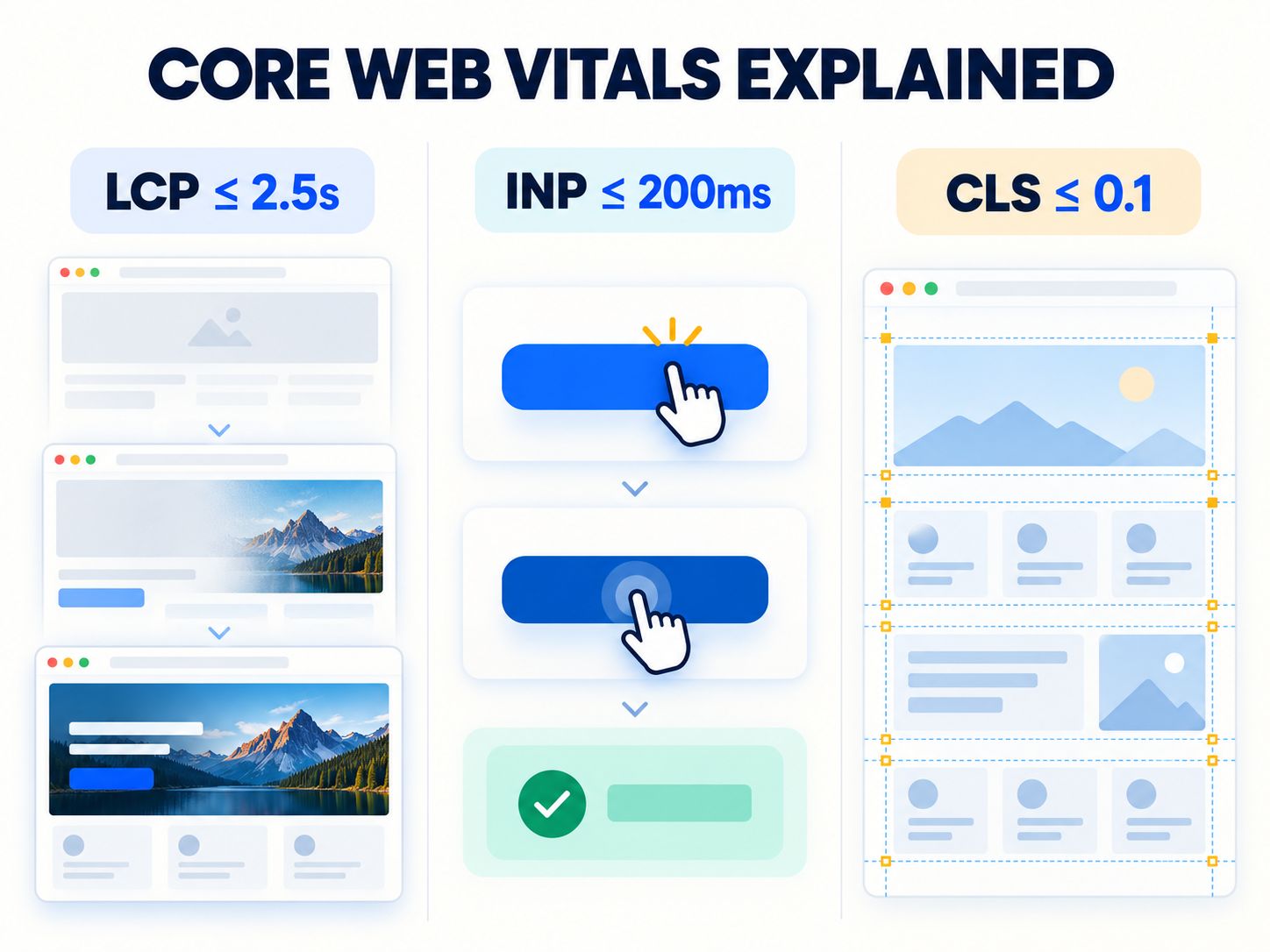
Google evaluates these thresholds using the 75th percentile of real-user experiences, considering mobile and desktop separately.
For the official metric definitions and measurement guidance, see Google’s Core Web Vitals documentation.
LCP: When does the main content appear?
Largest Contentful Paint measures how long it takes for the largest relevant content element to become visible.
Picture someone opening a B2B consulting website. The header appears almost immediately, but the main headline and hero image take several more seconds.
To that visitor, the page may still feel unfinished.
Poor LCP can result from slow server responses, late image discovery, render-blocking resources, or expensive rendering work.
The right fix depends on what is actually delaying the element.
INP: Does the website respond when someone clicks?
Interaction to Next Paint measures the responsiveness of a page to qualifying user interactions, such as clicking a button or using a keyboard control.
Imagine clicking a pricing filter and seeing nothing happen. You click again, and the interface suddenly changes twice.
The page loaded, but it didn’t respond reliably.
JavaScript tasks, expensive event handlers, and rendering work are common areas to investigate.
One important detail: INP measures the delay until the browser provides the next visual response. It does not measure the full time required for an asynchronous CRM submission, payment, or other background operation.
Those processes need separate monitoring.
CLS: Does the page move unexpectedly?
Cumulative Layout Shift measures unexpected visual movement.
For example, a visitor begins reading your services page. Then an embedded widget loads above the content, pushing everything downward.
That movement can interrupt reading and make buttons harder to select.
Images without reserved dimensions, late-loading fonts, banners, and embeds are worth checking.
The practical rule: A website isn’t performing well simply because its speed score looks impressive. Visitors must also be able to use it comfortably.
What Should You Fix Based on Your Speed Test Results?
This is the most useful part of a performance audit: moving from a confusing report to a specific next action.
Start with the metric that is failing, then identify the cause before making changes.
| Your result | What it may indicate | What to investigate first |
|---|---|---|
| LCP above 4 seconds | Main content appears late | LCP element, server response, loading order |
| INP above 500 ms | Interactions are seriously delayed | JavaScript tasks, event handlers, rendering |
| CLS above 0.25 | Visible content moves unexpectedly | Images, embeds, fonts, injected elements |
| High page weight | Too much data may be downloaded | Images, videos, fonts, scripts |
| Slow initial response | Backend or network delays | Caching, application work, hosting |
| Slow form submission | Backend or integration issue | Form handling, API requests, CRM response |
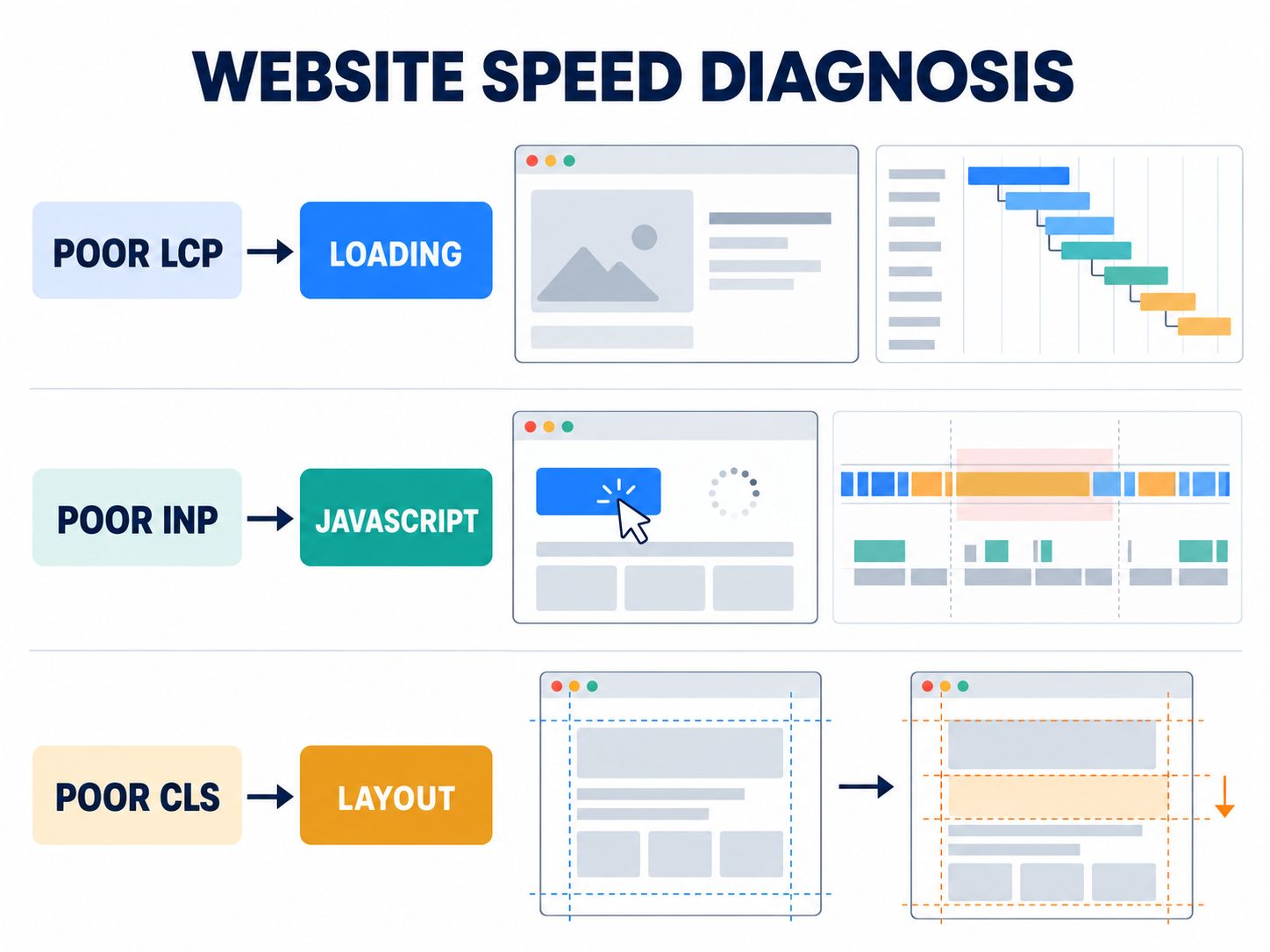
These are starting points, not automatic diagnoses. The same metric can have several different causes.
If LCP is poor, inspect the main content first
Don’t start by compressing every image on the site.
Find the element reported as LCP. It might be a hero image, a large text block, or another prominent piece of content.
Then check when the browser discovers it and what delays its appearance.
If the element is an image, ensure it uses sensible dimensions and isn’t unnecessarily delayed. The Aspect Ratio Calculator can help you plan consistent image dimensions, although image compression and resource loading still require separate attention.
If the resource is already small, the problem might be the server response or rendering process rather than its file size.
If INP is poor, investigate the interaction
Which action feels slow?
Perhaps it’s the mobile menu, a product filter, a pricing calculator, or an accordion containing technical specifications.
Use browser performance profiling to reproduce the delay.
Look for long tasks, repeated rendering, and expensive event handlers. Avoid removing a business-critical integration until you understand whether it is responsible.
If CLS is poor, identify what moved
Watch the page as it loads.
Does a banner appear above the headline? Does an embedded scheduling tool suddenly expand? Do images load without reserved space?
Fix the element responsible for the movement instead of applying unrelated speed optimizations.
If the site feels slow but Core Web Vitals are good
This is possible, particularly with form submissions, search tools, third-party APIs, or multi-step interactions.
For example, a demo form might provide immediate feedback when submitted but take eight seconds to receive confirmation from the server.
The immediate responsiveness may be good even though the workflow is frustrating.
Measure the relevant operation separately: submission duration, successful completion, error rate, and visible feedback.
Don’t try to solve every performance problem with Core Web Vitals alone.
Why B2B Website Speed Matters for Leads and Sales
A B2B website often supports several interactions before someone becomes a customer.
A buyer might discover your business through Google, review a product, compare alternatives, read a case study, and return days later to book a demonstration.
Every stage depends on the website providing information and functioning reliably.

Research should feel effortless
Prospective customers shouldn’t struggle to open product specifications, examine examples, or compare services.
A responsive website removes distractions from those tasks.
That doesn’t mean a faster page automatically creates demand. It means technical delays are less likely to interfere with the interest visitors already have.
Lead forms need more than a good loading score
Forms are among the most important components on many B2B websites.
Visitors need to know that their information was accepted, whether an error occurred, and what happens next.
After optimizing a page, test the complete form journey. Verify required fields, error messages, submission behavior, and CRM delivery.
The objective is a reliable inquiry process, not merely a faster-looking form.
Avoid treating conversion statistics as universal rules
You may encounter claims that a one-second delay always causes a fixed percentage reduction in conversions.
B2B companies should be careful with those statements.
Traffic quality, product pricing, acquisition channels, buying complexity, and website design all influence conversion behavior.
A more useful approach is to establish your own baseline and check whether performance improvements are associated with meaningful changes in inquiries and qualified opportunities.
What Usually Makes a B2B Website Slow?
Most investigations begin with a handful of familiar suspects. However, each website requires evidence before deciding which one is responsible.
Oversized images and videos
Large photographs, animated banners, and background videos can increase loading time, particularly on mobile connections.
Resize media for its intended display, use responsive assets, and avoid downloading files that visitors don’t immediately need.
Be careful with the main above-the-fold image. Loading it too late can make LCP worse.
Excessive third-party JavaScript
B2B marketing pages frequently include analytics, chat widgets, CRM forms, scheduling integrations, and advertising scripts.
These services can be valuable, but each may introduce requests or browser processing work.
Review whether every script is necessary on every page. Load nonessential features only where they’re needed, provided doing so doesn’t interfere with usability or data accuracy.
Slow backend processing
A slow server response can delay the initial HTML document and everything that depends on it.
If your site runs WordPress, review the hosting environment, theme behavior, database queries, caching, and application execution.
The Core Web Vitals on Shared Hosting guide provides related considerations for websites running in shared hosting environments.
Buying more expensive hosting isn’t always the answer. First establish that server-side performance is the bottleneck.
Redirect chains
Visitors may reach a landing page through several redirects, particularly after site migrations or campaign URL changes.
A redirect can be completely legitimate, but unnecessary chains introduce additional navigation steps.
Use the Redirect Checker and HTTP Status Code Checker to support URL troubleshooting.
For related search implications, the 301 Redirect SEO Penalty guide offers further context.
Unnecessary front-end complexity
A website can have powerful hosting and still respond slowly because the browser is doing too much work.
Some pages download extensive JavaScript simply to display content that could have been delivered through HTML.
For developers assessing rendering strategies, Server-Side Rendering vs Static Islands explores alternatives for reducing unnecessary client-side work.
A redesign shouldn’t be your first response to this problem. Start by investigating the specific components causing the overhead.
How to Run a B2B Website Speed Audit
A repeatable testing process gives you something more valuable than a single performance score: evidence that you can use to make decisions.
Step 1: Establish a baseline
Test a representative set of pages using consistent conditions.
Record the date, page URL, device category, Core Web Vitals availability, laboratory score, and important diagnostic findings.
Don’t compare a desktop result with a mobile result as though the environments were equivalent.
Step 2: Separate real-user data from laboratory data
PageSpeed Insights includes laboratory information from Lighthouse and real-user measurements from the Chrome UX Report, where enough data is available.
Laboratory results help you troubleshoot. Real-user results help you understand performance experienced by actual visitors over the reporting period.
A page with insufficient field data hasn’t automatically passed or failed. You simply lack enough information to draw that conclusion from that particular dataset.
Step 3: Identify the biggest obstacle
Find the slowest meaningful interaction or most severe performance issue on the page.
Then determine whether the problem originates from the server, asset delivery, browser execution, or another part of the user journey.
Your Website Technology Checker may help identify technologies worth investigating, but it cannot independently prove which technology causes a performance problem.
Step 4: Fix one issue and retest
Make a targeted improvement, then use comparable testing conditions to evaluate the result.
Individual Lighthouse runs can fluctuate. Repeat testing and consider longer-term field measurements before claiming a permanent improvement.
Step 5: Verify business functionality
Complete a real visitor journey after deployment.
Check the navigation, forms, pricing controls, scheduling tools, and integrations.
If you have a CRM connected to the website, confirm that valid inquiries reach the correct destination.
This step catches problems that a performance score cannot.
Practical Demonstration: Diagnosing a Slow Pricing Page
Consider a hypothetical B2B software company with a mobile pricing page that appears slowly and occasionally freezes when the user changes plans.
A performance report shows the following results:
| Metric | Demonstration result | Interpretation |
|---|---|---|
| LCP | 4.3 seconds | Poor |
| INP | 420 milliseconds | Needs improvement |
| CLS | 0.18 | Needs improvement |
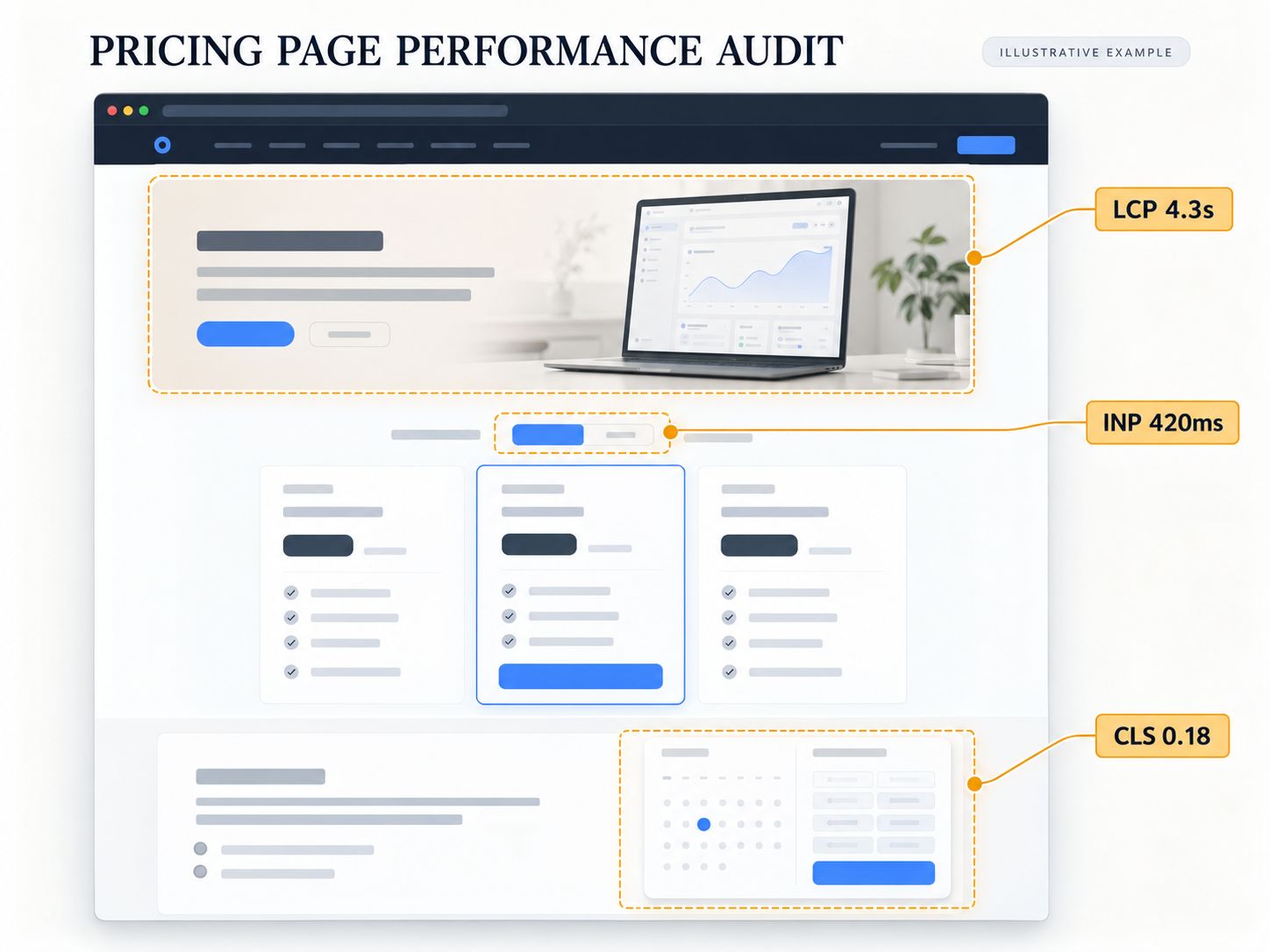
These numbers are illustrative, not results from a tested website.
Rather than installing an optimization plugin immediately, the developer investigates each symptom.
The LCP element turns out to be a large screenshot discovered late in the loading process. The pricing selector runs expensive JavaScript whenever the visitor switches plans. A scheduling widget loads without reserved layout space.
The developer now has three specific areas to address:
- Improve discovery and loading of the critical screenshot.
- Profile and simplify the pricing interaction.
- Reserve layout space for the scheduling widget.
After implementation, the page must be retested under comparable conditions. The team should also check that the pricing calculations and form submissions still work.
This demonstration shows the diagnostic process. It does not imply that these fixes produce a guaranteed percentage improvement.
How to turn this into original evidence
For the published WebPlatformLab page, replace this illustrative report with a real test when one is available.
Capture the original report, the problem element, the implemented fix, and a comparable retest. Include the testing conditions and date.
That would give readers evidence of an actual technical process rather than another unsupported success story.
Which Speed Improvements Are Worth Doing First?
Not every slow page deserves equal investment.
A page that receives little traffic and has no meaningful conversion function may be a lower priority than a frequently visited pricing page with broken interactions.
Use three factors to make a sensible decision:
Impact: How seriously does the issue affect visitors, and how important is the page?
Effort: How much development, testing, and coordination will the fix require?
Risk: Could the change disrupt forms, tracking, checkout behavior, accessibility, or important integrations?
| Situation | Recommended decision |
|---|---|
| Critical page fails Core Web Vitals | Investigate promptly |
| A lead form is visibly slow or unreliable | Prioritize functionality and response time |
| Small issue on a low-impact page | Schedule after higher-value work |
| Website is fast but Lighthouse is below 100 | Improve only where evidence justifies the effort |
| Repeated bottlenecks across many templates | Consider shared-component or architecture fixes |
| Optimization costs exceed sustainable maintenance | Evaluate a larger redesign or rebuild |
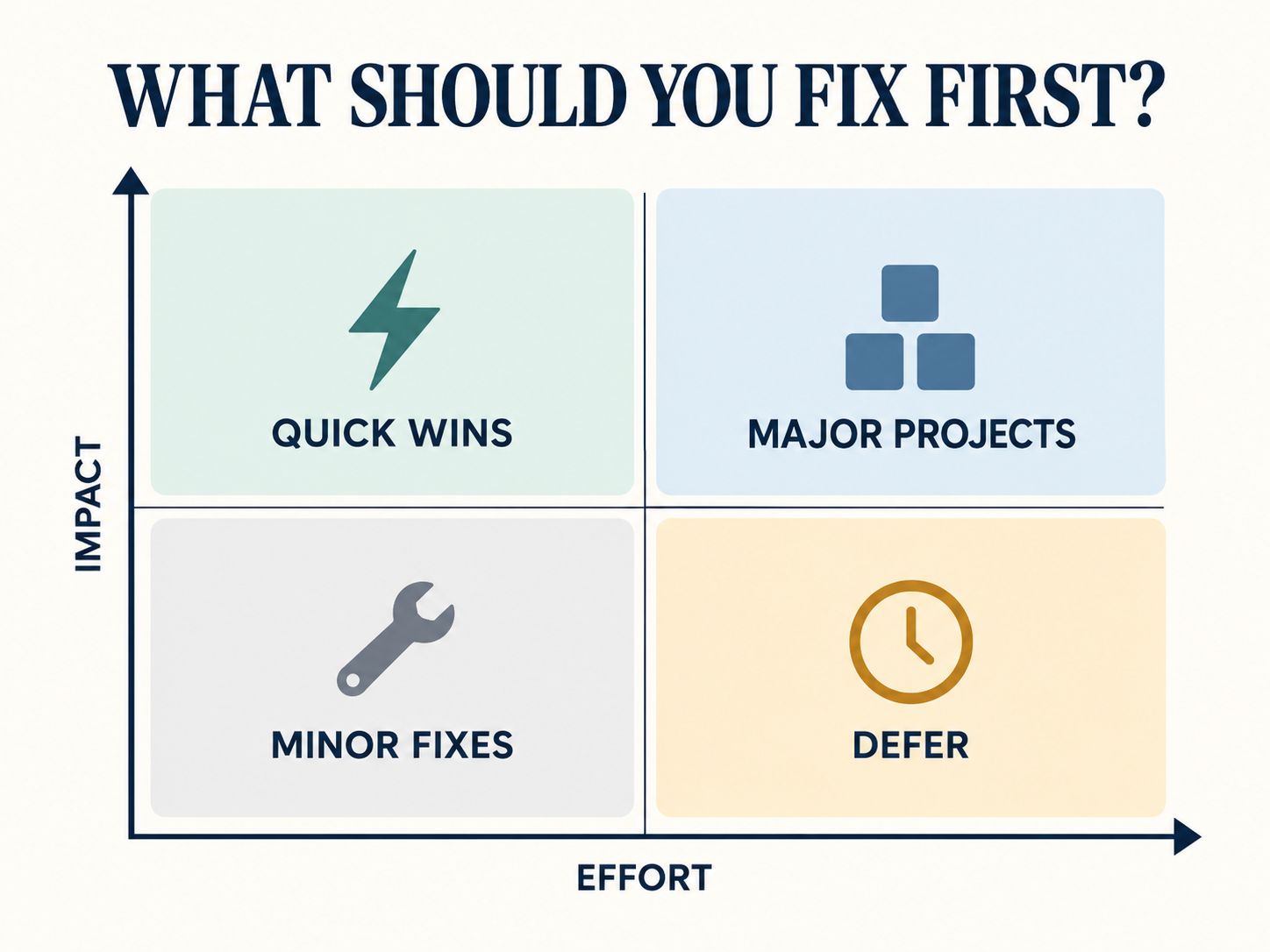
Before undertaking extensive development, the Website Cost Calculator can help structure an initial cost estimate.
When Should You Stop Optimizing?
You don’t need to chase every remaining millisecond indefinitely.
Once important pages meet your performance objectives, critical interactions work reliably, and further changes offer little measurable improvement relative to their cost, other website priorities may deserve attention.
For a B2B business, those priorities could include improving product information, strengthening case studies, making forms easier to complete, or addressing accessibility problems.
A perfect score isn’t the finish line. A fast, stable, useful website is.
B2B Website Speed Checklist
Before publishing a new page or completing an optimization project, confirm the following:
- Important mobile and desktop pages have been tested.
- LCP, INP, and CLS have been reviewed where field data exists.
- The main loading bottleneck has been identified.
- Heavy images and unnecessary scripts have been investigated.
- Important interactions have been tested manually.
- Redirect behavior and server responses have been checked.
- Forms and CRM submissions still work.
- Performance results have been retested under comparable conditions.
- Improvements have been documented for future reference.
Frequently Asked Questions
What is a good website speed?
A good website should meet Google’s recommended Core Web Vitals thresholds: LCP of 2.5 seconds or less, INP of 200 milliseconds or less, and CLS of 0.1 or less at the 75th percentile of real-user experiences. A Lighthouse score of 90–100 is also considered good, but it represents laboratory-based performance rather than every visitor’s experience.
Does B2B website speed affect Google rankings?
Yes. Google uses Core Web Vitals in its ranking systems, but good performance scores don’t guarantee higher rankings. Relevance, helpful content, and overall page experience remain important. Google’s page experience guidance explains this distinction.
Can a website score 100 and still have performance problems?
Yes. A perfect Lighthouse score does not guarantee that every real visitor, interactive feature, or server-side process performs well. Always examine important workflows and real-user data where available.
What is the rule of 7 in B2B?
The rule of seven is a traditional marketing concept suggesting that repeated brand exposure may influence buying decisions. It is not a technical website-speed rule or a fixed requirement for B2B customers.
Which is the best B2B website?
The most effective B2B website for a given company helps its intended audience understand the offering, compare options, evaluate credibility, and take the next step. Performance matters, but useful information, usability, and reliable functionality are equally important.
Is B2B business still good in 2026?
B2B remains a viable business model in 2026. Individual results depend on customer demand, competition, pricing, differentiation, and sales execution. A well-performing website can support acquisition, but it doesn’t guarantee business success.
Is WordPress suitable for a fast B2B website?
Yes. A well-built WordPress website can perform effectively. Results depend on implementation, hosting, caching, resource loading, and the cost of its integrations. A lightweight custom implementation may be appropriate in some cases, but a rebuild isn’t automatically necessary.
How often should I check my B2B website speed?
Test after significant deployments, redesigns, new tracking installations, and integration changes. Review important performance trends regularly, especially on your main conversion pages.
Should I prioritize mobile or desktop speed?
Test both. Give extra attention to the devices your actual visitors use while ensuring that important research and lead-generation actions remain accessible on mobile.
How do I know whether my hosting is the problem?
Inspect server response times, backend processing, cache behavior, and request timing. If the main problem is JavaScript execution or browser rendering, changing hosting providers may have limited impact.
Final Thoughts
A faster B2B website should make life easier for the people using it.
They should be able to understand your services, compare products, open useful resources, and contact your team without wondering whether something is broken.
Start with the pages that matter, measure the problems you can verify, and make changes that improve the actual experience.
Start with the pages that matter, measure the problems you can verify, and make changes that improve the actual experience.
If you’ve encountered a frustrating website speed issue or successfully fixed one, share your experience in the comments. Your findings may help another business avoid the same problem.