Google uses it to understand images and determine their relevance to searches. It also helps people who rely on screen readers access visual information. But adding alt text does not guarantee higher rankings, and filling every image with keywords can do more harm than good.
The real question is which images need descriptions, what those descriptions should say, and how much effort you should spend improving them. Here’s how to make those decisions using Google’s guidance and practical examples.
Does Alt Text Help SEO According to Google?
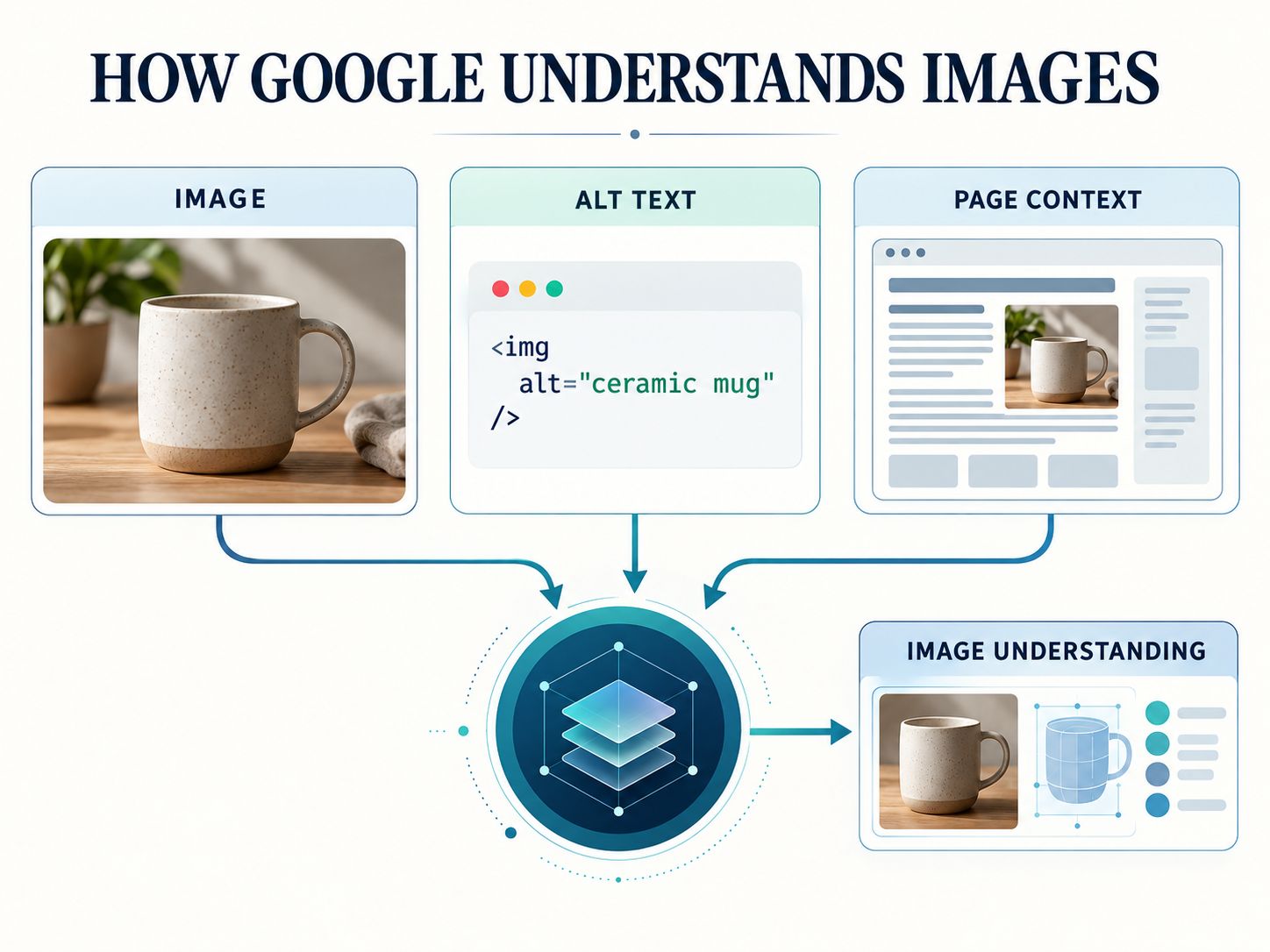
Yes. Google’s official documentation identifies alt text as an important source of information about an image. Google combines it with computer vision and surrounding page content to understand what an image represents.
That means alt text matters even though Google’s systems can already recognize many objects in photographs.
Think about a screenshot of an analytics dashboard. Image recognition might identify graphs, numbers, and interface elements. A useful description can explain that the screenshot shows image-search performance in Google Search Console.
The surrounding article then provides additional context.
Google recommends descriptions that are relevant and informative. It also warns against excessive keyword repetition.
This supports three practical conclusions:
- Meaningful alt text can help Google interpret an image.
- Descriptive alternatives can support relevance in Google Images.
- Alt text alone cannot guarantee improvements in ordinary web search rankings.
For the full technical guidance, see Google Search Central’s image SEO best practices.
The main takeaway: Alt text is useful because it explains images, not because it gives you another place to repeat your target keyword.
What Is Alt Text in SEO?
Alt text is the written alternative to an image, usually supplied through the HTML alt attribute.
Its primary purpose is to communicate an image’s information or function when the image cannot be seen.
For example:
<img
  src="black-leather-backpack.webp"
  alt="Black leather backpack with two front pockets"
>
That description helps a screen reader user understand what the photograph shows. Google can also use it when interpreting the image.
Alt text is different from an image filename, caption, or title attribute.
| Element | Main purpose |
|---|---|
| Alt text | Communicates image information or function |
| Filename | Identifies the file and may provide a small contextual clue |
| Caption | Presents visible explanatory text |
| Title attribute | Provides supplementary information in certain contexts |
| Image dimensions | Help the browser reserve layout space |
An image can have a descriptive filename and still need meaningful alt text.
Similarly, adding structured data through an SEO metadata tool doesn’t replace an accessible image description.
These features address different needs.
How Does Alt Text Help SEO?
Alt text contributes to image understanding. The size of its practical SEO benefit depends on the kind of website and how important its images are to the content.
It makes images easier to interpret
Consider an online store selling handmade backpacks.
One photograph shows the front of a bag. Another shows the interior compartments. A third shows the adjustable shoulder straps.
Using alt="backpack" on all three images loses useful information.
Better alternatives would distinguish them:
Black leather backpack with two front pocketsInterior of black leather backpack showing laptop compartmentAdjustable padded straps on black leather backpack
Each image now communicates something different.
This is valuable for people comparing products, and it gives search engines more specific information about the photographs.
It supports image search relevance
Google Images is especially important for visual searches involving clothing, furniture, travel destinations, illustrations, and similar subjects.
Descriptive alt text can help Google connect relevant images with those searches.
It works alongside the page’s text, image quality, filenames, and technical accessibility.
However, an image with excellent alt text may still struggle to appear in search results if Google cannot discover or access it.
For example, Google documents the value of standard HTML image elements for discovery. Images used only as CSS backgrounds are not indexed in the same way.
It makes tutorials easier to understand
Alt text matters in technical guides because screenshots often carry essential instructions.
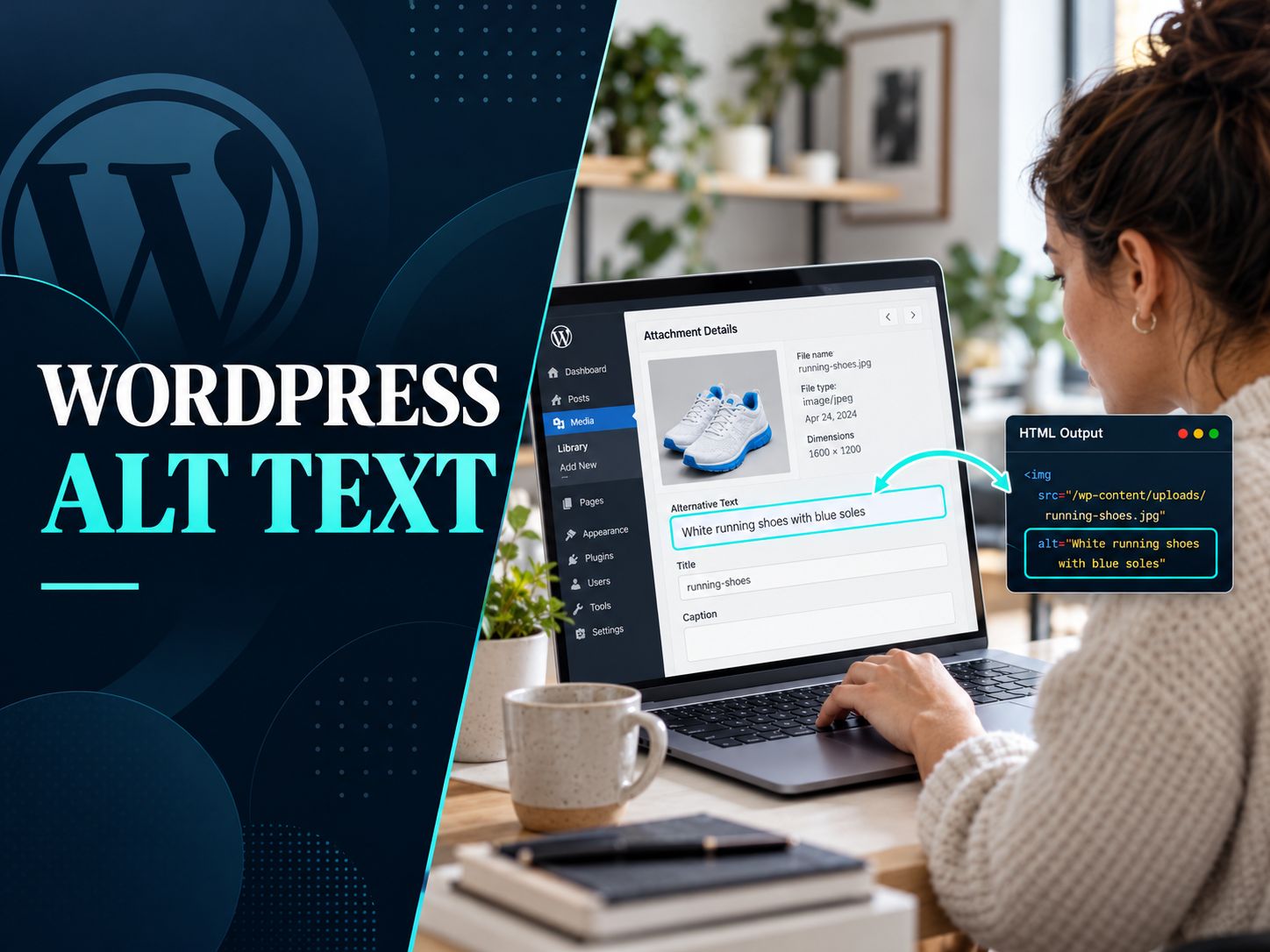
Suppose an article explains how to update settings in WordPress.
A description such as WordPress dashboard is too vague if the important part of the screenshot is the alternative-text field.
A better description is:
WordPress Media Library showing the Alternative Text field
The wording helps readers understand what the screenshot contributes to the tutorial.
It makes the page accessible
This is not simply an additional SEO benefit.
For someone using a screen reader, an informative image without a suitable alternative can mean missing part of the article.
That may be a product detail, a chart result, a navigation action, or an illustration explaining a process.
Accessible image descriptions help preserve that meaning.
How Much Does Alt Text Help SEO?
There is no reliable universal percentage showing how much alt text improves rankings. Google does not publish a fixed ranking weight for the attribute.
If someone promises that adding alt text will increase rankings or traffic by a specific amount, ask how they measured it.
A website might improve image-search impressions after updating its descriptions, but other changes could have contributed.
Perhaps the owner also replaced low-quality images, rewrote surrounding paragraphs, improved internal links, or fixed crawl restrictions.
Those changes make attribution difficult.
Instead of treating alt text as a guaranteed ranking boost, use the following decision table to prioritize your work.
| Situation | Recommended priority | What to do |
|---|---|---|
| Important product image with missing alt | High | Write an accurate product description |
| Tutorial screenshot explaining a step | High | Describe the relevant interface or action |
| Meaningful chart or diagram | High | Supply short alt text and an accessible explanation |
| Portfolio photograph | High when informative | Describe the photograph’s meaningful subject |
| Decorative separator | Low | Use an empty alt attribute |
| Informative image already described well | No immediate change | Keep the useful description |
| Image inaccessible to Google | Fix access first | Check image URLs and crawl restrictions |
These priorities are editorial recommendations, not measured SEO impact scores.
A useful rule: Prioritize images whose meaning would be lost if they disappeared from the page.
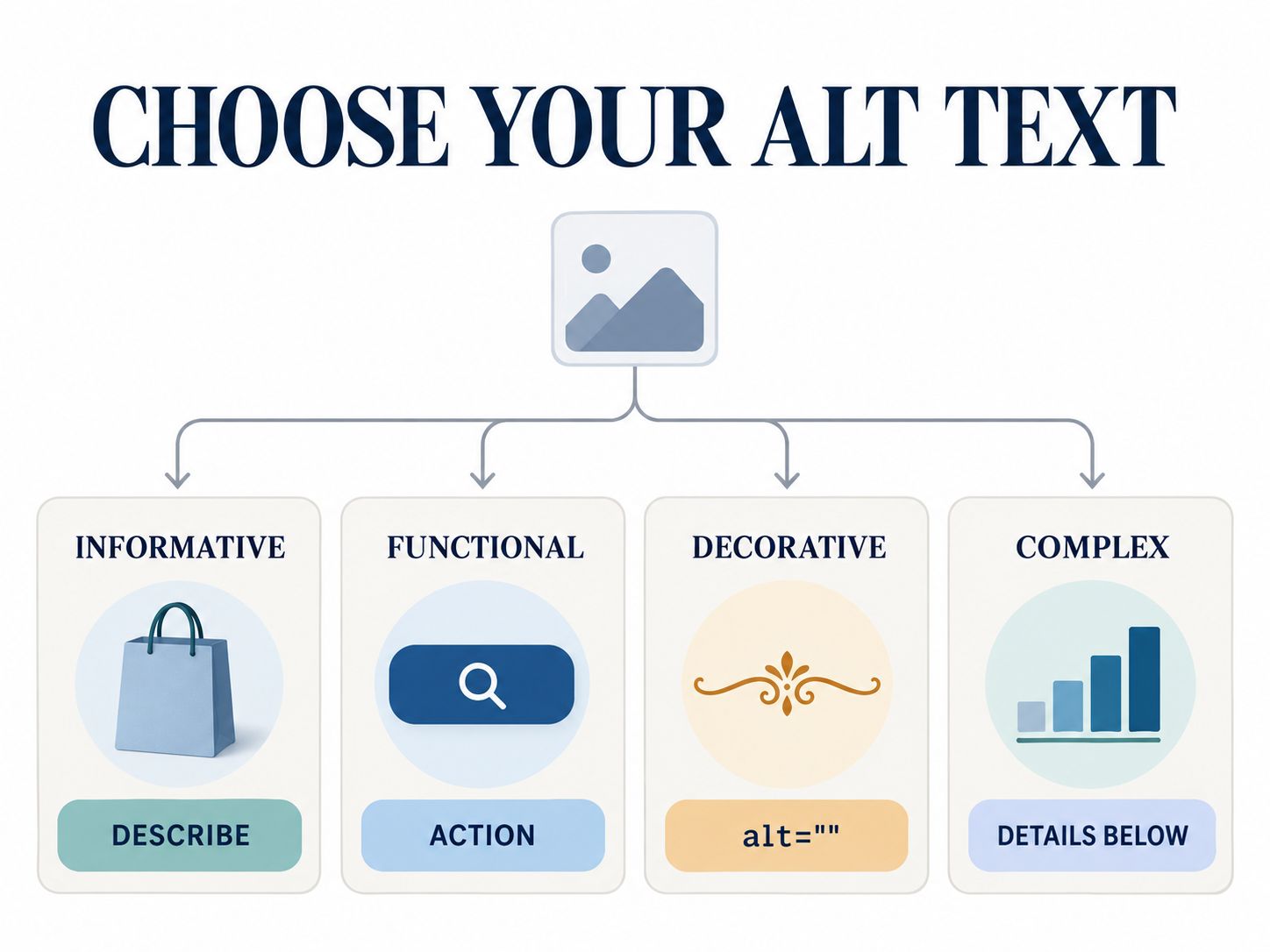
How to Decide What Alt Text an Image Needs
Before writing a description, decide what the image is doing.
This step prevents most common mistakes.
1. Does the image communicate information?
If it does, describe that information.
For example:
Laptop displaying a responsive ecommerce homepage
Avoid adding details that are not visible or relevant.
2. Does the image perform an action?
If an image is used as the only content of a link or button, its accessible name should generally explain the action or destination.
For a search button, alt="Search" is more useful than alt="Magnifying glass".
3. Is the image purely decorative?
If it contributes no information, an empty alt attribute is usually appropriate.
<img src="decorative-divider.svg" alt="">This isn’t an SEO mistake. It helps prevent unnecessary screen reader announcements.
4. Does the image contain complex information?
Charts and diagrams may need more than one short sentence.
A chart’s alt text can identify its main message, while the surrounding page provides the important values and details.
For example:
Line chart showing monthly website visits increasing from January to June
If exact monthly totals matter, include them in the text or an accessible table.
5. Does nearby text already communicate the same information?
Sometimes an image adds no information beyond adjacent text.
In that situation, an empty alt attribute may avoid redundant announcements.
The decision depends on the image’s purpose in that specific location.
For a more detailed explanation, consult the W3C Web Accessibility Initiative’s image tutorial.
Alt Text SEO Examples: What Good Descriptions Look Like
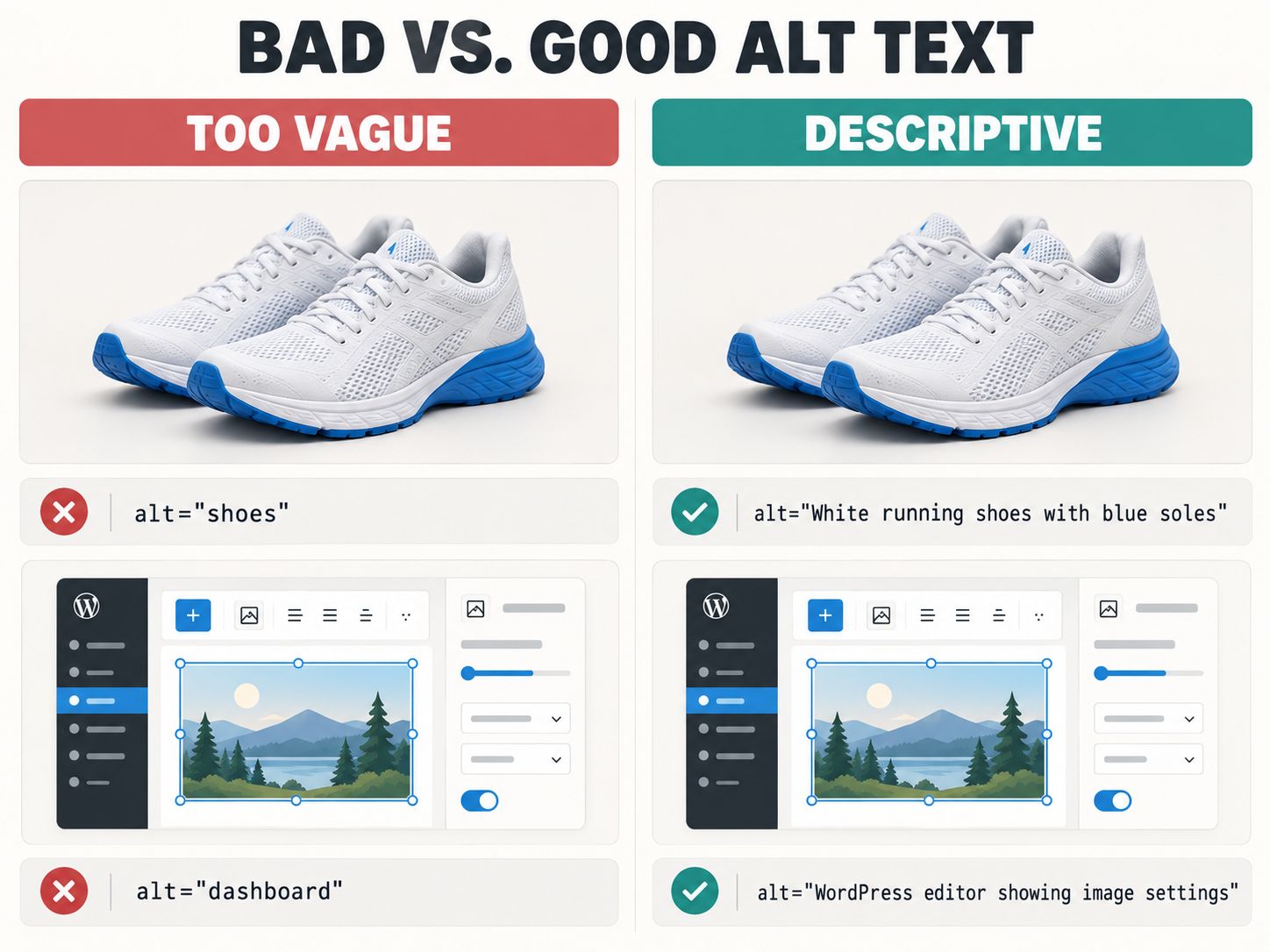
The easiest way to improve an image description is to compare it with a vague or keyword-heavy alternative.
| Image type | Weak description | Better description |
|---|---|---|
| Running shoes | best shoes buy shoes |
White running shoes with blue soles |
| Technical screenshot | WordPress SEO settings |
WordPress editor showing the image alt text field |
| Headshot | best marketing expert |
Portrait of Sarah Lee, marketing director |
| Travel photograph | beautiful Italy vacation |
Stone bridge crossing a canal in Venice |
| Product detail | leather bag |
Interior pocket and brass zipper on brown leather bag |
| Performance chart | website traffic |
Line chart showing image search clicks over six months |
The better alternatives are useful because they communicate specific information.
They aren’t necessarily better because they contain more words.
One image can need different alt text in different contexts
Consider a photograph of a laptop displaying an online store.
In a website design tutorial, the relevant description might be:
Ecommerce homepage displayed on a laptop screen
If the same photograph appears in a guide about desk setups, the laptop and surrounding workspace might be the relevant subject instead.
Neither description should invent details.
This is particularly important in WordPress, where media files are often reused across multiple posts and pages.
The image’s context should guide the final description.
Alt text for professional headshots
Use a person’s verified name and role when identifying them is important.
For example:
Portrait of Sarah Lee, customer support director
Avoid guessing names, occupations, age, or personal attributes from appearance.
Alt text for product galleries
Describe meaningful differences between images.
A front view, detail photograph, and interior view shouldn’t automatically receive the same description.
You don’t need to repeat every product specification in each alternative.
How to Write SEO-Friendly Alt Text
Once you know the image’s purpose, writing becomes easier.
Start with a description of what matters in the picture.
Add a relevant distinguishing detail if it helps the reader understand the content.
Include a target keyword only when it accurately fits the image.
Then remove unnecessary words.
For example, suppose your article targets “responsive web design.”
An illustration showing desktop and mobile versions of the same layout could use:
Responsive website layout displayed on desktop and mobile screens
That’s a natural use of the topic phrase.
A photograph of someone typing on a laptop shouldn’t be forced to include “responsive web design” unless the image actually communicates that concept.
How long should alt text be?
There is no universal Google-required character count.
Use as many words as needed to communicate the essential information concisely.
An icon might need only one or two words. A photograph may need a short sentence.
If a detailed infographic requires multiple paragraphs of explanation, place that explanation in accessible page content rather than forcing it into the alt attribute.
Do you need to write “image of” or “photo of”?
Usually not.
Assistive technologies can often identify an image element without that introductory wording.
There are exceptions when distinguishing the medium matters, such as a historic photograph versus a painting.
Write for the actual context rather than applying an inflexible formula.
How to Add Alt Text in WordPress
WordPress provides alternative-text controls through the Media Library and block editor.
To update an image:
- Open the WordPress dashboard.
- Go to Media → Library.
- Select the image.
- Find the Alternative Text field.
- Write the appropriate description.
- Save the changes.
- Check the image’s rendered HTML on the relevant page.
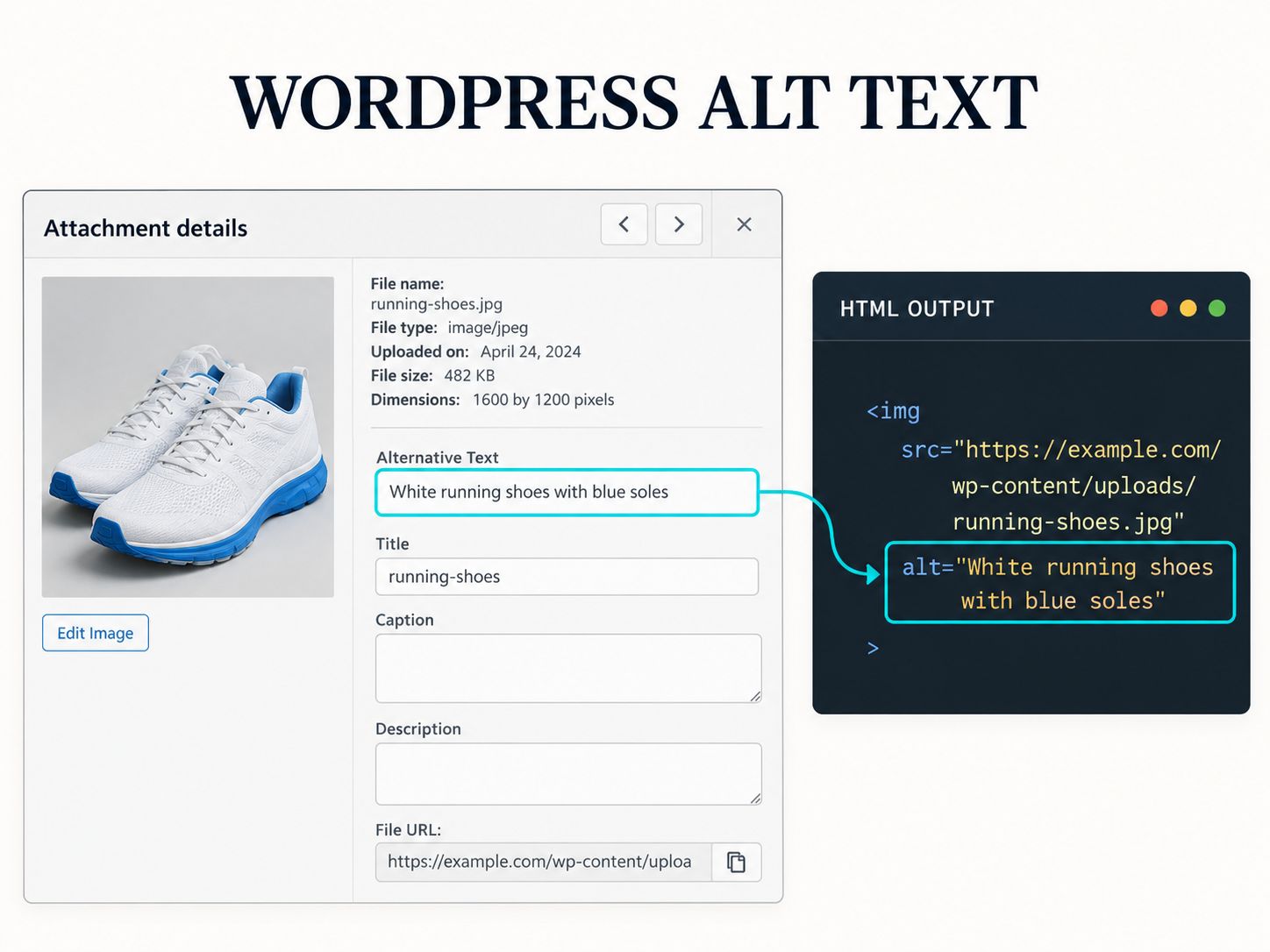
The final step is important.
Some themes, page builders, plugins, and custom image components may handle media attributes differently.
A correctly filled Media Library field does not guarantee that every image instance uses the intended alternative.
For websites built with custom WordPress templates, inspect the frontend output directly. A broader WordPress website quality control process can help identify other implementation issues.
If you’re improving a larger site, the developer utilities category includes tools that support broader development and maintenance tasks.
Should you use an alt text generator?
A generator can help draft descriptions, especially when dealing with many images.
But it cannot reliably decide every image’s purpose without understanding the surrounding content.
An automated tool may describe what it recognizes visually while overlooking what the image is meant to explain.
Review generated descriptions for factual accuracy, unnecessary details, duplication, and inappropriate keywords.
Never publish a description merely because a tool marks the alt field as complete.
Does Alt Text Help SEO on Shopify, Etsy, and Instagram?
These platforms need separate treatment because their search and discovery systems are not identical.
Shopify
Shopify product pages can benefit from accurate image descriptions that help Google understand visible product details.
For example:
Sage green linen midi dress with short sleeves
That’s more useful than filling the attribute with repeated clothing keywords.
Product image optimization should complement good product information, navigation, and technical performance.
For wider ecommerce development context, explore the Shopify collections SEO guide and the Shopify vs. WooCommerce comparison.
Etsy
Google’s HTML image SEO documentation does not establish a particular alt-text ranking benefit within Etsy’s own marketplace search.
Where appropriate alternative-text controls are available, use accurate descriptions for accessibility.
For search visibility, also follow Etsy’s current guidance on product listings, attributes, photographs, and relevance.
Alternative text can make Instagram image content more accessible.
However, you should not assume that Google’s image SEO recommendations describe how Instagram ranks content in Search or Explore.
Treat accessibility descriptions, captions, and social discovery as related but distinct tasks.
Does Alt Text Still Matter in the Age of AI Image Recognition?
Yes. Image recognition can identify visual objects, but it doesn’t always explain why those objects matter to the page.
A laptop in a photograph could be relevant to a product review, office design article, software tutorial, or accessibility guide.
The surrounding text and appropriate image description provide context that raw object recognition may not communicate.
This is also why automatically generated alt text shouldn’t be accepted without checking.
For example:
AI draft: Computer displaying colorful graphs
Contextually useful alternative: Google Search Console performance chart showing image search impressions
The second is better only if that’s genuinely what the screenshot shows.
The goal isn’t to make every alt description unusually detailed.
It’s to communicate the right information.
How to Audit Your Website’s Alt Text
A useful alt text audit checks both presence and quality.
You can begin without a paid SEO tool.
Open an important page, right-click an informative image, and select Inspect.
Look for its alt attribute in the rendered HTML.
Then ask whether the description communicates the image’s actual meaning.
Repeat the process for major product images, tutorial screenshots, charts, and functional icons.
For larger sites, use a crawler or accessibility checker to find candidates with missing or suspicious alternatives.
Treat automated findings as a review queue, not a final verdict. A deliberately empty attribute may be correct for a decorative image.
Don’t ignore image performance
Even perfect alt text cannot compensate for inaccessible image files or slow-loading pages.
Review image dimensions, responsive formats, and page weight alongside accessibility.
Our calculators and estimators category includes utilities for working with technical dimensions and calculations.
The performance auditing tools category supports broader website performance analysis.
For more information about website loading speed, explore our guide to optimizing Core Web Vitals on shared hosting.
For social previews, the SEO metadata tools category addresses sharing metadata rather than image alternatives.
These tools solve different problems, so choose them according to what your audit reveals.
Check crawlability separately
If search engines cannot access an important image or its page, improving the description isn’t enough.
Review the page’s indexing status, image URLs, and relevant crawl rules.
Relevant technical tutorials can help when investigating website configuration and implementation.
An XML sitemap may help with normal URL discovery. For image discovery, confirm whether you need image-specific sitemap markup.
If you suspect canonical or redirect issues, investigate them separately. Our guide to 301 redirects and SEO covers potential redirect errors and ranking concerns.
Alt text cannot fix those technical problems.
How to Measure the SEO Impact of Better Alt Text
Google Search Console can help you evaluate image search performance after an optimization project.
Open your website’s performance report and select Image as the search type.
Compare impressions, clicks, and relevant queries before and after making changes.
For more useful conclusions, follow this process:
- Choose a group of important pages with weak image descriptions.
- Record their current alt text and image-search performance.
- Improve the descriptions without unnecessarily changing other page elements.
- Record the publication date.
- Monitor performance over a meaningful period.
- Compare results while accounting for seasonality and other website changes.
A change in impressions is an observation, not proof that alt text alone caused it.
This is especially important when comparing SEO case studies. Multiple changes can happen during the same optimization project.
Keep your reporting accurate.
Common Alt Text Mistakes That Are Worth Fixing
Not every image needs more text. Some need less.
The most important mistakes include keyword stuffing, identical descriptions across different product photographs, vague screenshot labels, and unnecessary descriptions for decorative images.
Functional images are another area to check.
A button represented only by a magnifying-glass image needs an accessible name that explains its function. Describing the shape of the icon may not be enough.
For charts, avoid alternatives that merely say “graph” or “statistics.” Explain the main finding and provide detailed data elsewhere when necessary.
One final mistake is assuming that an automated SEO score can judge description quality perfectly.
A tool can detect whether an attribute exists. It may not understand whether the description is meaningful to your audience.
Use automation to find problems, then apply human judgment to solve them.
Frequently Asked Questions
Does alt text help SEO?
Yes. It helps Google interpret images and can support image search relevance. It also improves accessibility when written appropriately.
How much does alt text help SEO?
There is no universal percentage or fixed ranking improvement. The practical benefit depends on the image, page, query, and overall website quality.
Does Google use alt text for rankings?
Google documents using alt text to understand images and their relevance. That does not establish a guaranteed improvement in conventional web search positions.
Is alt text necessary for every image?
Every HTML image needs an appropriate alternative treatment, but not every image needs a descriptive phrase. Purely decorative images generally use alt="".
What is alt text used for in SEO?
It gives search engines contextual information about an image while providing a text alternative for people who cannot see it.
Can alt text contain SEO keywords?
Yes, when the keywords accurately describe the image. Avoid adding irrelevant phrases or repeating terms purely for optimization.
Does alt text help SEO on Instagram?
Instagram alternative descriptions support accessibility. Their ranking effects should not be assumed to match Google’s HTML image SEO practices.
Does alt text help SEO on Etsy?
Do not assume Google’s alt-text guidance establishes a specific Etsy marketplace ranking benefit. Follow Etsy’s current listing and accessibility recommendations.
Who benefits from alt text?
People using screen readers, visitors who cannot view an image, and systems interpreting image content can benefit from accurate descriptions.
What is the 80/20 rule in SEO?
It’s a prioritization principle, not a Google ranking rule. For alt text work, focus first on informative images on important pages instead of spending equal time optimizing decorative assets.
How can I increase SEO fast?
Start with issues that materially affect search visibility, including crawlability, indexing, useful content, internal links, and technical performance. Alt text is a supporting improvement.
Should I use AI to generate alt text?
AI can save drafting time, but the descriptions should be checked against the actual images and page context.
Final Verdict: Is Alt Text Worth Optimizing?
Yes, especially when your website relies on informative images.
If you run an ecommerce store, start with important product photographs. If you publish technical tutorials, review the screenshots that explain essential steps. If your website includes charts or infographics, make sure the underlying information is accessible.
For decorative images, an empty alternative is often the correct choice.
There is no need to force your target keyword into every description or promise a ranking increase that you cannot measure.
Write alt text that helps people understand the image, check that your implementation is correct, and monitor image search performance over time.
Alt text should describe what matters in an image, not simply repeat what you want a page to rank for.
Have you improved your website’s alt text? Share what you changed, whether you saw any difference in Google Images, or what you’re still unsure about in the comments.