
A visitor clicks a link to your pricing page, but instead of seeing your plans, they land on “404 Not Found.” Is that an SEO problem, a user experience problem, or both? The answer depends on why the page is missing. Understanding 404 SEO user experience helps you identify broken URLs, avoid unnecessary redirects, and keep visitors moving toward the content they actually need.
The important thing to know is that not every 404 needs fixing. Some are perfectly normal.
Quick Answer: Are 404 Errors Bad for SEO?
A legitimate 404 error does not automatically hurt your website’s Google rankings. It tells browsers and search engines that the requested resource cannot be found.
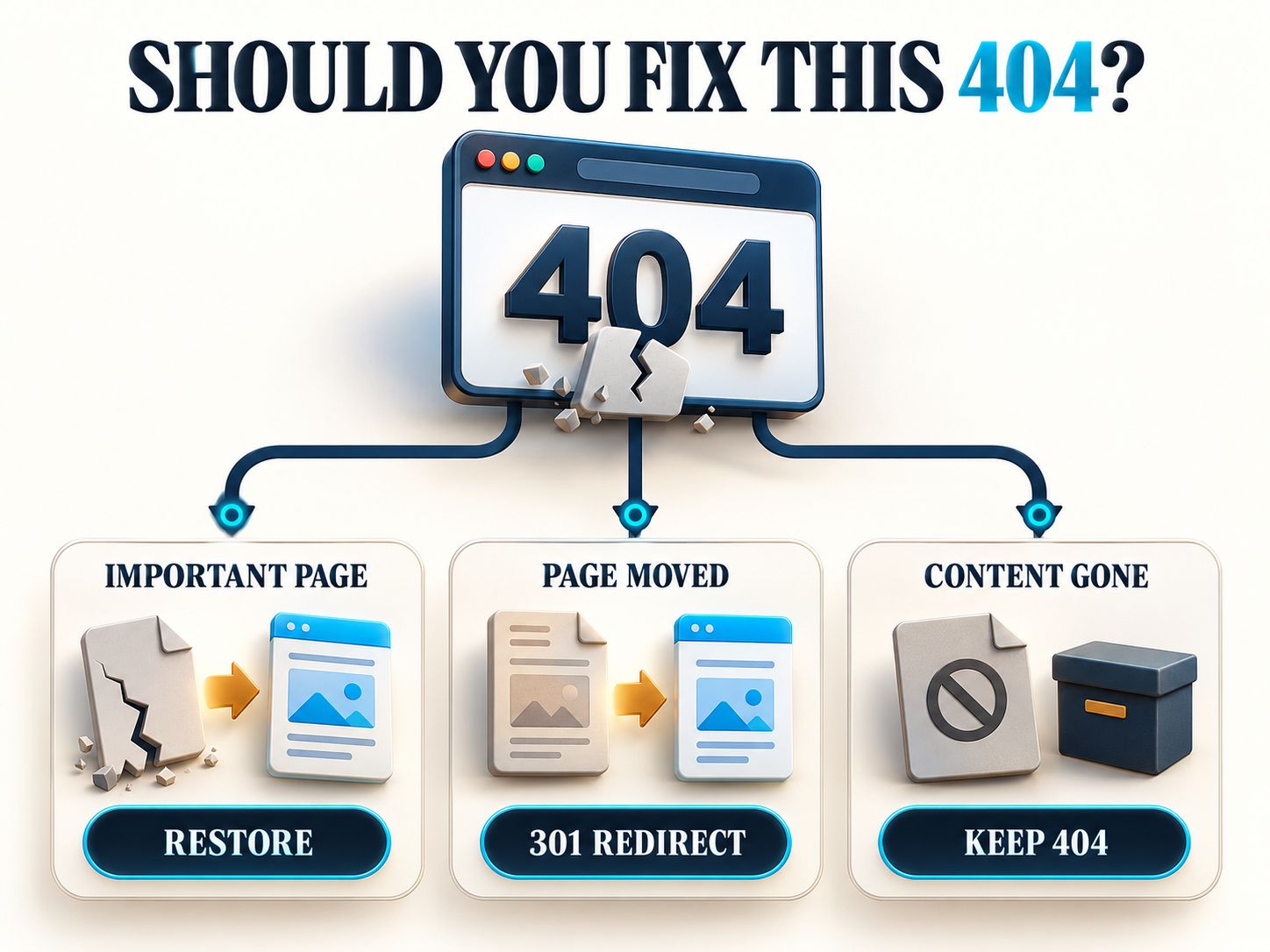
A 404 becomes worth investigating when it affects a page that should exist, breaks an important internal link, or prevents visitors from completing a task.
For example, a deleted article with no replacement may correctly return 404. But if your main navigation links to that deleted article, the navigation should be corrected.
Here is the simplest way to decide what to do:
| Your situation | Best action |
|---|---|
| The page was accidentally deleted | Restore the original content |
| The page permanently moved | Redirect to its genuine replacement |
| A link contains the wrong URL | Correct the link |
| The content is permanently gone | Return 404 or 410 |
| The page says “Not Found” but returns 200 | Fix the soft 404 |
| Bots request random nonexistent addresses | Usually leave the 404 alone |
Don’t measure the health of your website by how few 404 responses appear in a report. Look at whether important content and navigation work correctly.
What Does Error 404 Mean?
A 404 is an HTTP status code returned when a server cannot find the requested resource.
Suppose an article originally appeared at:
https://example.com/wordpress-seo-tips/
You remove it, and someone follows an old bookmark. The server may respond with:
That tells the browser the URL is unavailable.
Your website can then display a helpful message explaining what happened.
A 404 doesn’t necessarily mean your hosting is broken or that Google has penalized your site. It simply describes the result of that request.
What’s the difference between a 404 and a broken link?
A 404 is the server’s response. A broken link is a hyperlink that no longer takes someone to its intended destination.
The distinction matters because fixing the server response isn’t always the solution.
If a blog article links to /services/web-design-2024/ and that URL was accidentally entered incorrectly, you may only need to update the link.
Creating a redirect for a typing mistake inside your own article would add unnecessary complexity.
How to Check a 404 Error Website Link
Before making any changes, check the URL’s real HTTP response.
A page displaying the words “404 Not Found” doesn’t necessarily return an HTTP 404. Some websites display an error message while incorrectly responding with HTTP 200.
This distinction is essential when troubleshooting soft 404 errors.
Step 1: Check the HTTP response
Use an HTTP status checker or the browser’s developer tools.
If your WebPlatformLab tool provides a URL input and status-checking feature, enter the affected address and inspect the returned response.
For developers, the following command is a straightforward alternative:
An output of 404 confirms the response for that request.
If the result is a redirect, inspect its destination before drawing conclusions.
Step 2: Understand what the status means
| Status | Meaning | Typical next step |
|---|---|---|
| 200 | Successful response | Confirm the intended content exists |
| 301 | Permanent redirect | Check the replacement destination |
| 302 | Temporary redirect | Verify that the move is temporary |
| 404 | Resource not found | Investigate whether it should exist |
| 410 | Resource gone | Confirm intentional removal |
| 500 | Server error | Review application/server logs |
| 503 | Service temporarily unavailable | Investigate service availability |
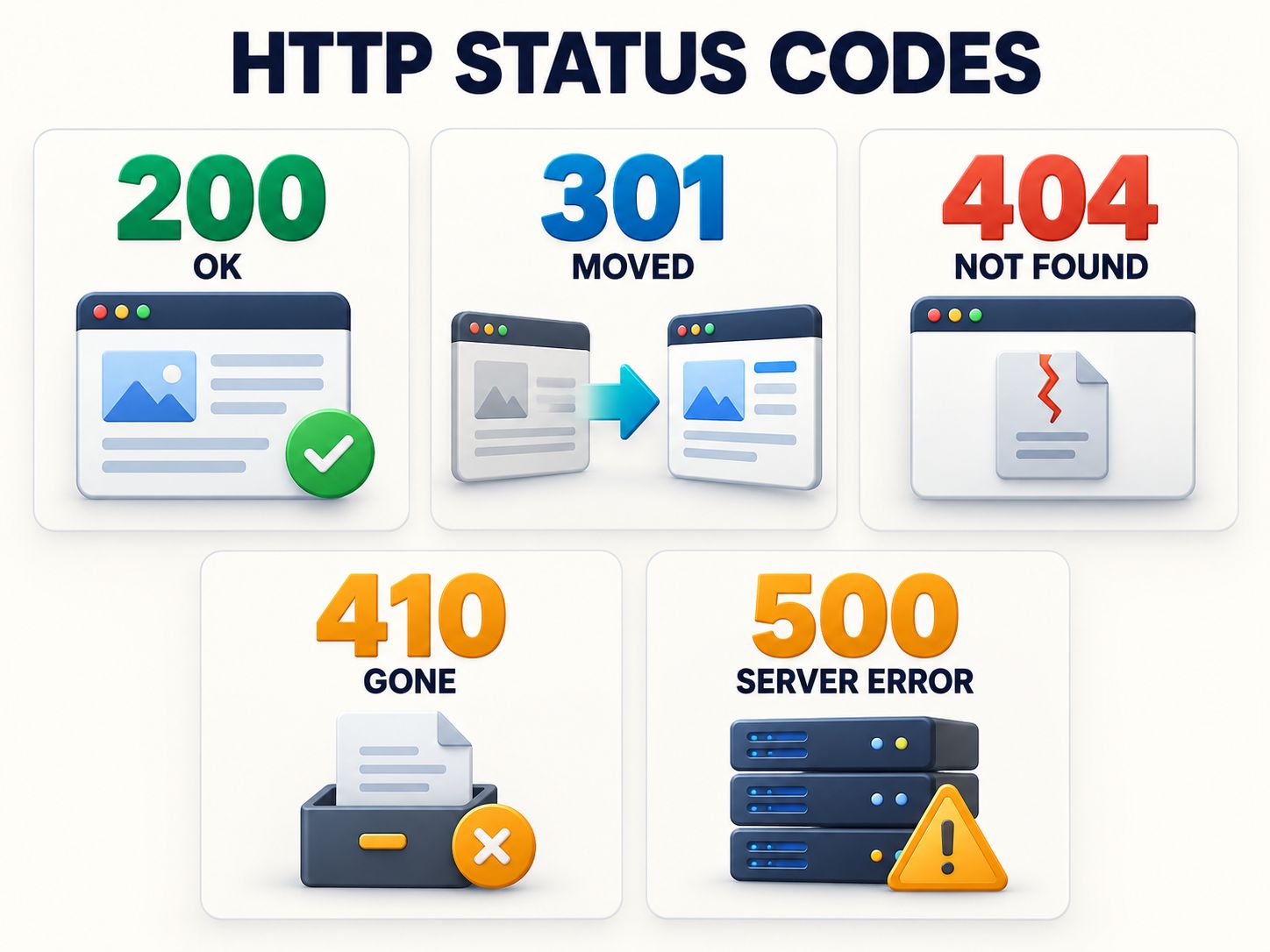
Don’t assume a 200 result means everything is working. You still need to examine the rendered content.
Step 3: Find out where the missing URL came from
This step is often more useful than immediately changing the error page.
Ask whether the URL came from a navigation menu, another article, a Google search result, an external website, a bookmark, or an automated crawler.
A broken link in your site’s header is an important usability issue. A random URL requested by an unknown bot generally isn’t.
Step 4: Decide whether the page should exist
This is where most fixes become obvious.
If the content should still be available, restore it.
If it moved, redirect to the correct replacement.
If it never existed or was deliberately retired without a replacement, returning 404 is likely appropriate.
Practical rule: Fix the reason someone reaches a dead end, not just the number shown in an SEO report.
How Do 404 Errors Affect Google Rankings and User Experience?
404 errors can affect individual URLs and visitor journeys, but they are not automatically negative sitewide ranking signals.
Google’s guidance explains that ordinary 404 responses are a normal part of the web. The more important consideration is whether the missing resource has a genuine replacement or should remain unavailable.
SEO impact: Important content becomes inaccessible
Imagine that your most popular tutorial receives organic search traffic and links from other articles.
During a redesign, its URL changes, but no redirect is added.
Visitors following the old address now receive 404, and Google no longer receives the original content from that address.
The problem is the unintended disappearance of valuable content, not the existence of the 404 response itself.
User experience impact: Visitors lose their intended destination
A visitor looking for a specific product may leave when that page disappears.
Another visitor may use your search bar and continue browsing.
A helpful custom 404 page can improve recovery, but it doesn’t guarantee visitors will remain on the website.
The best solution is to prevent important broken journeys wherever practical.
Does a 404 increase bounce rate?
A visitor may leave after encountering a missing page, but the outcome depends on the analytics system, its engagement definitions, and what the visitor does afterward.
A 404 response does not automatically prove poor engagement, and an elevated bounce rate should not be presented as a direct Google penalty.
Instead, examine the page’s traffic sources, navigation paths, and real user behavior.
How to Fix a 404 Error Correctly
The right fix depends on the history of the URL.
Case 1: The original page should still exist
Restore the original content when it was deleted accidentally or became unavailable because of a technical mistake.
For a WordPress site, check whether the post was unpublished, moved to Trash, assigned a different slug, or affected by a routing problem.
After restoration, verify that the original URL returns HTTP 200 and displays the intended content.
Case 2: The page moved to a different URL
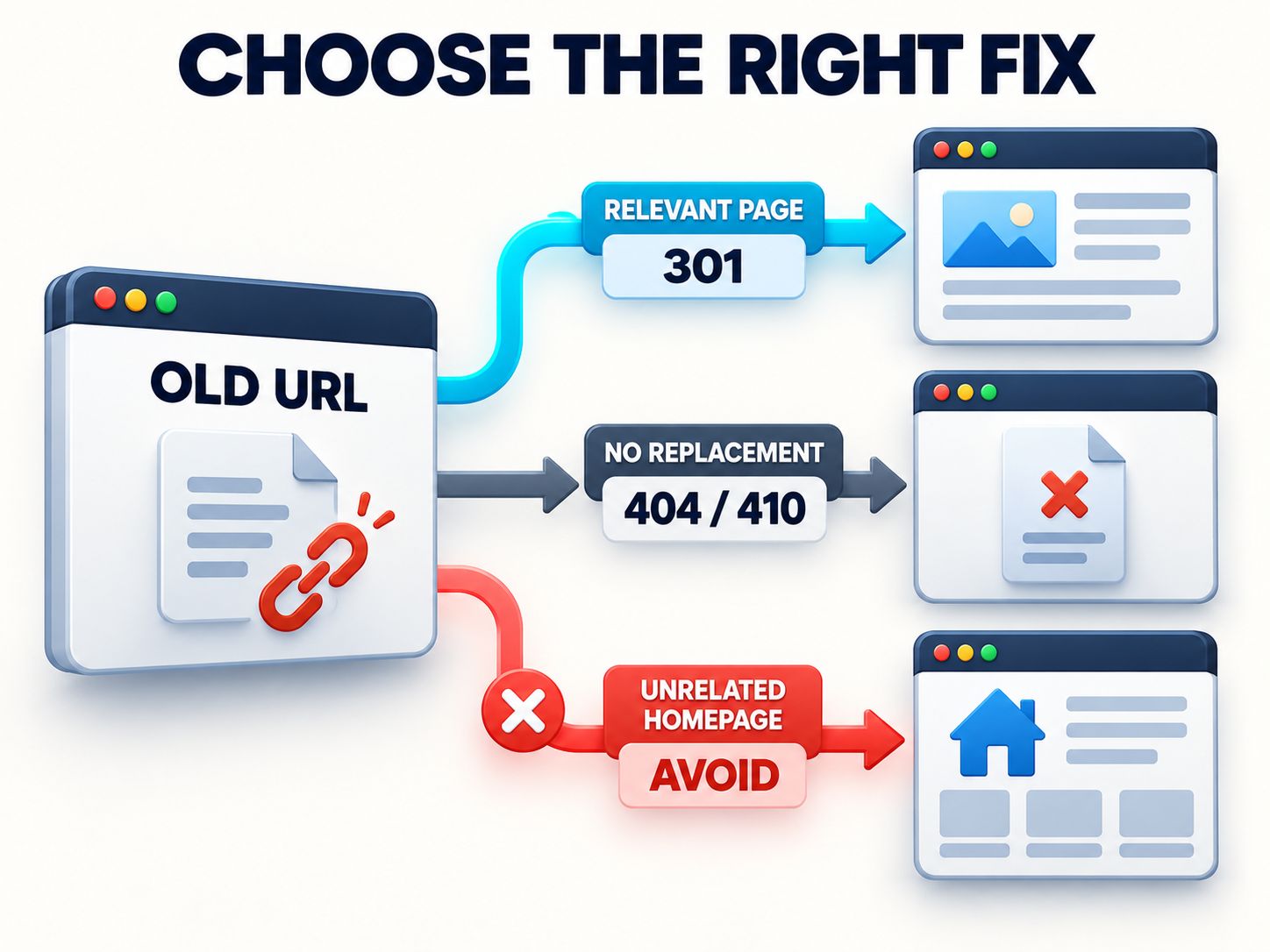
Use a permanent redirect when the new URL genuinely replaces the old one.
For example:
A relevant 301 redirect helps visitors reach the new resource and provides search engines with a strong signal about the URL change.
After implementing it, update internal links so they point directly to the new address.
For a closer look at redirect-related risks, see our guide to 301 redirects and SEO penalties.
Case 3: The original content is gone
Sometimes keeping 404 is the best choice.
Imagine you published an event registration page for a conference that ended two years ago. The event won’t run again, and there’s no updated equivalent.
Redirecting that old registration URL to an unrelated service page would be confusing.
If no replacement exists, returning 404 or 410 is appropriate.
Case 4: A link on your website is incorrect
Fix the source link directly.
For example, your navigation contains:
/wordpress-tutorials-old/
But the correct page is:
/wordpress-tutorials/
Update the menu item.
A redirect can still help with external links and bookmarks, but fixing the link at its source provides a cleaner experience.
Case 5: The redirect points somewhere irrelevant
Remove or replace the misleading redirect.
Sending every deleted URL to your homepage is not a sensible universal strategy. Google warns that redirects to unrelated destinations can confuse users and may be treated as soft 404s.
A relevant replacement is essential.
404 vs 410 vs 301: Which Should You Choose?
These responses solve different problems.
| Question | 404 | 410 | 301 |
|---|---|---|---|
| Is the original content available at this URL? | No | No | Redirects elsewhere |
| Does it explicitly indicate permanent removal? | No | Yes | Indicates a permanent move |
| Should a replacement exist? | Not required | Not required | Yes |
| Does it send visitors automatically to another URL? | No | No | Yes |
| Typical use | Missing content | Intentionally retired content | Moved or consolidated content |
A 410 can express a more definitive removal than a 404, but that doesn’t mean every deleted URL needs changing to 410.
Choose the response that best represents what happened.
What Is a Soft 404 Error?
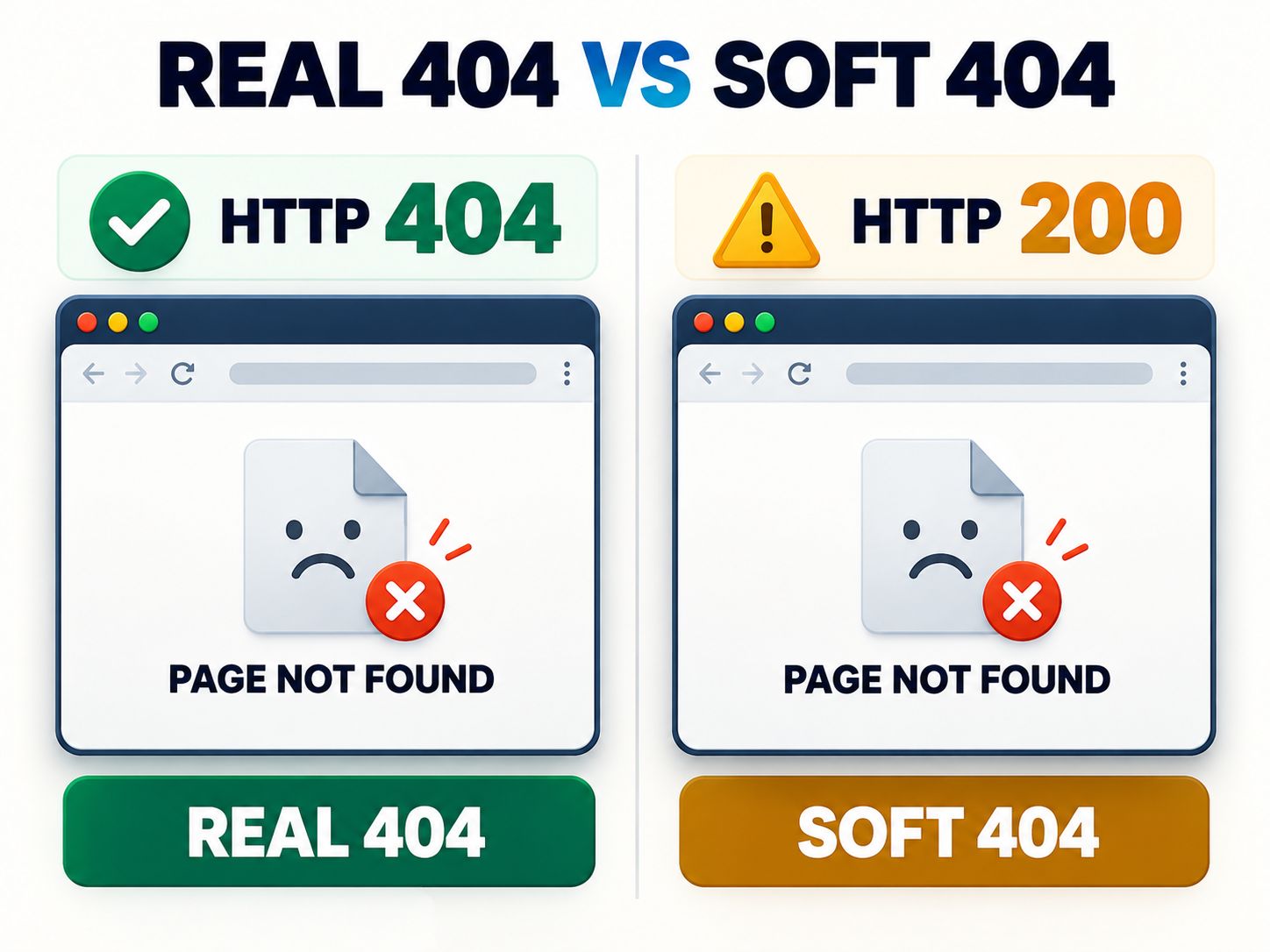
A soft 404 occurs when Google identifies a page as effectively missing or unusable even though its response doesn’t correctly indicate that situation.
The classic example is a page displaying a missing-page message while returning HTTP 200.
Real 404
The resource is missing, and the server accurately reports that fact.
Soft 404 example
But the page displays:
Sorry, this page does not exist.
The server claims the request succeeded even though the intended content is unavailable.
Google may also classify pages as soft 404s when essential content fails to render and the page appears empty.
How to fix a soft 404
Begin by checking the actual content.
If the resource is permanently unavailable, return 404 or 410.
If the page moved, implement a relevant permanent redirect.
If the page should exist, investigate missing content, failed database requests, blocked JavaScript resources, and rendering errors.
For client-rendered applications, Google’s JavaScript SEO guidance also documents special approaches using a redirect to a genuine 404 URL or a dynamically applied noindex directive.
These are fallback strategies for client-side routing limitations, not reasons to ignore correct server responses elsewhere.
Google explains these scenarios in its official crawling-error documentation.
How to Find 404 Errors in Google Search Console
Google Search Console helps identify missing URLs encountered by Googlebot.
Open your website property and navigate to the Page Indexing report.
Review the entries labeled Not found (404) and Soft 404.
Don’t treat every listed address as something that must be repaired.
Instead, inspect individual URLs and determine whether the content should exist.
What to do after finding an affected URL
Check its current HTTP response directly.
Then review whether the address is still linked internally, whether it once held important content, and whether it has a suitable replacement.
Use URL Inspection when you need to examine Google’s view of an important page.
If you change the page, test the live URL before using validation features.
Google’s reports may take time to reflect changes because they depend on crawling and processing.
Why does Google still show a 404 after you fixed it?
The reported information may reflect an earlier crawl.
Alternatively, the server may still return 404 to Googlebot because of a different redirect, caching layer, authentication setting, or routing configuration.
Confirm the live response and compare it with Search Console’s available crawl information before making further changes.
How to Fix 404 Errors in WordPress
WordPress 404 errors often appear after changes to permalinks, post slugs, custom post types, rewrite rules, or website migrations.
A sensible troubleshooting sequence begins inside WordPress Admin.
Verify the page and permalink
Check that the post or page exists and is published.
Compare its current slug with the URL visitors are requesting.
If the permalink structure is out of sync, visit Settings → Permalinks and save the existing configuration to refresh rewrite rules where appropriate.
Avoid changing the entire permalink format without planning the consequences.
Check themes and plugins
A redirect plugin, custom rewrite rule, or custom post type registration may interfere with routing.
If the error began after an update, investigate that change.
For production websites, test disruptive configuration changes on staging and maintain a recent backup.
Our WordPress staging subdomain setup guide explains a related staging workflow. For a wider technical perspective, see the WordPress architectural deep dive.
Check the custom error template
A classic WordPress theme generally uses 404.php to display its error page.
Block themes may use a 404.html template.
A minimal classic theme template could look like this:
Page Not Found
Sorry, we couldn’t find the page you were looking for.
WordPress website quality control guide. Developers working with custom architectures can also review server-side rendering vs static islands.What Makes a Good 404 Error Page?
A good 404 page tells visitors what happened and gives them a useful next step.
It should feel like part of your website rather than an unfamiliar error screen.
A simple design might say:
We couldn’t find that page.
The address may have changed, or the content may no longer be available.
Below the message, offer a homepage link, a search field, or links to useful categories.
Don’t overload visitors with technical explanations.
Design elements worth keeping
Use recognizable branding, readable text, accessible navigation, and working links.
A search field is helpful when visitors know the subject they’re looking for but not the correct URL.
Avoid listing unrelated articles just to fill the page.
For a service website, a link to the services overview may be helpful. For a content directory, a search field and topic categories could be more useful.

Should you add humor or a game?
Creative elements are optional.
An illustrated character or short joke can fit a gaming or entertainment brand, but a financial or business website may be better served by a straightforward message.
If you include a 404 game, keep navigation immediately accessible.
The point is to help visitors recover, not make them complete an activity before continuing.
Should You Block 404 URLs Using Robots.txt?
Generally, no.
Robots.txt controls crawler access. It doesn’t change a missing resource into a working page.
If Google cannot crawl a blocked URL, it may be unable to confirm that the resource now returns 404.
Similarly, adding noindex to an ordinary 404 page is generally unnecessary because the HTTP response already communicates that the resource is unavailable.
An exception applies to some client-rendered applications, as described earlier.
For ordinary server-rendered websites, focus on delivering the correct HTTP status.
Do 404 Errors Waste Crawl Budget?
Googlebot may request URLs that return 404, but a normal collection of missing URLs isn’t automatically a crawl-budget problem.
The issue becomes more relevant when large websites generate extensive numbers of unnecessary addresses or repeatedly expose broken links through important navigation and URL patterns.
For smaller websites, restoring valuable content and fixing user-facing links usually offers a clearer benefit than trying to eliminate every 404 in server logs.
Large ecommerce platforms and directories may need additional monitoring for incorrectly generated URLs, redirect chains, and infinite crawl spaces.
Related website optimization topics include Core Web Vitals on shared hosting and Shopify collections SEO.
How to Prevent Important 404 Errors
You won’t eliminate every missing URL, and you don’t need to.
The practical goal is to prevent broken journeys that should have been avoided.
Before a website migration, prepare a URL mapping for pages that will move.
After changing slugs, update internal links and redirects.
When deleting content, check whether other pages still reference it.
Periodically review navigation, high-traffic pages, and important conversion paths.
For ecommerce websites, pay particular attention to product pages, checkout-related navigation, and discontinued product handling.
A website maintenance process should focus on the consequences of broken links rather than chasing a perfect zero-error report.
For additional context on ecommerce platform decisions, see our Shopify vs WooCommerce cost breakdown. Website owners planning a larger CMS migration may also find the Umbraco to WordPress migration guide relevant.
The best 404 maintenance strategy focuses on valuable content, correct redirects, functional internal links, and useful visitor navigation.
Frequently Asked Questions
What is 404 in SEO?
A 404 is an HTTP status code stating that the requested resource couldn’t be found. It helps search engines understand that a URL isn’t currently available.
What is SEO experience?
SEO experience refers broadly to how effectively visitors can access, understand, and use a website after discovering it through search. It includes relevant content, navigation, accessibility, and technical reliability.
Is error 404 still a thing?
Yes. HTTP 404 remains a standard response used across websites, browsers, servers, and APIs.
Why is error 404 so famous?
People regularly encounter 404 errors when links are outdated, pages are deleted, or addresses are entered incorrectly. Creative error-page designs have also made the message widely recognizable.
Does a 404 error hurt Google rankings?
A legitimate 404 doesn’t automatically hurt rankings across your website. However, valuable missing content and broken navigation can create SEO and user experience problems.
Should I redirect every 404 to the homepage?
No. Only redirect when the destination is a meaningful replacement. Otherwise, a genuine 404 or 410 is usually more appropriate.
Which is better, 404 or 410?
Use 404 when a resource cannot be found and 410 when you explicitly want to communicate that it is gone. Both are valid responses for unavailable resources.
Why is Google reporting a soft 404?
Google may detect missing or nearly empty content despite a successful HTTP response. Inspect the URL’s rendered content, HTTP response, and resource loading behavior.
Can custom 404 pages improve user experience?
Yes. Clear explanations, familiar navigation, and relevant links can help visitors continue browsing.
How often should I check for 404 errors?
Review important URLs after migrations, redesigns, or major content changes. For ongoing maintenance, prioritize actual broken navigation, important content, and recurring patterns rather than every isolated bot request.
Final Thoughts
A 404 error is not something to fear. It’s a normal part of how the web communicates that a resource isn’t available.
What matters is whether the response accurately reflects the URL and whether visitors can still find what they need.
Restore pages that disappeared accidentally. Redirect content that genuinely moved. Correct broken internal links. And when a page is permanently gone with no suitable replacement, allow it to return an appropriate missing-page status.
That’s how you protect both technical SEO accuracy and the experience of the people visiting your website.
Shareable insight: A helpful 404 strategy isn’t about eliminating every missing URL. It’s about fixing broken journeys and making sure each URL returns an accurate response.
Have you encountered a persistent 404 or soft 404 problem? Describe the affected URL, HTTP response, and website platform in the comments. Your example may help another website owner make the right fix.