Shopify collections SEO is not mainly about adding more text to category pages. The real job is deciding which shopping searches deserve their own collection, making those pages genuinely useful, and preventing filters or overlapping collections from creating unnecessary URLs.
Get those decisions right and titles, descriptions, internal links and technical SEO become much easier. Get them wrong and you can optimize a page perfectly that never needed to exist.
This guide shows you how to make that distinction, improve existing Shopify collections, and decide what deserves your attention first.
What Is Shopify Collections SEO?
Shopify collections SEO is the process of making a collection page the best available landing page for a specific group of products and the shoppers searching for them.
A product page answers:
“Is this the product I want?”
A collection page answers:
“Which product in this category is right for me?”
That difference matters.
Someone searching for “women’s trail running shoes” probably expects several options.
Someone searching for a specific shoe model, color and size probably expects the product itself.
Someone searching “how to choose trail running shoes” probably needs a guide.
Before optimizing anything, identify which of those jobs the page is supposed to perform.
Should This Keyword Become a Collection, Filter, Product Page or Guide?
This is the decision that should come before title tags, descriptions or keyword placement.
Use the page type that best matches what the searcher wants to do.
| Search or Idea | Best Starting Page Type | Why |
|---|---|---|
| Women’s running shoes | Collection | Shopper wants several relevant products |
| Women’s waterproof running shoes | Collection if inventory supports it | Distinct commercial category |
| Black running shoes | Usually filter or collection depending on demand | Color may be browsing refinement rather than distinct intent |
| Nike Pegasus 41 women’s size 8 | Product page | Search is product-specific |
| Best running shoes for flat feet | Guide or comparison | Shopper needs advice before choosing |
| Running shoes under $100 | Collection if stable inventory exists | Price creates commercial browsing intent |
| Size 8 running shoes | Usually filter | Size normally refines an existing category |
| How to clean running shoes | Guide | Informational intent |
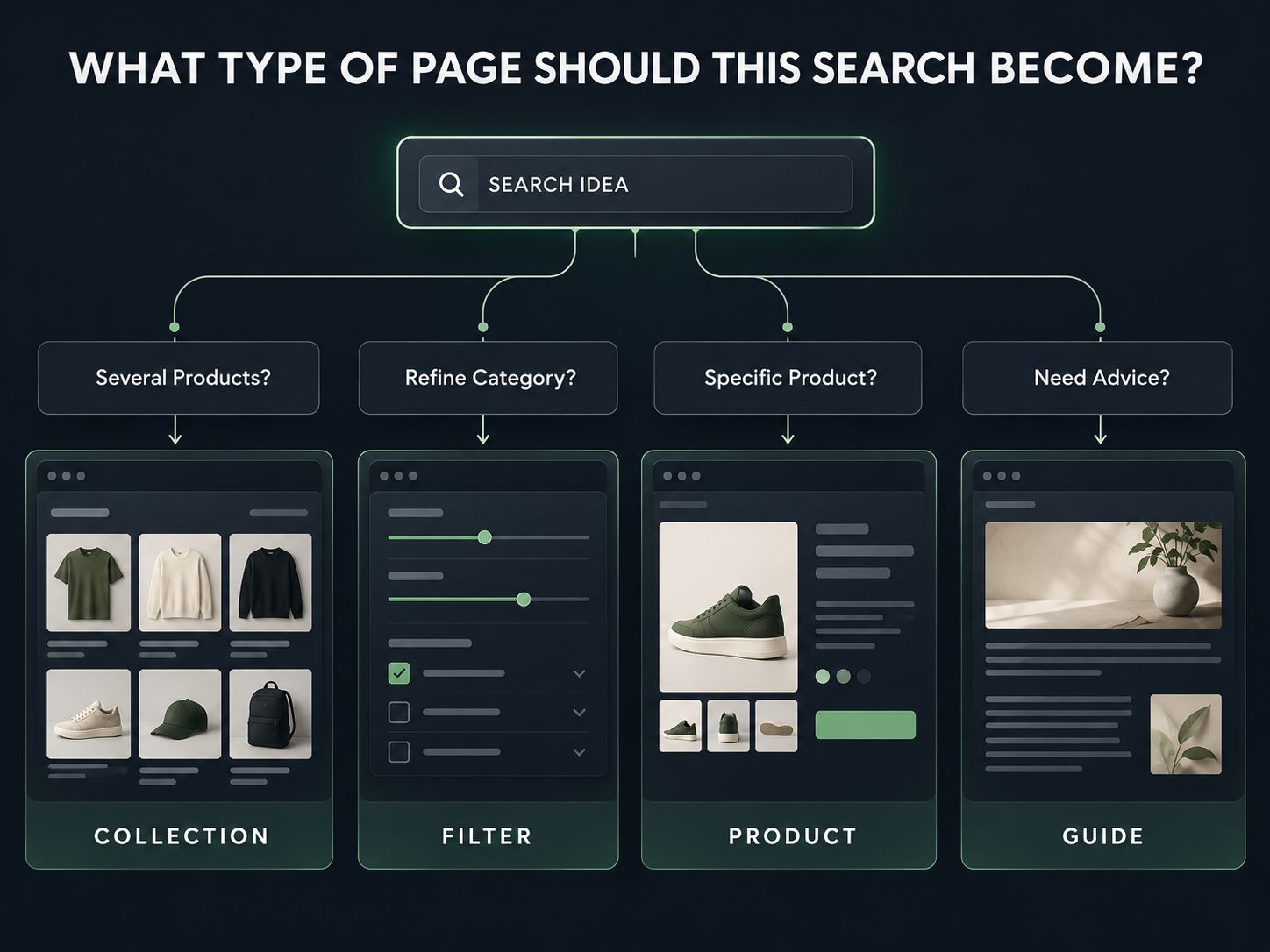
This immediately prevents one of the most common ecommerce SEO mistakes: creating permanent landing pages from every attribute that exists in the product catalog.
The Four-Gate Test: Should You Create a New Shopify Collection?
A new collection should normally pass four tests before you publish it.
Gate 1: Is the Search Intent Meaningfully Different?
Compare:
Running Shoes
and:
Shoes for Running
Those probably represent the same need.
Now compare:
Running Shoes
and:
Waterproof Trail Running Shoes
The second query is much more specific.
Gate 2: Can Your Inventory Actually Satisfy That Intent?
A collection called “Waterproof Trail Running Shoes” is weak if only one product actually qualifies.
There is no universal product-count rule, but the page needs enough useful choice to justify being a collection.
Gate 3: Can the Page Provide Something Distinct?
Ask whether the new page can have a meaningfully different:
- product set
- introduction
- filters
- merchandising order
- supporting guidance
- internal-link context
If everything will be identical to an existing collection, you may be creating duplication rather than additional value.
Gate 4: Does the Page Fit Naturally Into the Store?
A collection worth indexing should normally have a logical place in your navigation or internal-link structure.
If you cannot think of anywhere a real shopper would naturally discover it, ask whether it deserves to be a standalone landing page at all.
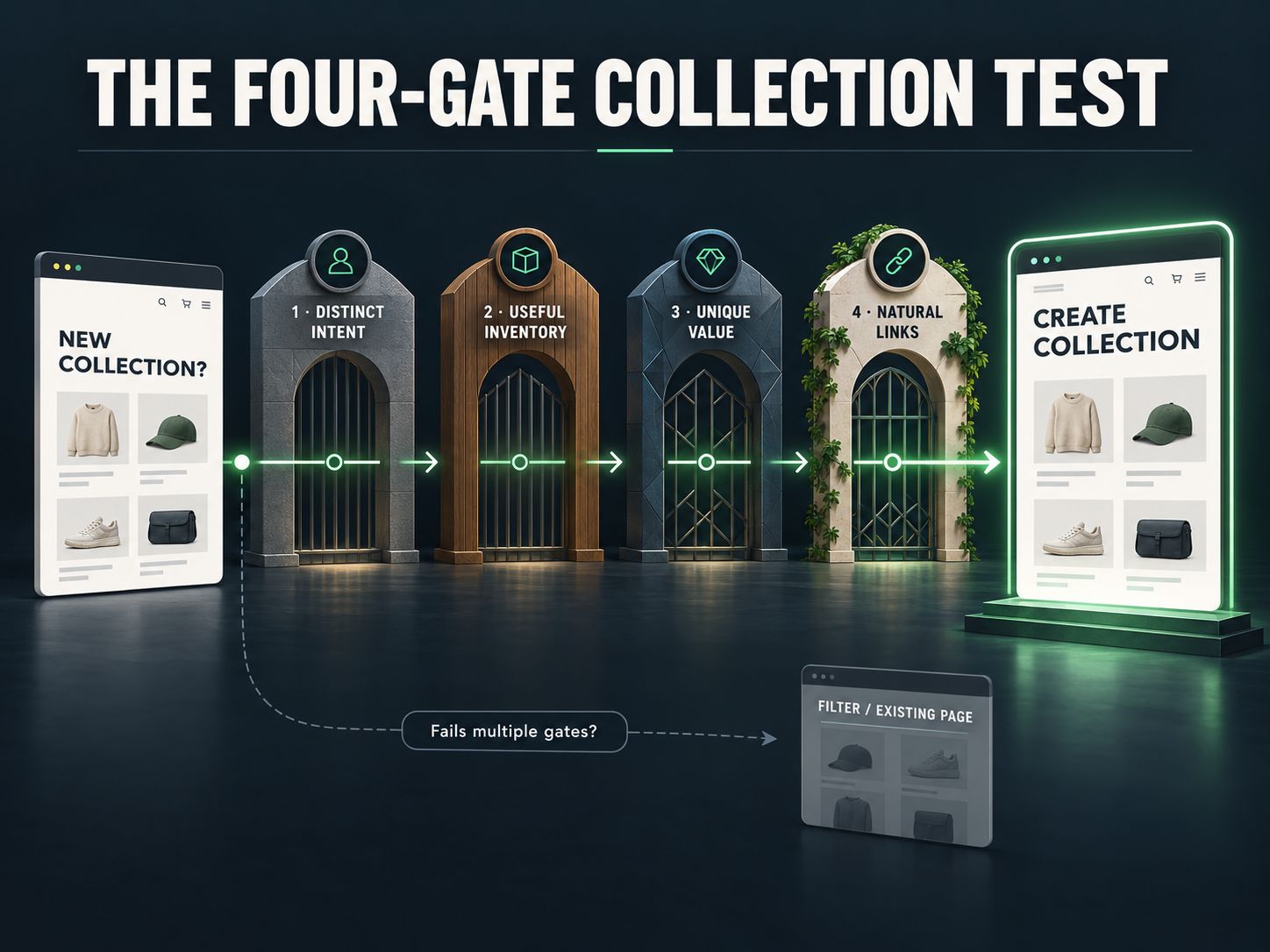
Distinct intent + useful inventory + distinct page value + natural internal links = strong collection candidate.
Fail several of those tests and a filter may be the better answer.
A 2026 Shopify Collections Update You Should Know About
Shopify is currently replacing its legacy manual and smart collection system with a new collections model.
Stores may therefore see different collection interfaces during the rollout.
The new model can work with sources including products, variants, other collections and compatible app sources, while merchants who have not yet received it can continue using the legacy manual and smart collection system.
That means a current Shopify SEO guide should avoid assuming everyone sees exactly the same collection-creation interface.
Shopify’s current collections documentation
From an SEO perspective, the important part remains the result: what products appear, what URL represents the category, and whether the page provides a useful shopping experience.
Shopify Collections SEO Best Practices: What Should You Fix First?
Start with page purpose before technical refinements.
A sensible priority is:
- Search intent
- Collection overlap
- Product relevance
- H1 and search title
- Helpful collection content
- Product ordering and filters
- Internal links
- URL, canonical and crawl behavior
- Mobile usability and page weight
- Measurement
This order matters.
A technically flawless collection aimed at the wrong search intent is still the wrong page.
1. Give Every Priority Collection a Clear Search Purpose
A collection should be understandable without looking at your keyword spreadsheet.
For example:
Running Shoes
→ Men’s Running Shoes
→ Trail Running Shoes
→ Waterproof Trail Running Shoes
That hierarchy makes sense to a shopper.
Compare it with:
Running Shoes
Best Running Shoes
Shoes for Running
Running Footwear
If the products and user need are essentially identical, splitting the category across several URLs may create more work without creating more value.
A Practical Overlap Check
Search the two collection ideas you are considering.
Look at the page types and results.
If essentially the same ecommerce category pages dominate both searches, Google may be interpreting the queries similarly.
Do not treat this as an absolute rule. Treat it as evidence.
Then ask the more important question:
Would someone making these two searches genuinely benefit from different landing pages?
That is the decision that matters.
2. Write a Collection Title That Immediately Explains the Category
The H1 should describe the products, not demonstrate how many keyword variations you discovered.
Weak:
Shoes
Better:
Women’s Running Shoes
More specific where appropriate:
Women’s Waterproof Trail Running Shoes
Do not turn the heading into:
Women’s Running Shoes, Ladies Running Sneakers & Women’s Athletic Footwear
That does not make the page more sophisticated.
It makes the page less readable.
If you are testing possible titles and snippets, WebPlatformLab’s Meta Tag & OpenGraph Generator can help you draft them before implementation.
3. Treat the SEO Title as Search-Result Copy
Your SEO title should quickly identify what the searcher will find after clicking.
A straightforward format often works:
Primary Category | Brand
or:
Important Modifier + Category | Brand
For example:
Women’s Waterproof Hiking Boots | Brand
Do not automatically insert words such as:
- Best
- Cheap
- Premium
- Top Rated
unless they accurately describe what the customer will find.
A search title has two jobs:
Represent the page accurately and make the right person want to visit it.
It does not need to contain every secondary keyword.
4. How Much Content Should a Shopify Collection Have?
Use enough content to remove uncertainty, but not so much that the shopper has to fight through an article before seeing the products.
For a simple collection, two or three useful sentences above the grid may be enough.
For example:
Explore waterproof trail running shoes designed for wet terrain and unpredictable conditions. Compare lightweight options for shorter routes with more supportive designs for longer trail sessions.
That tells the visitor what the collection contains without slowing them down.
A more complicated category may justify additional information below the products about:
- sizing
- materials
- compatibility
- intended use
- care
- buying criteria
There is no universally correct 100-, 300- or 500-word target.
The right amount is whatever the shopper needs to understand the category and make a better choice.
Common Mistake
Writing a long keyword-heavy introduction simply because an SEO tool says the page needs more words.
If the shopper’s first reaction is “Where are the products?”, the content is probably working against the page.
5. Merchandising Is Part of Collection SEO
A search result can deliver the perfect visitor and the collection can still fail.
Imagine clicking “Waterproof Trail Running Shoes” and seeing casual sneakers first.
The keyword targeting is fine.
The product experience is not.
Put the strongest matches where they are easiest to discover.
For an evergreen collection, this might mean best sellers or curated products.
For New Arrivals, recency makes more sense.
For a tightly targeted SEO collection, relevance should usually matter more than alphabetical ordering.
Also inspect what customers can understand directly from the grid:
- product name
- price
- useful variant information
- image quality
- availability
- reviews where appropriate
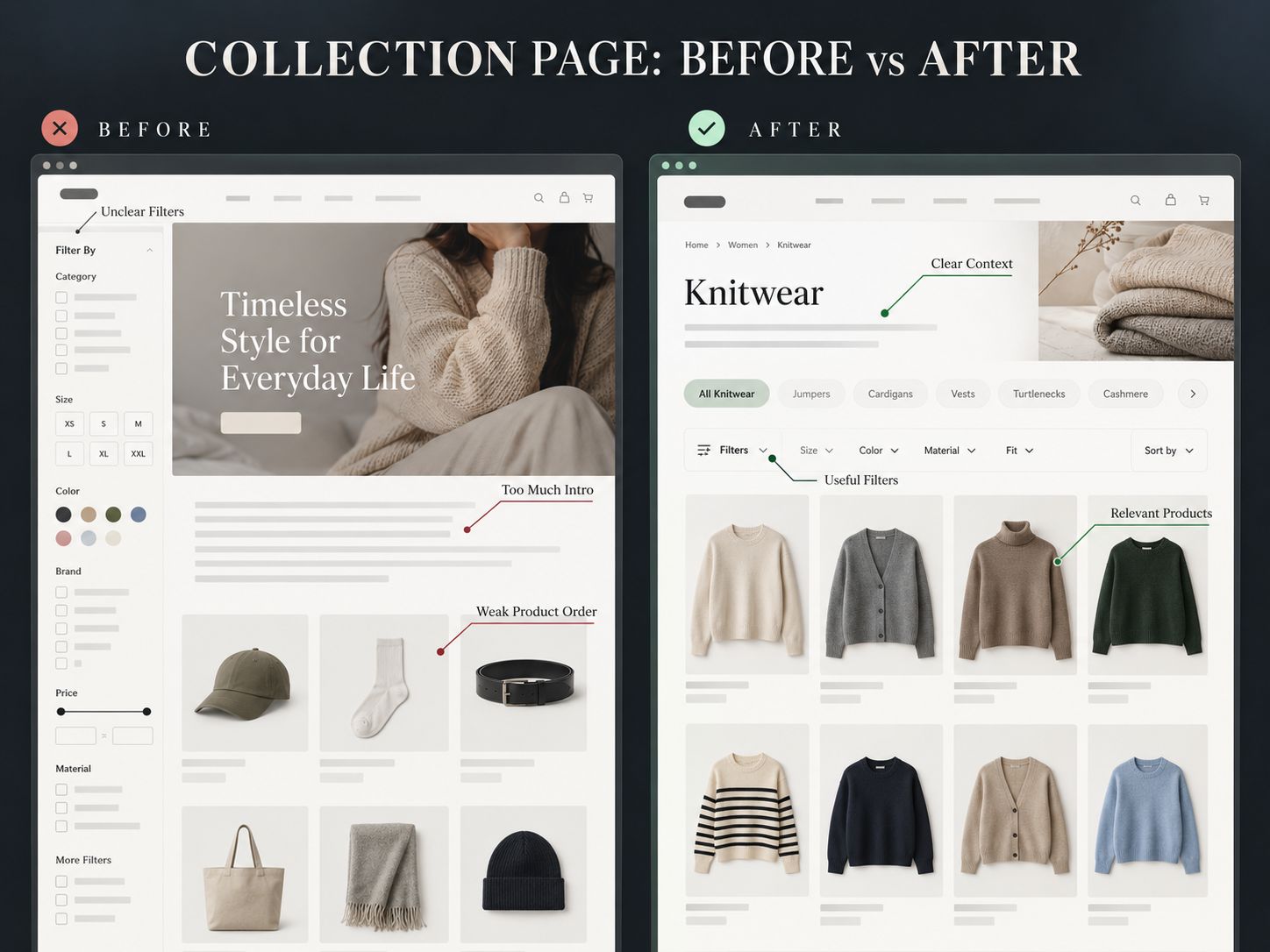
This is where SEO and conversion optimization meet: the page has to deserve the click after it earns the click.
6. Build Internal Links Around the Way People Shop
Important collections should not exist as isolated sitemap URLs.
Useful links can come from:
- navigation
- parent collections
- subcollections
- products
- buying guides
- relevant articles
For example:
Running Shoes → Trail Running Shoes → Waterproof Trail Running Shoes
That path is understandable to both a shopper and a crawler.
WebPlatformLab follows the same principle by grouping related resources within its website tools directory instead of leaving individual utilities isolated.
When you are checking collection metadata, link naturally to the Meta Tag & OpenGraph Generator.
When a URL has changed, verify it through the Redirect & Canonical URL Checker and HTTP Status Code Checker.
These links are useful because they let the reader perform the task being discussed.
They are not inserted simply to increase internal-link count.
If a collection is important enough to rank, it should be important enough to appear naturally in the store’s internal architecture.
7. Treat Filters and SEO Landing Pages as Different Things
Filters help shoppers refine an existing category.
Dedicated collections exist to satisfy standalone shopping intents.
That difference becomes important with attributes such as:
- Color
- Size
- Brand
- Material
- Price
- Availability
Suppose the main collection is:
A customer chooses:
Women + Waterproof + Black
Should that combination become a permanent SEO page?
Not necessarily.
Ask whether “women’s waterproof running shoes” represents a meaningful category that deserves its own products, copy and internal links.
“Black” may simply be a preference.
“Size 8” is probably a refinement.
That distinction keeps the index focused on pages that actually deserve to compete.
8. Check What Filtered URLs Are Doing Technically
Faceted navigation can create a huge number of URL combinations.
Google’s current documentation specifically warns that this can lead to overcrawling and slower discovery of more valuable URLs. If filtered URLs do not need to appear in search, Google recommends controlling their crawl behavior rather than simply creating unlimited crawlable combinations.
Google’s faceted-navigation guidance
Do not assume every Shopify store behaves identically.
Themes and filtering apps can change what happens.
Take one important collection and test:
- Main collection URL
- one filter
- two filters
- sort order
For each version, inspect:
- URL
- HTTP status
- canonical
- indexability
- internal links to the filtered URL
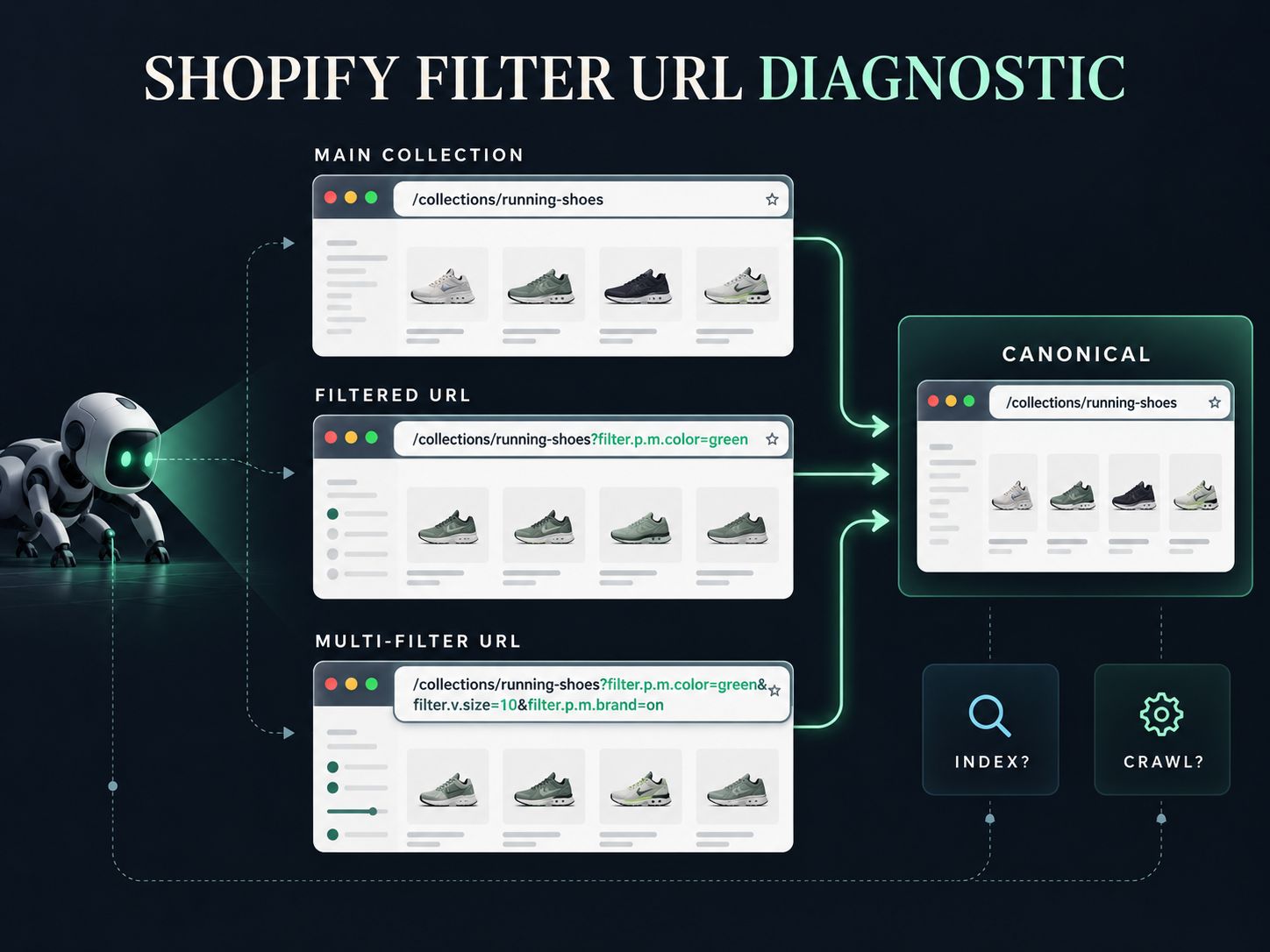
Use the Redirect & Canonical URL Checker to compare the canonical behavior.
9. Do Not Change Stable Collection URLs Just to Add a Better Keyword
Suppose you already have:
and later decide “trail running shoes” is a better target phrase.
You may be able to improve:
- the H1
- the SEO title
- the description
- internal anchor text
- supporting content
without changing the URL.
A URL change should solve an actual problem.
If you do change one, check the old address with the HTTP Status Code Checker and confirm that it reaches the correct replacement.
A slightly prettier slug is rarely worth a broken or unnecessary migration.
10. Keep Images Helpful Without Letting Them Dominate the Page
A category image can establish context quickly.
It can also become the biggest asset on the page and push the products far below the first mobile screen.
Review:
- dimensions
- compression
- responsive behavior
- relevance
- how quickly products appear
Use the Page Size & Weight Analyzer to spot unusually heavy assets.
When preparing custom collection images, the Aspect Ratio & Dimension Calculator can help maintain consistent proportions.
For original article visuals, use your editable diagrams or annotated screenshots rather than generic stock graphics whenever possible.
They provide evidence that the article was actually constructed around the problem being discussed.
11. Check Crawlability Before Looking for More Keywords
If an important collection cannot be crawled or is sending conflicting technical signals, another 200 words of copy will not solve the underlying problem.
Check:
- HTTP response
- canonical
- robots directives
- meta robots
- internal links
- sitemap discovery
Shopify handles several SEO fundamentals automatically, but custom themes and apps can change the final output.
The Robots.txt Generator is useful when reviewing crawler rules, while the XML Sitemap Generator can help you understand valid sitemap structure.
If a storefront has an unfamiliar technical setup, the Website Technology Checker can help identify technologies that may deserve further investigation.
Structured data should also be inspected before adding more of it. Use the Schema Markup Generator only when the schema type accurately describes the visible content.
12. Measure Whether the Collection Is Solving the Right Problem
Do not judge collection SEO from a single ranking number.
Look at search behavior and shopping behavior together.
| Signal | What It Can Tell You |
|---|---|
| Impressions rising | Google is exposing the page more often |
| Clicks rising | More searchers are reaching it |
| CTR falling | Search snippet or query match may need review |
| Unexpected queries | Google may understand the page differently than you intended |
| Strong traffic, weak product clicks | Product selection or merchandising may be poor |
| Strong product clicks, weak sales | The issue may be farther down the buying journey |
| Several collections ranking for the same query | Potential overlap worth investigating |
Search Console can show the queries and pages involved.
Your ecommerce analytics can show what happens after the click.
Neither dataset tells the entire story by itself.
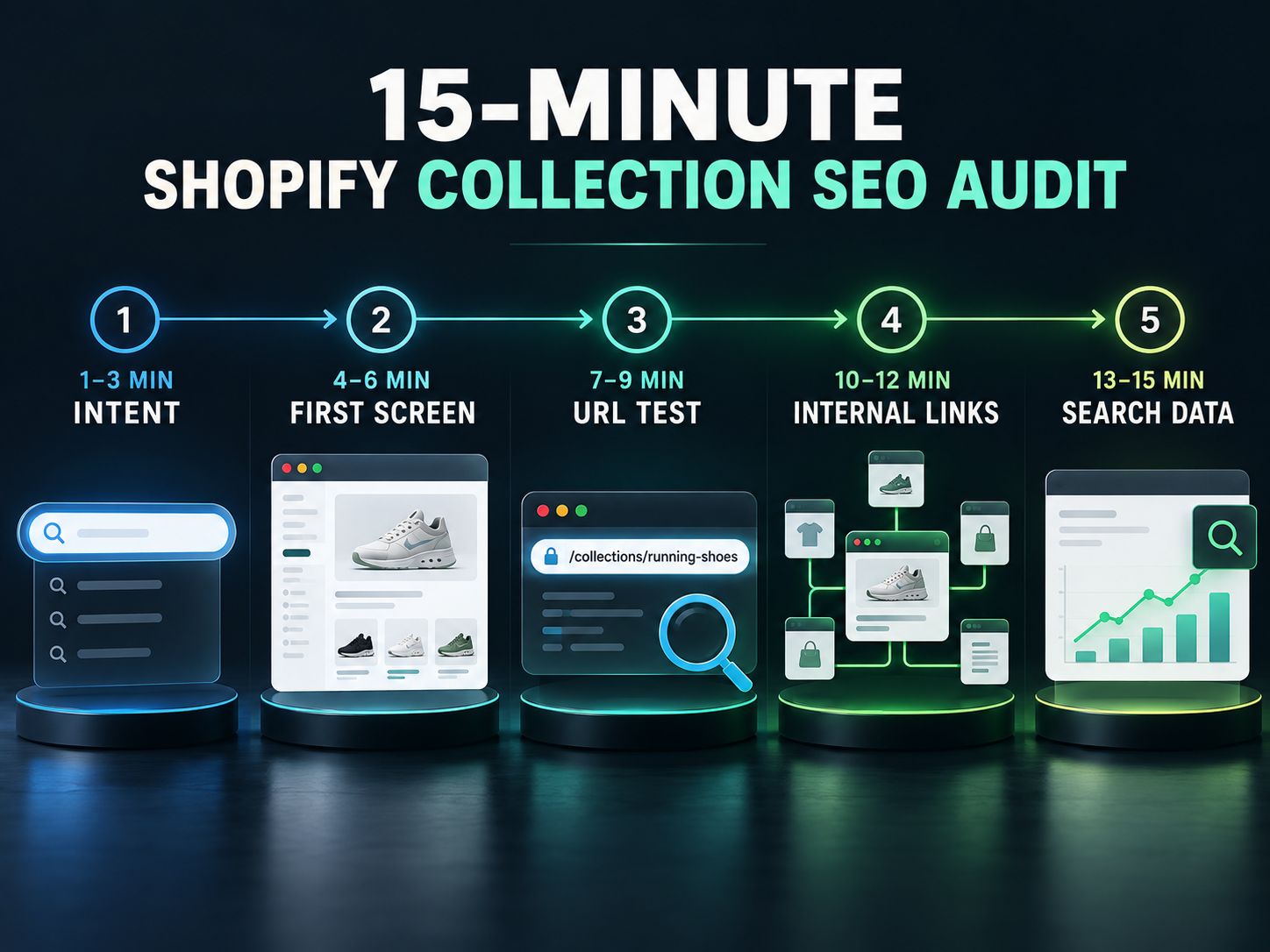
The 15-Minute Shopify Collection SEO Audit
If you have dozens or hundreds of collections, do not start by rewriting all of them.
Take one important collection and run this test.
Minute 1–3: Understand the Page
Without reading your keyword notes, answer:
- What category is this?
- Who is it for?
- Why does this collection deserve its own page?
If those answers are unclear, fix strategy before copy.
Minute 4–6: Inspect the First Screen
On mobile and desktop, check:
- H1
- introductory copy
- first products
- filters
- image size
A shopper should understand the category quickly and reach relevant products without unnecessary friction.
Minute 7–9: Test the URL Variants
Open:
- the collection
- one filtered state
- one sorted state
Check whether the URLs and canonicals behave as expected.
Minute 10–12: Follow the Internal Links
Can you reach the collection naturally from:
- navigation?
- a parent category?
- a relevant article?
- a product?
Then look at where the collection sends the shopper next.
Minute 13–15: Look at Actual Search Data
Check the queries bringing impressions to the collection.
Are they:
- exactly what you expected?
- broader?
- narrower?
- informational instead of commercial?
Those queries tell you what to investigate next.
Which Collections Should You Optimize First?
Do not treat every collection as equally important.
Prioritize pages where SEO improvement has a plausible business impact.
A simple scoring model is:
| Factor | 0 | 1 | 2 |
|---|---|---|---|
| Search demand | Little evidence | Some evidence | Clear demand |
| Commercial importance | Low | Moderate | High |
| Inventory depth | Weak | Acceptable | Strong |
| Existing impressions | None | Some | Significant |
| Current page quality | Strong already | Average | Clearly weak |
A collection scoring 8–10 deserves attention before a collection scoring 2–3.
This is not a Google ranking formula.
It is a workload-management tool.
That distinction matters.
A Practical Example: Collection or Filter?
Imagine a store has 120 running shoes.
The merchant is considering four pages:
- Running Shoes
- Women’s Running Shoes
- Women’s Waterproof Running Shoes
- Women’s Waterproof Black Running Shoes
The first three may represent increasingly specific but useful shopping categories.
The fourth may be too granular.
Instead of immediately creating another page, ask:
- Does “black” change the shopping intent enough?
- Is inventory consistently deep?
- Would shoppers navigate to this category directly?
- Could the page contain unique value beyond the color filter?
If not, leave black as a filter.
This is a better SEO decision than publishing a new landing page simply because a keyword tool returned the phrase.
Common Shopify Collections SEO Mistakes
The mistakes worth fixing first are the ones that affect page purpose, discovery or usability:
- several collections competing for essentially the same intent
- collections with too little relevant inventory
- generic titles that do not explain the category
- large blocks of SEO copy before the product grid
- poor product ordering
- important collections with weak internal linking
- uncontrolled filter combinations
- unexpected canonical behavior
- unnecessary URL changes
- large images hurting mobile usability
- measuring rankings without checking conversions
A missing adjective in a meta description is usually less important than a collection whose purpose is confused.
Our Perspective: Create Fewer Pages, but Give Each One a Better Reason to Exist
The strongest Shopify collection strategy is not necessarily the one with the most URLs.
It is the one where every important collection has a clear job.
Before creating another page, ask:
- What does the shopper want?
- Why is the existing page insufficient?
- Can our inventory satisfy the new intent?
- Can we make the new page meaningfully better than a filter?
If you cannot answer those questions convincingly, creating another collection may only create another page to maintain.
If you can answer them, then optimize that collection properly and make it easy to discover.
More collection URLs do not automatically mean more SEO opportunity. More useful landing pages do.
Frequently Asked Questions
What Is Shopify Collections SEO?
Shopify collections SEO is the optimization of collection pages around clear commercial search intent, relevant inventory, useful content, strong internal linking and clean technical signals.
What Are Shopify Collections SEO Best Practices?
Start by matching each important collection to a distinct shopping intent. Then improve its H1, search title, product selection, description, merchandising, internal links, mobile experience and technical behavior.
How Long Should a Shopify Collection Description Be?
There is no universal required length. Write enough to orient the shopper and answer important category questions without delaying access to the products.
Should Every Keyword Become a Shopify Collection?
No. Some keywords belong on product pages, informational guides or filters. Create a collection only when the intent, inventory and page value justify a standalone landing page.
Should Every Shopify Filter Be Indexable?
No. Many filters exist only to help shoppers refine a category. Large numbers of crawlable faceted URLs can create unnecessary crawling and duplication problems.
Can Products Appear in Multiple Collections?
Yes. The important SEO question is not whether products overlap. It is whether the collections themselves serve distinct purposes.
A trail shoe can reasonably appear under:
- Running Shoes
- Trail Running Shoes
The two collections can still satisfy different shopping needs.
Are Automatic or Smart Collections Worse for SEO?
No. The method Shopify uses to populate the collection does not determine its SEO quality. What matters is the resulting page, product relevance, content, links and technical implementation.
Should I Change an Existing Collection URL to Include a Keyword?
Not automatically. If the current URL is understandable and established, improving the page itself may be more useful than changing the handle.
Do Shopify Collection Pages Need FAQs?
Only when shoppers genuinely have category-level questions. Do not add FAQs simply to increase page length or because an SEO template says every page needs them.
How Do I Know If Two Collections Are Competing With Each Other?
Compare their target searches, products, search results and Search Console query data. If both URLs repeatedly appear for the same intent and provide nearly identical experiences, investigate whether they should be consolidated or differentiated.
How Do I Know Whether Shopify Collection SEO Is Working?
Track collection-level impressions, clicks, search queries and CTR together with product interactions, conversions and revenue. More traffic is useful only when the page attracts the right shoppers.
Final Shopify Collection SEO Checklist
Before publishing or substantially rewriting an important collection, make sure you can answer yes to these questions:
- Does this collection serve a distinct shopping intent?
- Is there enough relevant inventory?
- Would this page be more useful than a simple filter?
- Does the H1 clearly describe the category?
- Do the first visible products fulfill the promise?
- Does the content help without delaying shopping?
- Can shoppers reach the collection naturally?
- Do filtered URLs behave as intended?
- Is the canonical correct?
- Does the page work well on mobile?
- Are images reasonably lightweight?
- Are you measuring both search performance and commercial outcomes?
If those fundamentals are right, you have done something more valuable than “optimizing a collection for SEO.”
You have built a category page with a clear reason to exist.
More collection URLs do not automatically mean more SEO opportunity. More useful landing pages do.
What is the biggest problem with your Shopify collections right now—choosing which collections to create, duplicate intent, filtering, descriptions, internal links or indexing? Share your experience or question in the comments.