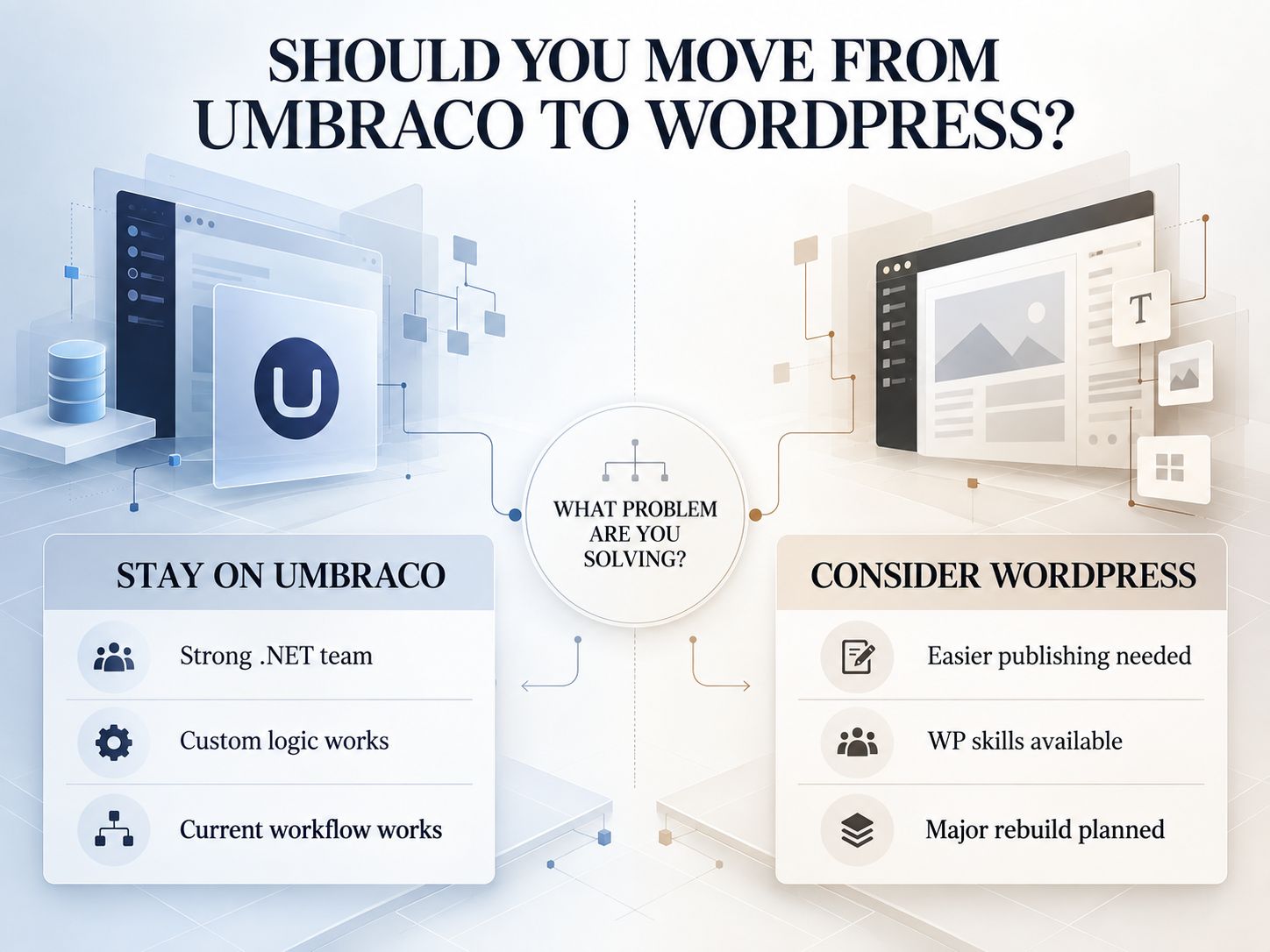
Should You Migrate From Umbraco to WordPress?
You should migrate when WordPress solves a clear operational, technical or publishing problem. You should not migrate simply because WordPress is more popular.
That distinction matters in 2026 because Umbraco is still actively developed. Umbraco 18 is an active Standard-Term Support release, while Umbraco 17 is the current Long-Term Support release and remains supported until November 27, 2028. Umbraco 13 reaches end of life on December 14, 2026.
So this is not a story about escaping an abandoned CMS.
The more useful question is:
Will WordPress make this particular website easier, less expensive or more practical to operate over the next several years?
Use this as an initial decision framework:
| Situation | What it suggests |
|---|---|
| Editors regularly need developers for basic content changes | WordPress may simplify publishing |
| Your team already manages several WordPress sites | Consolidating platforms may reduce operational friction |
| The website is being redesigned anyway | Migration may fit naturally into the rebuild |
| Most functionality is standard publishing, forms and integrations | WordPress may be relatively straightforward |
| The site contains extensive custom .NET applications | Rebuild cost needs careful investigation |
| Umbraco already works well and your team has .NET expertise | Staying may be more economical |
| Migration is being considered only because “everyone uses WordPress” | That is not enough justification |
The official Umbraco lifecycle is worth checking against the version you currently run before deciding between upgrading and migrating.
Umbraco Long-term Support and End-of-Life schedule
Key Point: A good CMS migration starts with a business reason. The export comes later.
How Difficult Is Your Umbraco to WordPress Migration?
Do not estimate the project from the page count alone. Content structure, custom functionality, integrations and SEO exposure usually tell you far more about the real difficulty.
A website with 4,000 conventional articles may be easier to move than a 120-page corporate site with custom authentication, CRM workflows, pricing logic and multilingual relationships.
A practical complexity check looks like this:
| Migration area | Lower complexity | Higher complexity |
|---|---|---|
| Content | Basic pages and posts | Nested content, relations, custom Document Types |
| Components | Simple templates | Block Lists, custom editors, reusable structured components |
| Functionality | Forms and standard publishing | Member areas, ecommerce, calculations, workflows |
| Integrations | Few external systems | CRM, ERP, SSO, APIs, external databases |
| Languages | One language | Several locales with translation relationships |
| SEO | Small site with little organic visibility | Large indexed site with valuable landing pages and backlinks |
| Launch | Flexible maintenance window | Business-critical site with minimal downtime tolerance |
This is a better basis for deciding whether you can handle the project internally or need an Umbraco to WordPress migration service.
If the project also involves a broader redesign, hosting change or maintenance-cost comparison, the calculators and estimators available on WebPlatformLab can help structure the financial side of the decision.
What Actually Moves During an Umbraco to WordPress Conversion?
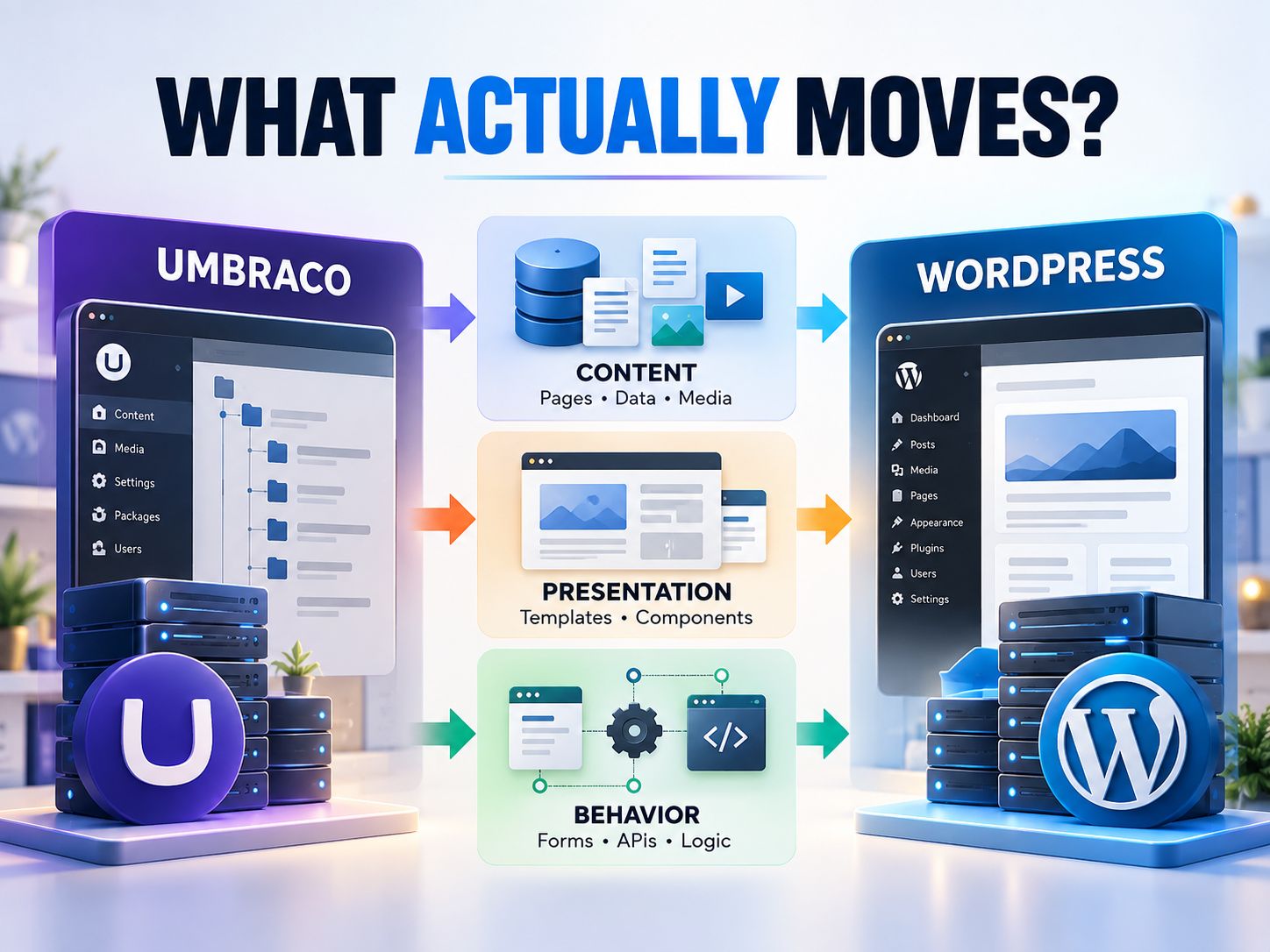
Think of the migration as three connected projects: content, presentation and behavior.
The first layer is content and data. That includes pages, articles, fields, taxonomies, media, metadata, users and relationships.
The second layer is presentation. Razor templates, partial views, page layouts and frontend components cannot simply be activated as a WordPress theme. Their visual outcome can be recreated, but the implementation needs to fit WordPress.
The third layer is behavior, and this is where many migrations become more complicated than expected. Forms may talk to a CRM. Search may depend on a separate index. A members area may use an external authentication provider. Scheduled tasks may run behind the scenes without appearing anywhere on the public site.
A migration can therefore transfer every visible page correctly and still be incomplete.
Before architecture work begins, the Website Technology Checker can help identify technologies that are visible externally. It will not reveal every server-side dependency, so it should support an application audit rather than replace one.
How Do Umbraco Document Types Map to WordPress?
There is no universal one-to-one conversion. The correct WordPress structure depends on what the content represents and how editors will manage it after migration.
A useful starting point is:
| Umbraco element | Possible WordPress destination |
|---|---|
| Document Type | Page, post or Custom Post Type |
| Property | Native field or custom field |
| Content tree relationship | Parent/child structure or taxonomy |
| Block List | Gutenberg block or custom block |
| Rich Text Editor content | Block content or cleaned HTML |
| Media item | Media Library attachment |
| Member | WordPress user or membership record |
| Razor View | WordPress template |
| Partial View | Template part or custom block |
| Macro/component | Block, plugin or custom function |
| Package | Plugin, service integration or custom development |
| Custom .NET logic | Custom WordPress plugin/API/service |
Consider a real content-model example.
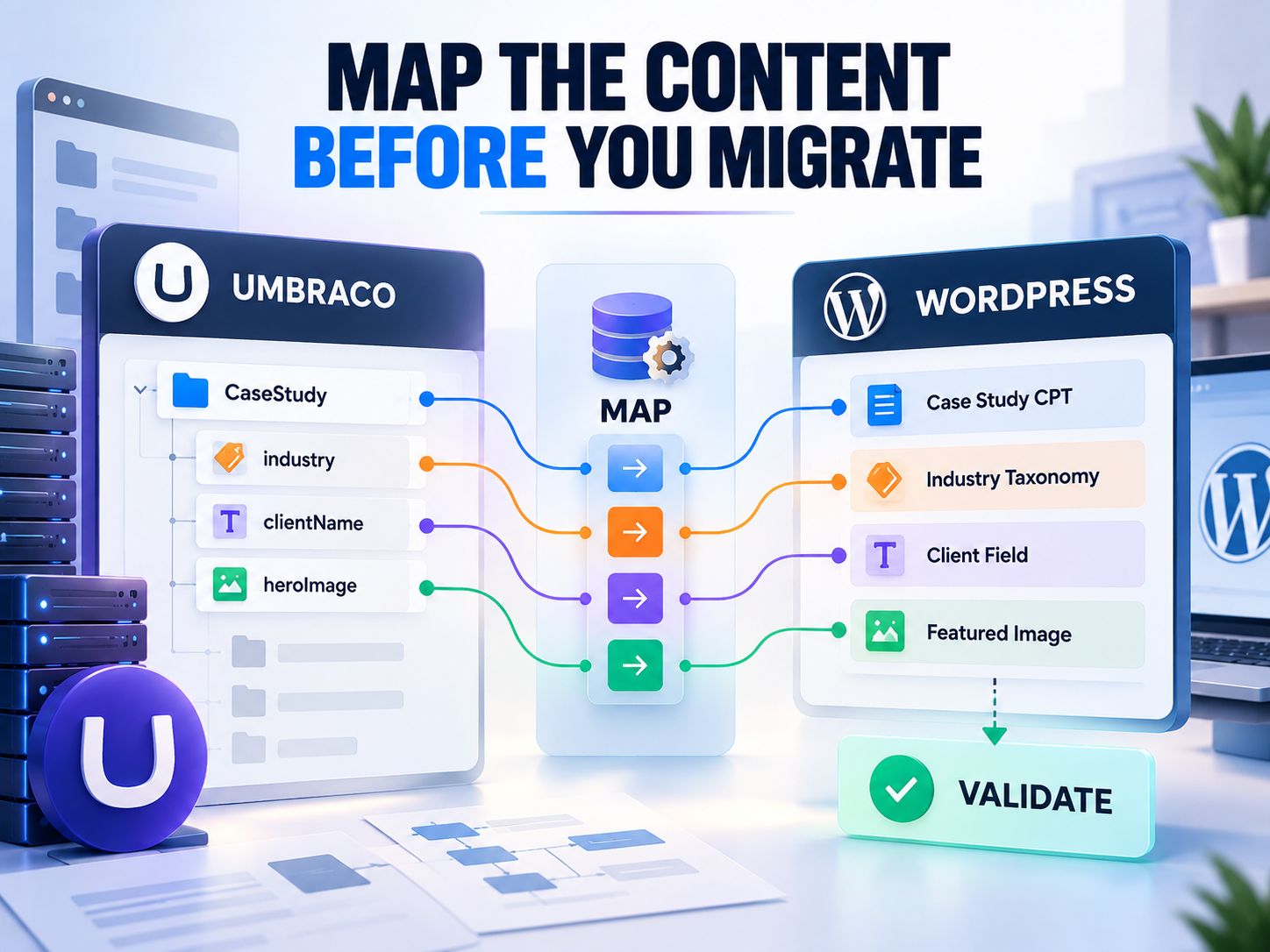
Suppose the Umbraco site has a CaseStudy Document Type containing clientName, industry, challenge, results and heroImage.
Putting every case study into a generic WordPress Page would technically move the content, but it would throw away useful structure.
A better WordPress model could make CaseStudy a Custom Post Type, industry a taxonomy, clientName a custom field, challenge and results structured content, and heroImage the featured image.
That is the difference between moving records and performing a useful Umbraco to WordPress data migration.
Audit the Existing Umbraco Website Before Building WordPress
You need to understand both what visitors can see and what the application does behind the scenes.
Start with the public website. Capture the important URLs, response codes, canonical URLs, titles, indexability, internal links, media, language variations and redirects. This becomes your baseline for later comparison.
Then inspect Umbraco itself. Document the Document Types, properties, Data Types, Block Lists, media types, member structures, templates, forms, packages, controllers, scheduled processes, APIs, search system, ecommerce functionality and multilingual configuration.
Here is why both views matter.
A quotation form might appear to contain five fields and a Submit button. Behind that interface it may validate an account number, assign a sales region, create a lead in HubSpot, send an internal email and trigger analytics.
Recreating five fields in WordPress does not recreate that process.
Pro Tip: For every important feature, ask: What happens after the visitor clicks?
That question often reveals more migration work than inspecting the page itself.
Build a Mapping Sheet Before Migrating the Data
A mapping document should describe both where each source value goes and how you will prove that the transformation worked.
For example:
| Umbraco source | WordPress destination | Migration rule | Validation |
|---|---|---|---|
| News Article | post | Preserve publish date | Compare counts and dates |
| Case Study | case_study | Preserve relationships | Review sample records |
| pageTitle | Post title | Direct transfer | Compare text |
| Rich-text property | Post/block content | Clean incompatible markup | Visual comparison |
| SEO title | SEO metadata | Preserve value | Source/destination check |
| Media reference | Attachment | Resolve media path/ID | Load asset from WordPress |
| Category | Taxonomy term | Match or create term | Verify relationships |
| Existing URL | Permalink or redirect | Preserve/map | Test HTTP response |
The final column is particularly important.
Many migration plans explain what the importer is supposed to do. Far fewer define how somebody will prove it did the job correctly.
That validation rule makes troubleshooting faster and gives the team an objective way to approve the migration.
Decide What Should Not Be Migrated
Moving everything is not automatically the safest approach. A migration is one of the few opportunities to remove content debt deliberately.
Old campaign pages, test entries, duplicate content, expired staff profiles, abandoned taxonomy terms and unused downloadable files may no longer belong on the new website.
Deletion still needs evidence. Before retiring an old URL, check whether users visit it, other sites link to it, it supports a customer journey, or it has a genuine equivalent on the new site.
If a meaningful replacement exists, redirect accordingly. If there is genuinely no replacement, sending every obsolete URL to the homepage is not a useful solution.
Warning: Redirecting many unrelated old URLs to the homepage can confuse visitors and may create poor search behavior. Use genuinely relevant destinations when they exist.
Build WordPress on a Separate Staging Environment
Keep the current Umbraco site serving visitors while the WordPress replacement is being built and tested.
This also solves a practical concern that often appears during CMS migrations: developers need somewhere to build the WordPress replacement without disrupting the existing live domain. A separate development or staging environment is much cleaner than rebuilding production in place.
WordPress 7.1 was released on August 19, 2026. Its current recommended hosting baseline includes PHP 8.3 or newer, MariaDB 10.11+ or MySQL 8.0+, and HTTPS. Apache or Nginx is recommended, but WordPress does not require Linux specifically.
Current WordPress hosting requirements
Before importing real content, decide the permalink structure, post types, taxonomies, fields, blocks, roles, multilingual architecture, backups, caching and security model.
For broader technical implementation guidance, WebPlatformLab’s engineering resources, architecture guides, and developer utilities can help during the WordPress build.
Community Insight: The staging question is not theoretical. A common concern when moving from Umbraco is how to build WordPress while keeping the existing website online.
The practical lesson is simple: treat the replacement as a separate application until cutover.
Which Umbraco to WordPress Content Migration Method Should You Use?
Use the simplest migration method that remains repeatable and safe for your data structure. There is no prize for making a small migration overly technical, and there is no benefit in manually copying thousands of structured records.
Manual transfer makes sense for a small brochure site with straightforward pages. It lets someone review and improve content during the move, but it becomes inefficient once relationships, structured fields, languages or large media libraries appear.
CSV or XML can work well when the source model can be flattened predictably. JSON or API-based workflows are often better when nested structures and relationships must be preserved.
For large or unusual sites, a custom importer can provide the most control. The real advantage is repeatability: if a transformation rule is wrong, you fix the rule and rerun the process rather than manually repairing hundreds of records.
Share This Insight: “Choose the migration method from the content model—not from the page count.”
How Should Media Be Transferred From Umbraco to WordPress?
Copying the media files is only half of the migration. The content references must also stop pointing to the old Umbraco environment.
Imagine that every image has been uploaded to the WordPress Media Library, yet an article still contains an absolute reference to an old /media/ path.
The page looks fine while the source server stays online.
The old server is switched off.
The image disappears.
That is why media QA should verify both the new asset and the page that consumes it. Check inline images, featured images, downloadable PDFs, background images, structured fields, document links and any source-domain references embedded in HTML.
Alternative text should also be preserved where it is meaningful. Automatically copying filenames such as IMG_4829-final-v2.jpg into alt attributes does not improve accessibility.
Umbraco to WordPress Theme and Template Migration
An Umbraco Razor template does not become a WordPress theme file. Preserve the user experience where appropriate, but rebuild the implementation for WordPress.
Depending on the project, the frontend could use a traditional custom theme, a block theme, Gutenberg, custom blocks, structured fields or a decoupled architecture.
The migration is also an opportunity to stop carrying technical debt into the replacement website. Review semantic HTML, accessibility, responsive behavior, image delivery, font loading, CSS, JavaScript and Core Web Vitals while the frontend is already being rebuilt.
WebPlatformLab’s Core Web Vitals optimization guide provides additional performance context, while its performance resources and performance auditing tools can support frontend QA.
First-Hand Perspective
From hands-on WordPress rebuild work, I find it more useful to treat the existing website as a functional and visual specification than as code that has to survive unchanged.
The important question is not, “How can I reproduce this old component line for line?”
It is, “What does the visitor or content editor need this component to accomplish in WordPress?”
That usually leads to a cleaner implementation and a site that is easier to maintain after handover.
Umbraco Module and Plugin Migration
Umbraco packages and custom modules should be mapped by purpose, not by name. They do not automatically correspond to WordPress plugins.
A form could become a maintained WordPress form solution. A reusable content module may be better as a block. A CRM connector might need an API integration. Custom business rules could justify a lightweight custom plugin. An old feature nobody uses may not need a replacement at all.
The same principle applies to commerce. Do not assume an existing Umbraco commerce setup translates directly to WooCommerce simply because both systems sell products. Review catalog complexity, checkout behavior, subscriptions, taxes, payment gateways, fulfillment and existing integrations first.
WebPlatformLab’s platform comparison resources can provide additional context when evaluating that part of the architecture.
Common Mistake: Treating every custom Umbraco component as a reason to install another WordPress plugin often creates a larger maintenance burden than necessary.
Umbraco to WordPress SEO Migration
SEO migration begins with the current URLs and search signals, not with installing an SEO plugin after the site is built.
Preserve useful existing URLs wherever practical. A CMS change does not require every URL to change, and avoiding unnecessary URL changes reduces the number of redirects and failure points you need to manage.
When URLs do change, create an explicit old-to-new mapping.
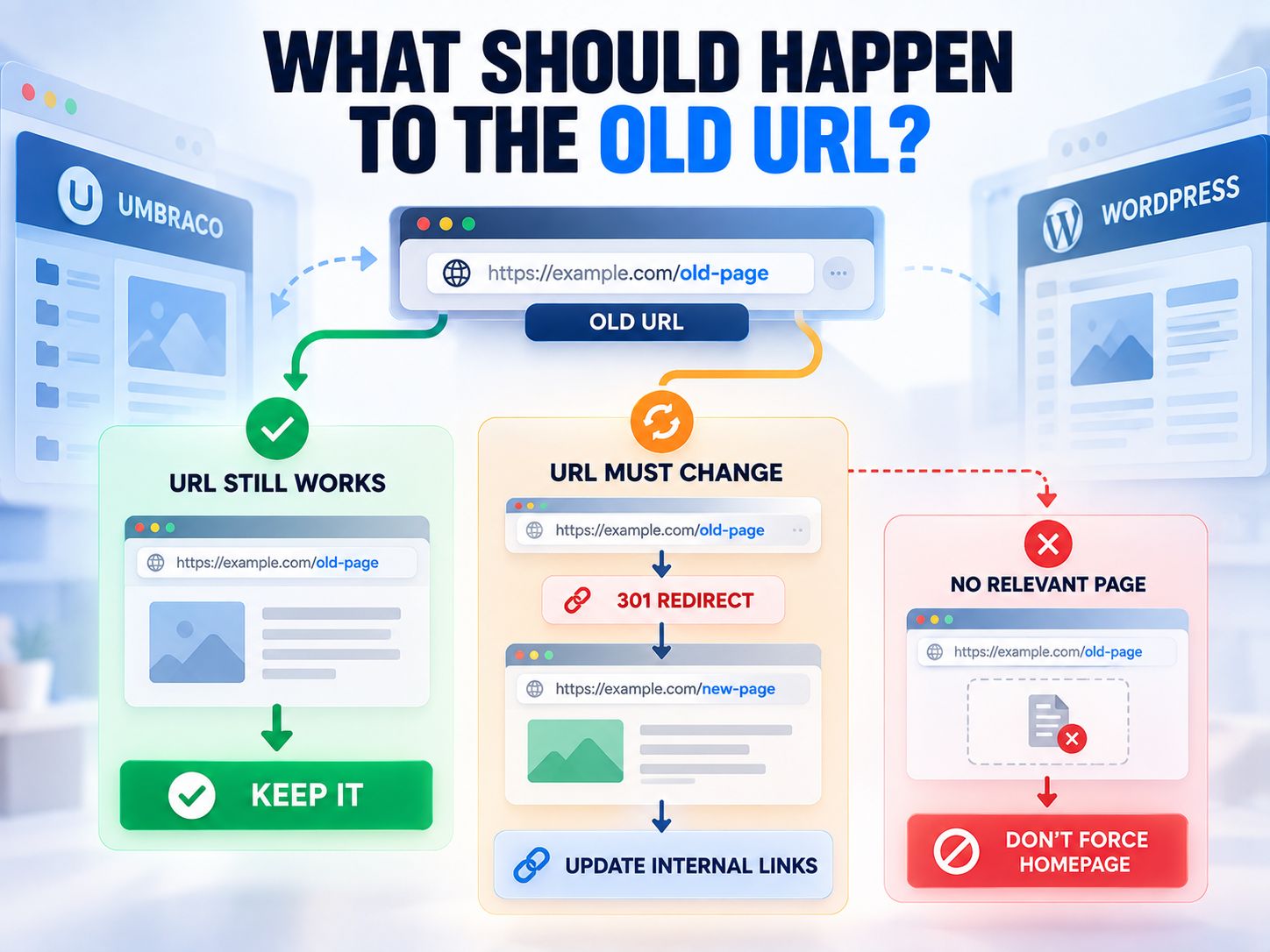
After implementation, test priority URLs and review redirects, canonical behavior and indexability. WebPlatformLab’s SEO and metadata tools can support this part of the migration.
Preserve or Deliberately Replace Metadata
Metadata should be reviewed deliberately rather than blindly copied. Titles, descriptions, canonical URLs, robots directives and social metadata may be preserved where they still work or rewritten where the new page has changed substantially.
Revalidate Structured Data
Changing the theme can remove schema even when the visible page looks unchanged. Important structured data should be checked again after the new frontend is in place.
Check Robots and the Sitemap
Staging restrictions should not accidentally reach production.
Likewise, the new sitemap should contain the WordPress URLs you actually want indexed rather than redirected, deleted or staging URLs.
Replace Old Internal Links
Do not knowingly publish WordPress content full of old Umbraco URLs and rely on redirects to repair them.
Redirects protect old entry points.
Your own new internal links should normally point directly to their final destinations.
Key Point: A redirect is a bridge from an old URL. It should not become the internal linking system of the new website.
How Should Users, Members and Passwords Be Migrated?
Separate editorial users from front-end members before designing the migration. They often represent very different requirements.
An editor may map reasonably cleanly to a WordPress role. A member account might contain profile data, subscription state, organization relationships, permissions or authentication dependencies that need a dedicated membership architecture.
Passwords deserve particular care because the source and destination systems may not authenticate stored credentials in the same way. If credentials cannot be transferred safely and compatibly, a controlled password-reset process is preferable to weakening security simply to preserve the old login experience.
How Should Multilingual Umbraco Content Be Migrated?
A translated page is not just another page. Its relationship to other language versions is part of the data.
Before importing multilingual content, document the locales, default language, translated counterparts, language-specific URL patterns, hreflang behavior, menus, taxonomies and translated metadata.
Then choose the WordPress multilingual architecture.
Doing this after the import creates a common failure mode: every language is present, but the relationships between them have been lost.
Run a Sample Migration Before the Full Import
A small representative migration can expose a bad assumption before that assumption is repeated thousands of times.
Do not choose only your easiest pages for the test. The sample should contain ordinary content, a complex structured record, media-heavy content, unusual fields, taxonomy relationships and translations when applicable.
Ask both developers and editors to review the result.
A technically valid record can still be a poor migration if the content team now needs twice as many steps to update it.
That is an important acceptance criterion which automated data checks cannot detect.
Plan for Content Changes Made During the Migration
If the live Umbraco site remains active while WordPress is being built, content can change after your main import. Those changes need a deliberate path into the final site.
For a smaller website, the simplest solution may be a short publishing freeze immediately before launch.
For a busier site, use a delta migration that identifies content created or modified after the main transfer and moves only those changes.
Whichever method you use, everyone involved should know which CMS is the authoritative content source at each stage of the project.
Four Gates the WordPress Site Should Pass Before Launch
Do not approve launch because the homepage looks complete. Approve it when the data, functionality, search implementation and recovery plan have all been validated.
| Gate | What must be demonstrated before launch |
|---|---|
| Data | Expected records exist; important fields, relationships, authors, dates and media are correct |
| Functionality | Forms, search, login, ecommerce, email, APIs, CRM connections and key workflows work |
| SEO & URLs | Important URLs, redirects, canonicals, robots rules, schema, sitemap and internal links are correct |
| Recovery | A usable backup exists; rollback triggers, responsibility and restoration procedure are understood |

The launch itself can then follow one controlled sequence:
- Create the final backup.
- Apply the publishing freeze or delta migration.
- Perform final acceptance checks.
- Deploy WordPress.
- Activate required redirects.
- Switch DNS or infrastructure where necessary.
- Verify HTTPS, high-value URLs and critical workflows.
- Confirm analytics.
- Begin production monitoring.
What Should You Monitor After the Umbraco to WordPress Transfer?
The migration is not finished when DNS resolves to WordPress. Production behavior is part of the validation process.
Watch 404 responses, server errors, unexpected redirects, broken media, forms, authentication, analytics, conversions, organic landing pages, crawl behavior, sitemap processing and performance.
Temporary search fluctuations can occur during a substantial site move while search engines recrawl and process changed URLs.
Keep an inaccessible archive or reliable rollback option for the old environment until you are confident that the new site is stable.
Common Umbraco to WordPress Migration Mistakes
Most expensive migration problems begin before the importer runs.
| Mistake | Why it causes problems | Better approach |
|---|---|---|
| Importing before designing WordPress architecture | Data arrives in the wrong structure | Define post types, fields and taxonomies first |
| Making every Document Type a Page | Useful source structure is lost | Model content according to purpose |
| Auditing only visible pages | Hidden APIs and workflows are missed | Audit application behavior as well |
| Changing every URL during redesign | Creates unnecessary redirects and SEO risk | Preserve good URLs where practical |
| Moving media without changing references | Content can still depend on Umbraco | Validate both file and consuming page |
| Rebuilding forms visually only | CRM/email logic may disappear | Test end-to-end behavior |
| Installing a plugin for every old component | Creates maintenance overhead | Choose the simplest suitable implementation |
| Redirecting removed content to the homepage | Creates poor destinations and possible soft 404s | Map to a relevant page or retire appropriately |
| Forgetting staging noindex rules | Production may remain blocked from indexing | Recheck robots and metadata before launch |
| Keeping a backup without a rollback procedure | Restoration becomes improvisation | Define who, when and how rollback happens |
DIY vs Umbraco to WordPress Migration Service
A simple content-driven site may be a reasonable DIY project. Professional migration becomes more valuable as the number of dependencies—and the cost of failure—increases.
The strongest indicator is not the prestige of the site or the total number of pages. It is the number of things that must remain correct simultaneously.
A project with custom Document Types, nested blocks, member accounts, multiple languages, ecommerce, valuable organic search traffic, CRM/API dependencies or custom .NET logic deserves more formal engineering and QA ownership.
A useful rule is this:
If losing one relationship, integration or workflow could materially affect customers, revenue or business operations, that area should have a named owner and an explicit test before launch.
Umbraco to WordPress Migration Checklist
- The source system has been backed up and audited.
- The WordPress content architecture and URL strategy are documented.
- Sample data has been migrated and approved.
- Content, media, users and translations have been validated.
- Templates and functionality have been rebuilt.
- Redirects, canonicals, robots rules, schema and sitemap behavior have been checked.
- Late source changes have been captured.
- Forms and integrations work.
- Monitoring is active.
- Rollback remains possible.
That is enough to tell you far more about launch readiness than whether the homepage “looks finished.”
Share This Insight: “A CMS migration is complete when the new system has been proven—not when the homepage first loads.”
Frequently Asked Questions About Umbraco to WordPress Migration
Is Umbraco better than WordPress?
Neither platform is universally better. Umbraco can be an excellent choice for organizations invested in .NET and custom application development, while WordPress can suit organizations that prioritize widespread developer availability, familiar publishing workflows and a broad extension ecosystem.
The better CMS is the one that fits the actual website, team and maintenance model.
Is Umbraco still used?
Yes. Umbraco remains actively developed in 2026.
Umbraco 18 is an active STS release, Umbraco 17 is the current LTS release, and Umbraco 13 reaches end of life on December 14, 2026.
Which CMS is better than WordPress?
There is no CMS that is better than WordPress for every project. Umbraco, Drupal, Shopify, Webflow and other platforms each solve different combinations of publishing, development, commerce and infrastructure requirements.
Choose from requirements rather than popularity.
Can I transfer my existing website to WordPress?
Yes, in most cases. Content and media can usually be transferred, while platform-specific templates, packages and custom application functionality need to be replaced or rebuilt.
The amount of automation depends on how structured and customized the original implementation is.
Is there an automatic Umbraco to WordPress migration tool?
There is no universal one-click converter that can correctly understand every Umbraco data model and reproduce its behavior in WordPress.
Generic import tools can help with predictable content. Complex projects still require mapping and transformation rules.
Can you convert an Umbraco theme to WordPress?
The design can be recreated, but Razor templates cannot simply be installed as WordPress theme files.
The frontend must be reimplemented using the chosen WordPress theme and block architecture.
What is Umbraco to WordPress template migration?
It means recreating the rendering logic used by Umbraco templates within WordPress.
This may involve PHP templates, block templates, template parts, custom blocks or another suitable WordPress frontend approach.
What is Umbraco to WordPress plugin migration?
It is really functionality migration.
An Umbraco package may be replaced by a WordPress plugin, but it could also be better represented by WordPress core, a custom block, a custom plugin, an API integration or a redesigned workflow.
Can I keep the same URLs after migrating?
Often, yes.
If the existing URLs are suitable and WordPress can reproduce them, keeping them avoids unnecessary redirects. When a URL must change, map it to the closest genuinely equivalent destination.
Will Umbraco to WordPress migration hurt SEO?
It can if important URLs, metadata, links, canonicals, structured data, crawl rules or content change incorrectly.
A well-planned migration reduces those risks, but responsible migration planning should still allow for temporary search fluctuation while search engines recrawl and process the changes.
How long does an Umbraco to WordPress migration take?
There is no useful universal timeline.
A site with thousands of predictable articles may be easier to migrate than a much smaller website with member authentication, custom .NET functionality and several business integrations. Audit the source system before estimating the project.
What is the safest way to migrate Umbraco to WordPress?
Start by auditing the current website and application, define the WordPress content model, build separately on staging, run a representative sample migration, correct the mapping, migrate the complete dataset, capture late changes, validate the four launch gates, deploy with a rollback plan and monitor production.
That approach is slower at the beginning and usually much faster when something unexpected appears.
Our Perspective
The phrase Umbraco to WordPress migration can make the project sound as though the same website is simply being moved from one container into another.
That is not really what happens.
The content may remain recognizable. The design can remain almost identical. Many URLs may not need to change at all.
Underneath, however, the website is being reconstructed around a different content and application model.
That is why I would spend more time understanding Document Types, relationships, integrations, custom behavior and existing URLs before the first full import than choosing plugins afterward.
If those architectural decisions are sound, the migration becomes easier to automate, easier to test and easier for editors to live with afterward.
If those decisions are wrong, even a technically successful import can leave you with a WordPress website that is harder to manage, missing important workflows or carrying avoidable SEO risk.
Final Takeaway: Treat the migration as a controlled reconstruction of content, presentation and behavior—not as a simple CMS export-and-import exercise.
Planning an Umbraco to WordPress migration now? Share your Umbraco version, approximate number of content records and the most customized feature on the existing site in the comments. Those three details usually reveal where the real migration challenge is.