

A visitor submits a contact form on your landing page. The confirmation message appears, but the lead never reaches your CRM. Did the form fail, the API time out, or the field mapping break?
A dependable landing page builder CRM integration form submission schema database design helps you answer those questions. It gives every accepted submission a reliable record, preserves the values the visitor entered, and tracks what happens when that information is sent to a CRM.
This guide walks through a practical architecture for a custom form builder, including MySQL tables, field mapping, duplicate prevention, WordPress integration, and failure recovery. You’ll also see when a simpler native connector is the better choice.
Which CRM Integration Architecture Should You Choose?
For a straightforward landing page, start with a supported native CRM connector. Build a custom integration when you need independent submission storage, dynamic forms, multiple destinations, or more control over failed requests.
You don’t need a complicated database architecture simply because your website has a contact form.
Consider three common projects:
| Project | Recommended starting point | Why |
|---|---|---|
| Small business landing page connected to one CRM | Native integration | Fewer components to maintain |
| Marketing agency using several form builders and CRM platforms | Middleware or managed integration | Easier routing between services |
| Custom landing page builder with multiple clients | Server-side API and dedicated submission storage | Better control over ownership, mappings, and recovery |
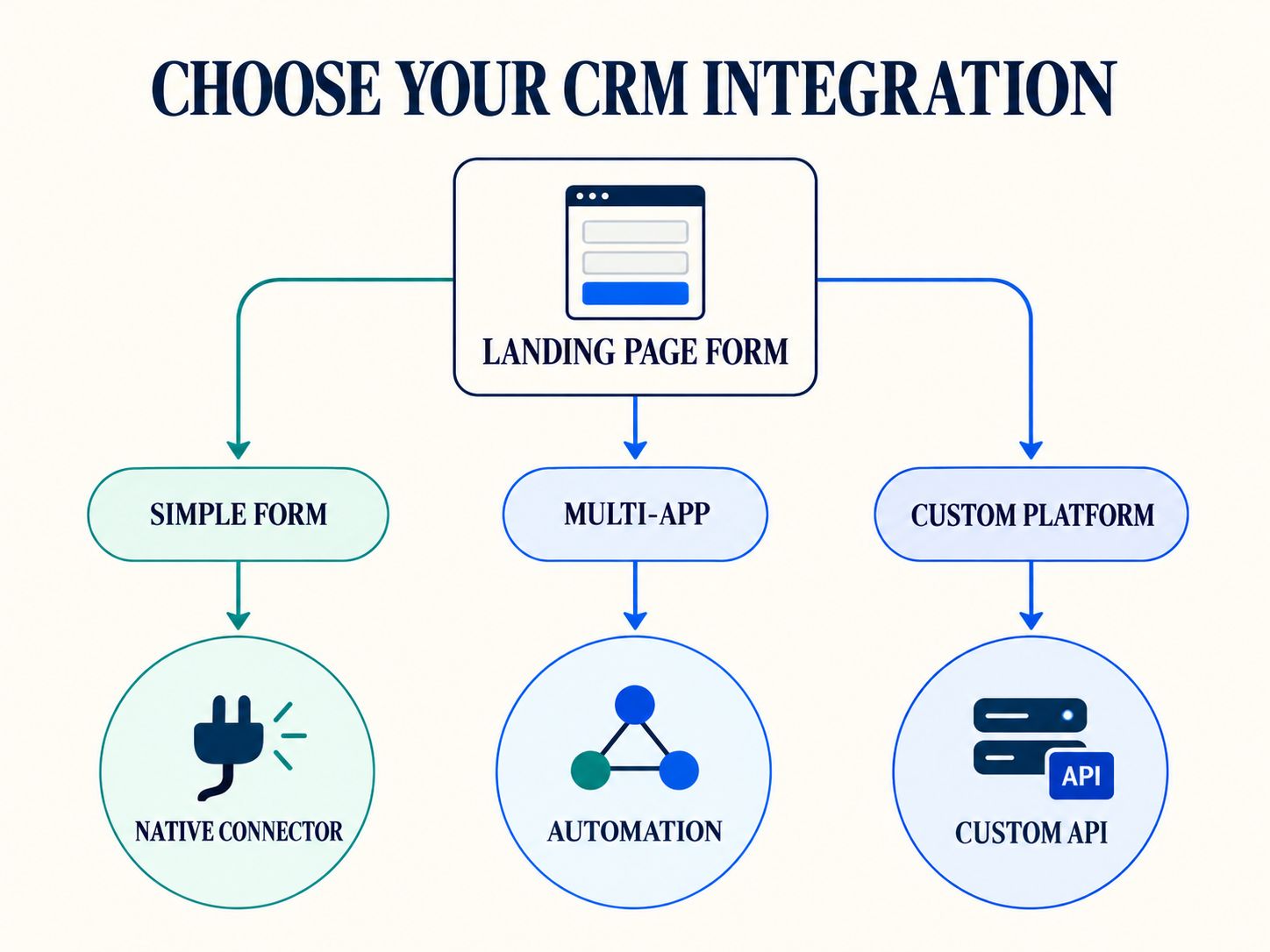
Before choosing a connector, ask whether it supports your required CRM objects, custom fields, contact updates, error logs, and retries.
A connector may support creating contacts while offering limited control over associated deals, custom records, or historical submissions.
When Is Local Submission Storage Necessary?
Local storage becomes valuable when losing an inquiry would be difficult to investigate or recover.
For example, an agency collecting high-value consultation requests may want an independent record of every accepted submission.
If the CRM is temporarily unavailable, the application can preserve the inquiry and process its delivery later.
That doesn’t mean every application must keep personal data indefinitely. Your storage and retention policies should match the actual business purpose.
The key distinction: Successfully accepting a form submission and successfully delivering it to a CRM are two separate events.
How Should Form Submissions Move from a Landing Page to a CRM?
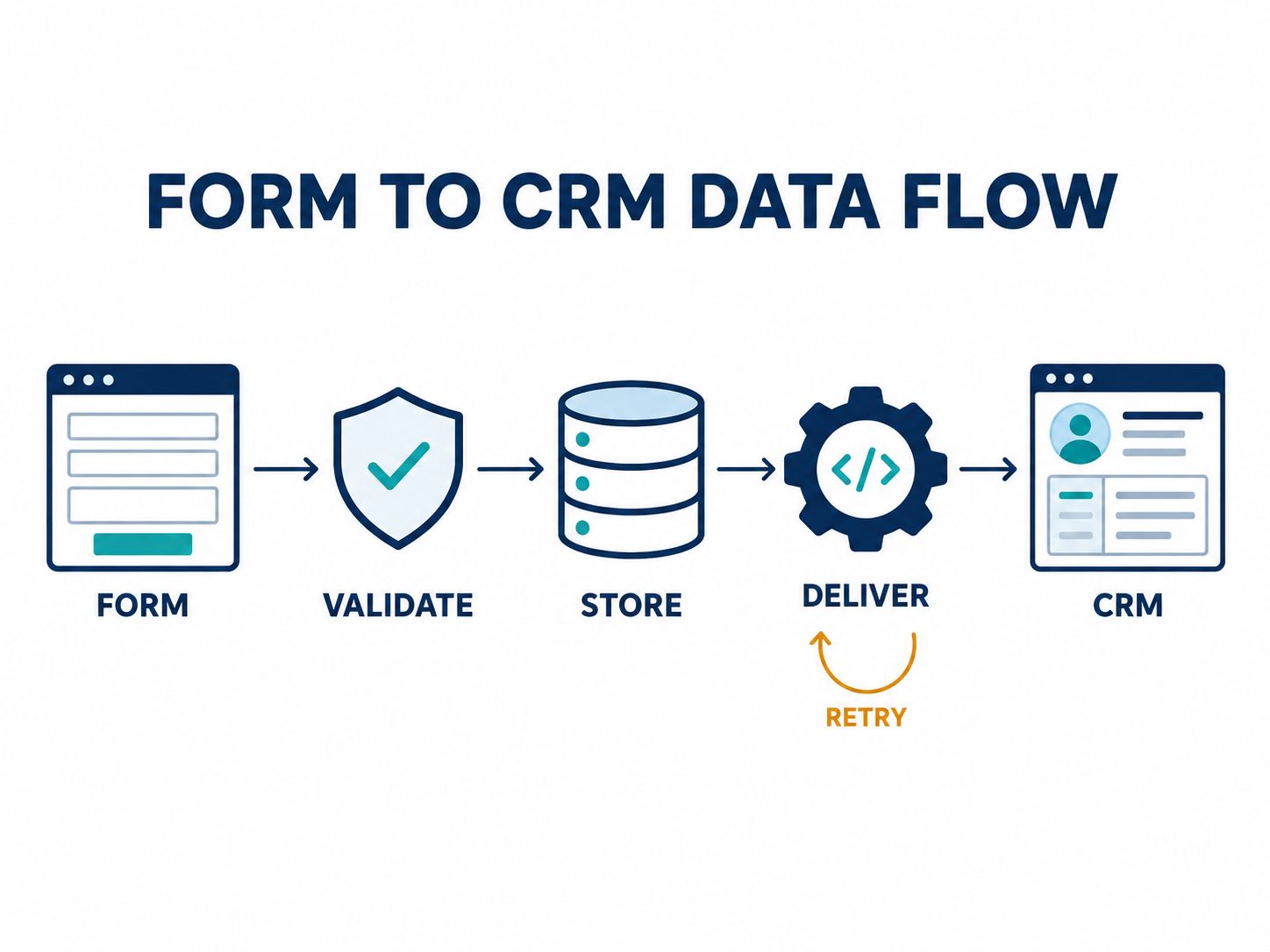
A reliable integration validates the visitor’s information, records the accepted submission, and processes CRM delivery as a separate operation.
For a custom application, the recommended workflow is:
Landing Page → Server Validation → Submission Database → Delivery Queue → CRM API → Delivery Result
Let’s use one example throughout the guide.
A web development agency creates a demo-request landing page with four fields:
- Full Name
- Work Email
- Company
- Project Requirements
When a visitor submits the form, the application checks the fields and stores the answers.
Next, it creates a pending delivery operation for the agency’s CRM.
If delivery succeeds, the application records the result. If the CRM temporarily fails, the accepted submission remains available.
This design makes troubleshooting much easier than a system that attempts one API request and discards the payload if the request fails.
What Does the Visitor See?
Ideally, the visitor sees a straightforward confirmation that the inquiry has been received.
The system should not claim that a sales representative has already received or reviewed the request unless that is actually known.
Behind the scenes, administrators can see whether the record has reached its destination.
What Database Schema Does a Landing Page Builder Need?
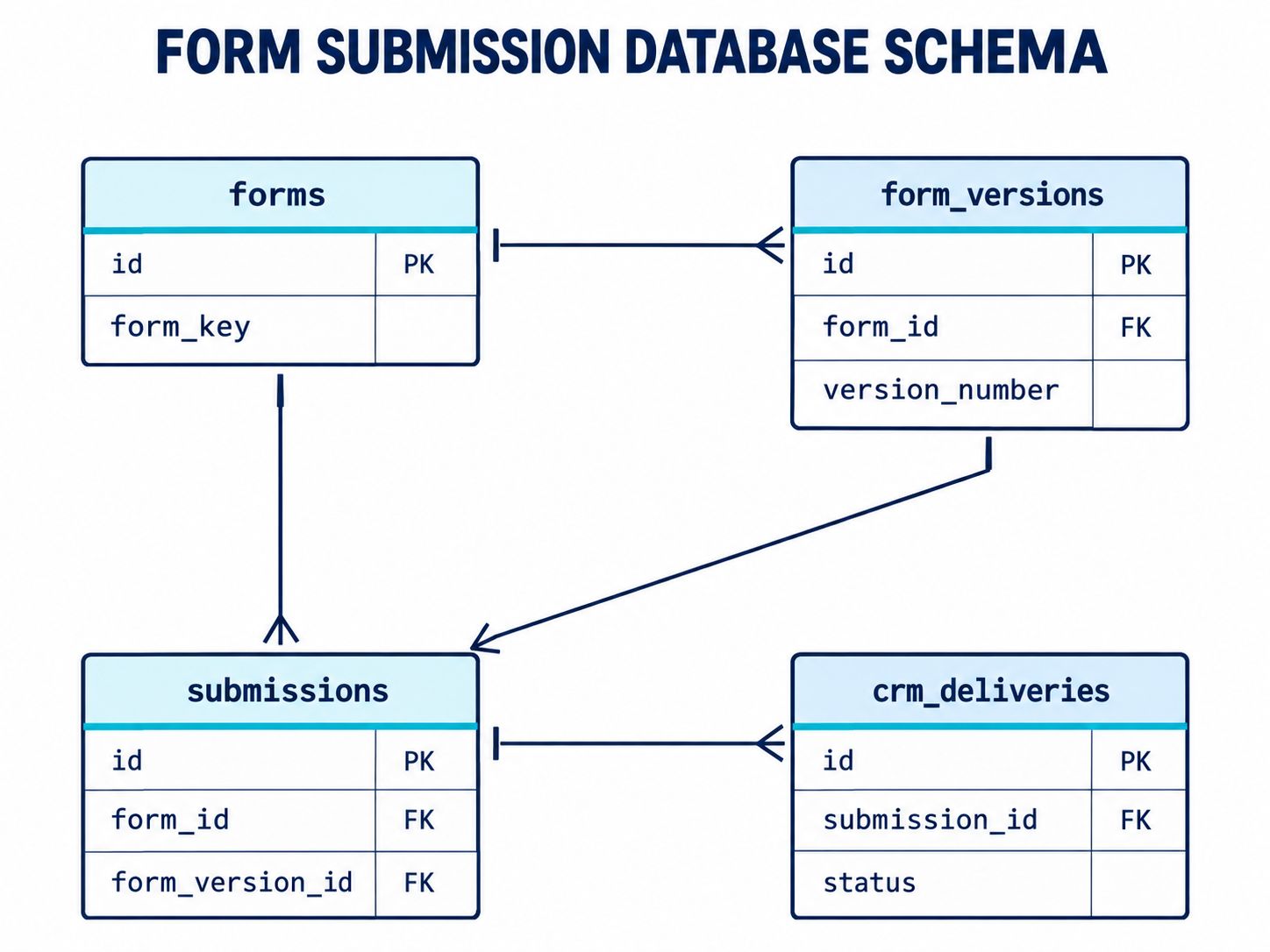
A practical CRM-connected form builder separates form definitions, accepted submissions, destination configurations, and delivery tracking.
For a small application, a few tables may be enough. For a multi-client platform, you will need additional relationships for account ownership and configuration history.
Here’s a useful starting structure:
| Table | Purpose |
|---|---|
forms |
Identifies each form |
form_versions |
Preserves published form definitions |
form_submissions |
Stores accepted submissions |
crm_connections |
References configured CRM destinations |
crm_mappings |
Defines how fields translate |
crm_deliveries |
Tracks current delivery status |
crm_delivery_attempts |
Records individual delivery attempts |
Why Do Forms Need Versions?
Suppose the agency changes a field from “Project Budget” to “Estimated Investment.”
Changing the visible label should not destroy the meaning of historical submissions.
Likewise, if the team changes the available budget ranges, older submissions should still reflect the choices the visitor originally saw.
A published form version preserves that context.
Each submission references its original version, allowing the system to interpret older records accurately.
Practical MySQL Schema for Form Submissions
The following example uses MySQL with InnoDB tables.
It shows a simplified storage and delivery foundation. It does not implement an entire CRM connector, background worker, or credential vault.
Step 1: Define the Forms
CREATE TABLE forms (
  id BIGINT UNSIGNED AUTO_INCREMENT PRIMARY KEY,
  form_key VARCHAR(100) NOT NULL UNIQUE,
  name VARCHAR(255) NOT NULL,
  created_at DATETIME NOT NULL
) ENGINE=InnoDB;
The form_key is a stable internal identifier.
An administrator can rename the form without changing the identifier used by the application.
Step 2: Preserve Form Versions
CREATE TABLE form_versions (
  id BIGINT UNSIGNED AUTO_INCREMENT PRIMARY KEY,
  form_id BIGINT UNSIGNED NOT NULL,
  version_number INT UNSIGNED NOT NULL,
  definition_json JSON NOT NULL,
  published_at DATETIME NOT NULL,

  UNIQUE KEY uq_form_version (
    form_id, version_number
  ),

  FOREIGN KEY (form_id)
    REFERENCES forms(id)
) ENGINE=InnoDB;
Each published version contains the relevant field definitions and validation rules.
The application should avoid modifying published versions during ordinary editing.
Step 3: Store Accepted Submissions
CREATE TABLE form_submissions (
  id BIGINT UNSIGNED AUTO_INCREMENT PRIMARY KEY,
  submission_uuid CHAR(36) NOT NULL,
  form_version_id BIGINT UNSIGNED NOT NULL,
  idempotency_key VARCHAR(128) NOT NULL,
  answers_json JSON NOT NULL,
  received_at DATETIME NOT NULL,

  UNIQUE KEY uq_submission_uuid (
    submission_uuid
  ),

  UNIQUE KEY uq_submission_retry (
    form_version_id, idempotency_key
  ),

  FOREIGN KEY (form_version_id)
    REFERENCES form_versions(id)
) ENGINE=InnoDB;
The submitted answers are stored in JSON.
This allows different forms to collect different fields without adding a new database column whenever a form is edited.
The unique idempotency constraint helps the application recognize repeated attempts for the same intended submission.
In a multi-tenant system, extend the model with tenant ownership and appropriate uniqueness and access boundaries.
Step 4: Record CRM Deliveries
CREATE TABLE crm_deliveries (
  id BIGINT UNSIGNED AUTO_INCREMENT PRIMARY KEY,
  submission_id BIGINT UNSIGNED NOT NULL,
  destination_key VARCHAR(100) NOT NULL,
  status VARCHAR(30) NOT NULL DEFAULT 'pending',
  next_attempt_at DATETIME NULL,
  external_record_id VARCHAR(255) NULL,

  UNIQUE KEY uq_destination (
    submission_id, destination_key
  ),

  KEY idx_pending (
    status, next_attempt_at
  ),

  FOREIGN KEY (submission_id)
    REFERENCES form_submissions(id)
) ENGINE=InnoDB;
Each record describes delivery to one configured destination.
The unique constraint assumes one delivery operation per submission and destination. If your application performs several operations at the same destination, you’ll need a more detailed operation model.
Step 5: Preserve Delivery Attempts
CREATE TABLE crm_delivery_attempts (
  id BIGINT UNSIGNED AUTO_INCREMENT PRIMARY KEY,
  delivery_id BIGINT UNSIGNED NOT NULL,
  attempted_at DATETIME NOT NULL,
  outcome VARCHAR(30) NOT NULL,
  http_status SMALLINT UNSIGNED NULL,
  error_code VARCHAR(100) NULL,

  FOREIGN KEY (delivery_id)
    REFERENCES crm_deliveries(id)
) ENGINE=InnoDB;
The delivery table tells you the current state.
The attempt table records what happened during individual requests.
For example, one delivery might fail temporarily, wait, and then succeed. You can preserve both events without replacing the earlier failure record.
What Still Needs to Be Added for Production?
A production application needs more than these SQL statements.
In particular, implement persistent mapping configurations, secure CRM connection references, worker locking, transactional queue creation, retry limits, appropriate indexes, and privacy controls.
A multi-tenant system must also enforce account ownership when reading or modifying submissions.
Use these tables as a learning foundation rather than deploying them unchanged as a complete SaaS schema.
Should You Use JSON or Separate Tables for Dynamic Form Answers?
JSON is a practical starting point when forms change frequently and the application mostly retrieves complete submissions.
Separate answer rows may be more suitable when users need advanced filtering, field-level reporting, or complex relationships.
| Requirement | JSON storage | Separate answer rows |
|---|---|---|
| Frequently changing form fields | Convenient | Flexible |
| Retrieve complete submission | Straightforward | Requires assembling rows |
| Filter by many dynamic fields | Requires careful query design | Often more explicit |
| Field-level relationships | Mostly application-enforced | Can use relational constraints |
| Simple implementation | Often easier | More tables and joins |
A Realistic Design Decision
If you’re building a basic WordPress lead form, JSON submission storage may be sufficient.
If you’re developing a SaaS reporting dashboard where clients regularly filter by dozens of custom fields, a hybrid model may be worth evaluating.
MySQL supports JSON functions and indexing strategies based on extracted values, so don’t assume JSON means every query must scan every record.
Benchmark the queries that your actual product needs before deciding on a more complicated design.
How Does Form-to-CRM Field Mapping Work?
CRM field mapping translates your form’s internal identifiers into the properties accepted by a CRM.
For example, your landing page may display “Work Email,” store the value under work_email, and send it to a CRM property called email.
| Form label | Internal field key | Example CRM field |
|---|---|---|
| Work Email | work_email |
email |
| First Name | first_name |
firstname |
| Last Name | last_name |
lastname |
| Company | company_name |
company |
| Budget | project_budget |
Custom property |
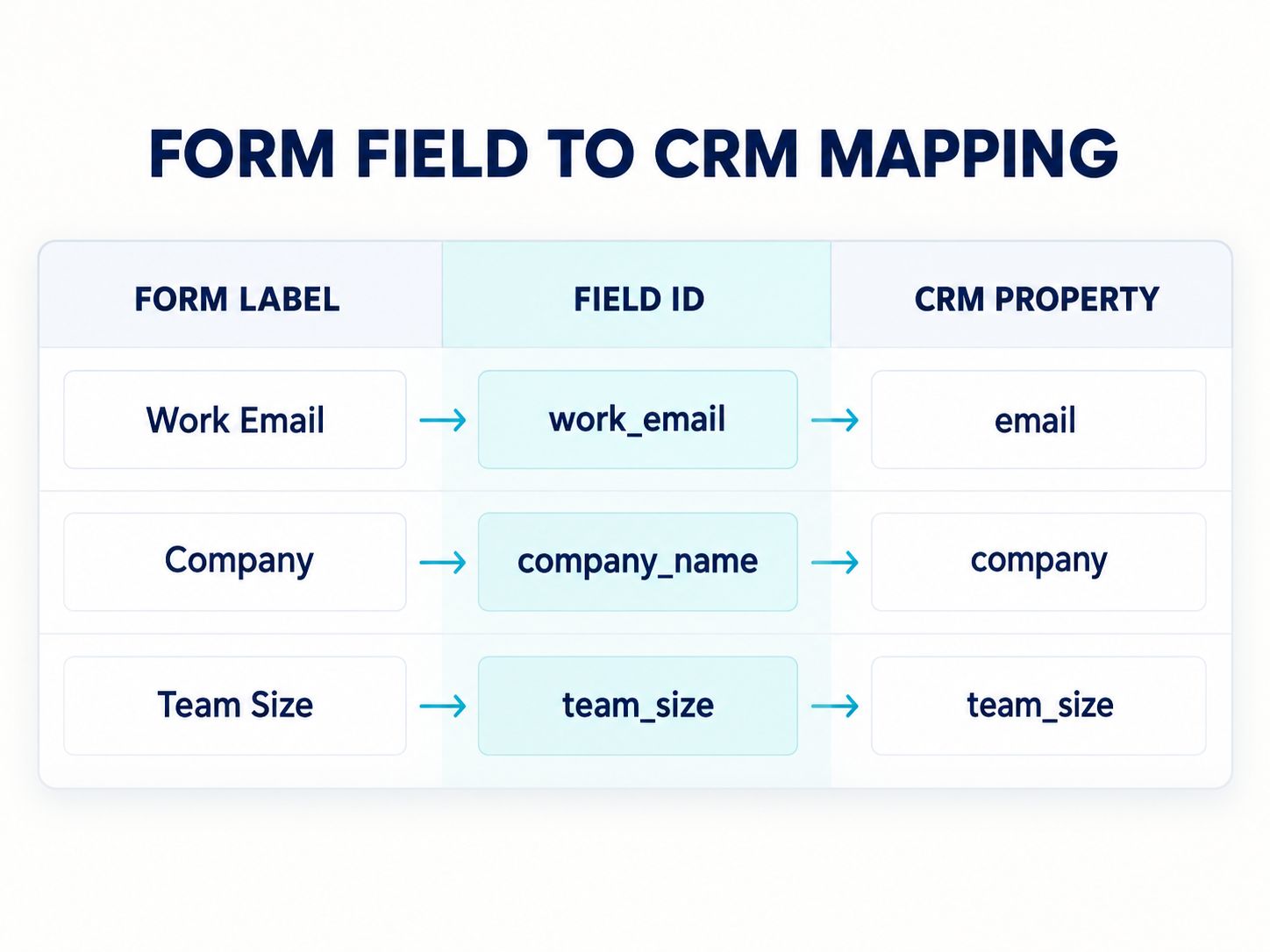
These are illustrative mappings, not a universal CRM API schema.
The destination’s current documentation determines the actual property identifiers, supported data types, and object relationships.
Example Submission
{
  "submission_id": "demo-1001",
  "form": "project_inquiry",
  "answers": {
    "first_name": "Alex",
    "last_name": "Taylor",
    "work_email": "[email protected]",
    "company_name": "Example Studio",
    "project_budget": "5000-10000"
  }
}
This is a fictional internal submission record.
The CRM adapter reads the field mapping and produces a request compatible with the selected CRM.
What Happens If a Field Is Renamed?
If the marketing team renames “Work Email” to “Business Email,” the internal identifier can remain unchanged.
The mapping continues working because it relies on work_email, not the visible label.
If the meaning or permitted values of a field change, review the mapping and create a new configuration version where appropriate.
Practical lesson: Field labels should be easy to edit. Internal identifiers should remain stable unless the underlying data meaning changes.
How Can You Prevent Duplicate Submissions and Contacts?
Use idempotency to prevent repeated processing of the same intended form submission. Use a separate CRM identity policy to decide whether a submission belongs to an existing contact.
These two problems are related but not identical.
Example 1: The Visitor Clicks Twice
Someone submits a form but sees no immediate response, so they click Submit again.
If both requests share the same intended submission key, your database can identify the second request as a duplicate.
The application can return the previously accepted result.
Example 2: A Customer Returns Next Month
The same person submits another inquiry several weeks later.
This should normally become a new submission event, even if the email address is unchanged.
The CRM may associate the new inquiry with an existing contact.
That lets you preserve the history of the relationship without creating unnecessary duplicate contacts.
Why Email Matching Alone Is Not Enough
People may share email addresses, change addresses, or represent several companies.
Different CRMs also provide different identity and upsert capabilities.
Choose a supported matching strategy based on your business requirements and destination documentation.
Don’t treat email address uniqueness as a universal rule for all forms.
How Should the System Handle CRM API Failures?
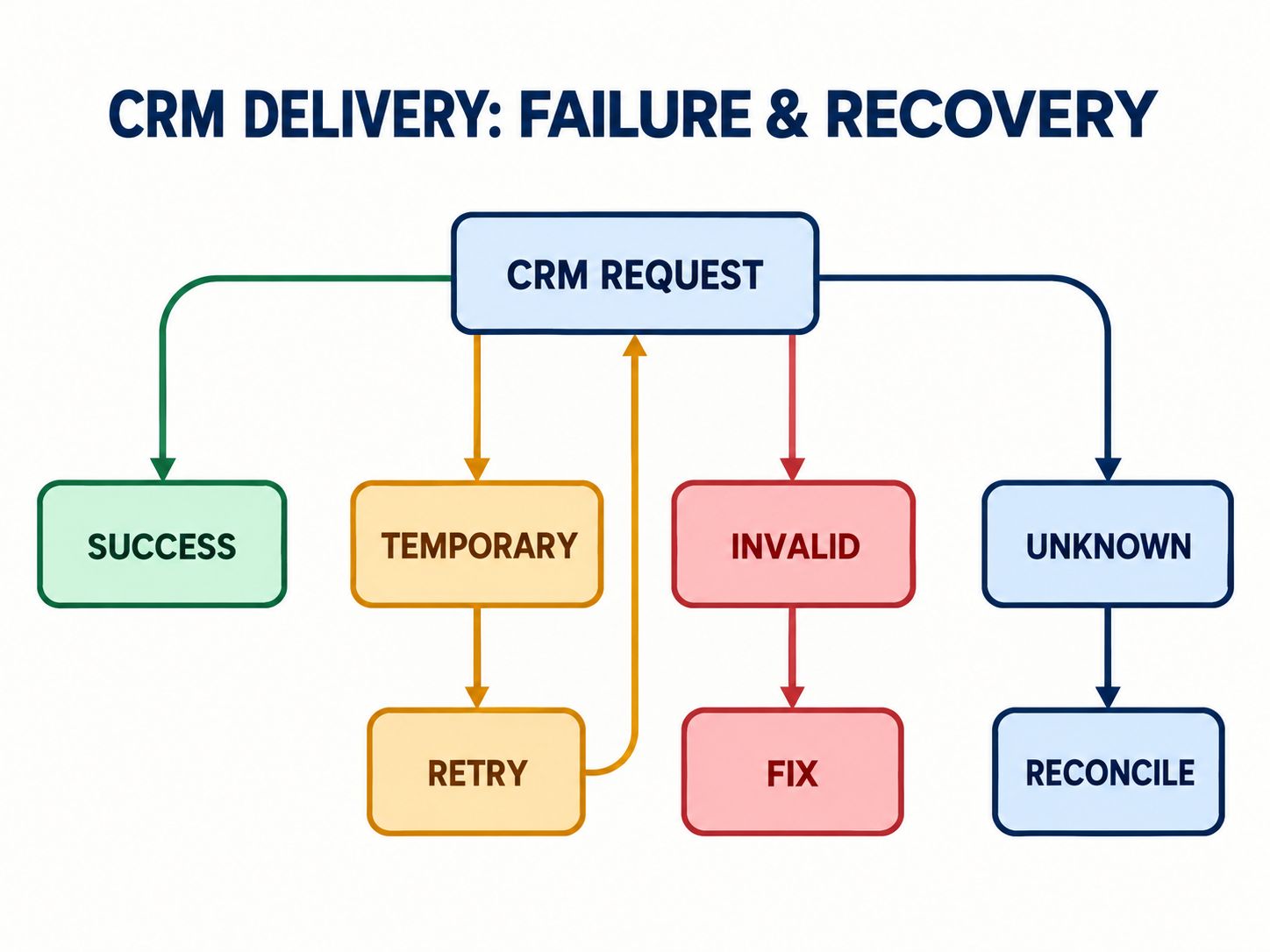
The correct recovery action depends on whether the CRM operation succeeded, failed temporarily, was rejected, or has an unknown outcome.
This is one of the most important parts of the integration.
| Outcome | Example | Recommended action |
|---|---|---|
| Confirmed success | CRM returns a successful result | Save result and external record ID |
| Temporary failure | Rate limit or transient service error | Retry with controlled delay |
| Validation failure | Unsupported field value | Correct data or mapping |
| Authentication failure | Revoked credentials | Restore access before retrying |
| Uncertain result | Timeout after sending request | Reconcile before repeating a potentially unsafe operation |
Why an API Timeout Is Different from a Rejection
Imagine that your application sends a contact creation request.
The CRM creates the contact, but the connection closes before your server receives the response.
Your application cannot confidently say the request failed.
Blindly resending it could produce another record.
Where supported, use destination-specific idempotency features. Otherwise, reconcile the operation using an appropriate identifier and the CRM’s lookup capabilities.
If the outcome remains uncertain, flag it for investigation.
What Should the Admin Dashboard Show?
For each submission, an administrator should be able to identify:
- Whether the form was accepted.
- Which CRM destination was selected.
- Whether delivery is pending, successful, or blocked.
- When the latest attempt occurred.
- Whether an operator needs to correct or reconcile something.
A delivery log should preserve useful diagnostic information without exposing unnecessary personal data or credentials.
Practical Walkthrough: WordPress Form to CRM
Let’s return to the fictional web development agency.
Its website runs on WordPress and uses a custom demo-request form.
The agency wants to preserve every accepted inquiry locally before sending it to the CRM.
Step 1: Create a Server-Side Endpoint
A custom plugin registers a REST API endpoint for submissions.
The route needs an appropriate permission callback and server-side validation.
For a public form, accepting anonymous submissions is different from allowing anonymous access to the stored leads.
Restrict administrative operations and protect the submission endpoint against abuse.
WordPress explains the route registration mechanism in its official register_rest_route() documentation.
Step 2: Validate Submitted Values
Check required fields, data types, supported options, and length limits.
Reject unexpected values.
Use appropriate database query protections and output escaping.
Don’t depend on browser validation alone because clients can send HTTP requests without using your form interface.
Step 3: Save the Submission
Store the validated answers, form version, unique submission identifier, and acceptance timestamp.
For a durable asynchronous workflow, create the pending delivery operation within the same appropriate transaction boundary.
That prevents the application from committing an accepted inquiry without also recording the downstream work.
Step 4: Process CRM Delivery
A background or scheduled worker reads pending operations.
It loads the selected mapping configuration and sends the transformed values to the CRM.
On suitable shared hosting, a server cron job can trigger scheduled PHP processing. A WordPress queue mechanism may also be appropriate.
Whichever method you choose, account for concurrent workers, interrupted executions, retry limits, and failed jobs.
For related WordPress deployment practices, the WordPress staging subdomain setup guide and WordPress architecture deep dive provide additional context.
Step 5: Record the Result
If the CRM confirms delivery, store the external identifier and mark the operation successful.
If the request is rejected or its outcome is uncertain, record the appropriate state.
Step 6: Test Recovery
In staging, deliberately make the CRM destination unavailable.
Submit a valid form.
Verify that the accepted submission remains stored and the delivery operation is not incorrectly marked successful.
Restore the destination and verify the expected recovery behavior.
This is a reproducible testing procedure, not a claim that a particular live CRM connection was tested for this article.
For a broader site audit, see the WordPress website quality control guide. If your landing page uses SureForms, the SureForms two-column layout tutorial covers a related form presentation task.
How Do You Handle Privacy, Consent, and Attribution?
The application should store only the personal information needed for its defined purposes and preserve relevant privacy records.
For marketing attribution, useful values may include the landing page, UTM source, UTM campaign, and submission timestamp.
These values explain where the inquiry came from.
They do not automatically establish permission to send marketing communications.
Consent and Lawful Processing
For EU visitors, determine the applicable lawful basis for each processing purpose.
Consent is one possible legal basis, but it is not required for every form submission.
The European Data Protection Board explains these distinctions in its guidance on lawful personal-data processing.
Where consent is used, maintain suitable records of the purpose, notice wording, timestamp, and relevant selection.
For US visitors, review applicable state privacy requirements and the circumstances of your processing activity.
Protect Sensitive Information
Keep CRM credentials out of public JavaScript and HTML.
Limit who can read submissions, export data, update mappings, and retry deliveries.
Create appropriate retention and deletion workflows across local storage and connected destinations.
Security and privacy are not optional extras added after the integration is working. They influence how the system should be built.
How Do You Know the Integration Is Ready to Launch?
A form-to-CRM workflow is ready for release only after its important success and failure scenarios have been tested.
Use this checklist in a staging environment:
| Test | Expected behavior |
|---|---|
| Valid form submission | Accepted and saved |
| Missing required field | Clear validation error |
| Same request submitted twice | Duplicate transport attempt handled |
| Returning customer submits new inquiry | New submission preserved |
| Form field label changes | Stable field mapping remains valid |
| CRM connection unavailable | Submission remains stored |
| CRM rate limit | Controlled retry |
| Invalid destination property | Delivery marked for correction |
| Request times out | Outcome reconciled or safely investigated |
| Form version changes | Historical records remain interpretable |
| Two CRM destinations | Independent delivery status |
| Unauthorized admin request | Access denied |
Which Metrics Should You Monitor?
A useful dashboard shows more than the number of submitted forms.
Track accepted submissions, successful deliveries, unresolved deliveries, retries, validation failures, and delivery delays.
For example, consider this fictional test result:
Illustrative example — not measured production data
| Metric | Example |
|---|---|
| Accepted submissions | 100 |
| Confirmed CRM deliveries | 92 |
| Pending deliveries | 5 |
| Correction required | 2 |
| Uncertain outcome | 1 |
A basic form dashboard might show 100 successful submissions.
An operational CRM dashboard reveals that eight submissions still need attention.
This distinction explains why delivery monitoring is worth building when the business depends on timely inquiries.
How Does Landing Page Performance Affect CRM Lead Capture?
A reliable backend cannot fully compensate for a confusing visitor experience.
Keep the form easy to understand, use appropriate field labels, display useful errors, and avoid unnecessary questions.
Visitors should know what they are submitting and what will happen next.
If you’re reviewing a WordPress implementation, explore WebPlatformLab’s engineering resources, architecture guides, and technical tutorials for related platform setup considerations.
For page-level checks, the Website Technology Checker, performance resources, and Core Web Vitals optimization guide address different aspects of public website behavior. They do not replace authenticated CRM testing.
Is Database Schema the Same as SEO Schema Markup?
No.
A database schema defines how your application stores information.
SEO structured data describes supported information about a page in a machine-readable format.
For page metadata and structured-data work, WebPlatformLab’s SEO and metadata tools and code generators are related resources.
The 301 redirect SEO guide and 404 errors and user experience guide can also support broader technical site reviews.
These are separate from the architecture that stores and delivers CRM form submissions.
Frequently Asked Questions
What is a CRM form submission schema?
It is the database structure used to represent accepted form entries, their fields, and any supporting CRM integration records.
Can a landing page connect directly to a CRM?
Yes. Many platforms support native connections or direct API integrations. Whether you need independent submission storage depends on your workflow and recovery requirements.
What database is best for a custom landing page builder?
MySQL and PostgreSQL can both support form-builder applications. The right choice depends on hosting, application architecture, query requirements, and operational expertise.
Should form answers be stored in JSON?
JSON is useful for dynamic form definitions and complete submission retrieval. More complex reporting requirements may justify relational answer tables or a hybrid design.
How do I prevent duplicate CRM leads?
Separate submission idempotency from CRM identity matching. Use destination-supported identifiers and update mechanisms where appropriate.
What should happen if a CRM API fails?
Preserve the accepted submission, classify the failure, and apply a recovery strategy. Do not blindly retry operations whose outcomes are uncertain.
Can WordPress support custom CRM integrations?
Yes. Custom PHP plugins, REST API endpoints, dedicated database tables, and scheduled processing can support these workflows on suitable hosting environments.
How do I verify a successful CRM submission?
Confirm the acceptance record, review the delivery result, and verify the expected CRM record or object. A successful website form response alone is not sufficient.
Do CRM-connected landing pages need GDPR consent?
The lawful basis depends on the purpose and circumstances of processing. Consent is one possible basis, not a universal requirement for every form.
What is the most important design decision?
Decide what counts as an accepted submission and how that record will be preserved independently of the CRM’s temporary availability.
Final Thoughts
A working CRM integration should do more than move contact information from one system to another.
It should preserve what the visitor submitted, maintain the meaning of historical answers, and explain whether the intended CRM operation succeeded.
For a simple marketing form, a supported native integration may be the most sensible choice.
For a custom landing page builder, invest in stable field identifiers, clear submission records, reliable delivery tracking, and recoverable operations.
Those foundations will be useful long after the first form goes live.
Shareable insight: A successful form submission is not the same as a successful CRM delivery. Reliable systems track both.
Have you developed a custom landing page form or connected WordPress to a CRM? Share your approach, database design questions, or integration challenges in the comments.