

Need to know whether an online store is built on Shopify?
Start with the website detector below. In many cases, the answer takes only a few seconds. When the result is uncertain, however, you should verify it using stronger technical evidence such as active Shopify resources, cart behavior, network requests, domain infrastructure, or checkout activity.
That distinction matters. A store can look exactly like Shopify without using it, while a headless Shopify store can look completely custom and hide many of Shopify’s familiar fingerprints.
Check Whether a Website Uses Shopify
Enter the store URL and run the technology check first.
Website URL
The first result should answer the simple question:
Does this website currently expose recognizable Shopify signals?
For a broader technology audit, you can also explore WebPlatformLab’s practical website-building and platform resources.
How should you read the result?
Do not treat every detection as equally certain.
A result becomes more trustworthy when several independent signals agree.
- Shopify theme assets + Shopify cart behavior = strong evidence
- Shopify network activity + Shopify checkout flow = strong evidence
/products/in the URL = only a clue- A website that visually resembles a Shopify theme = weak evidence
If the automated result is unclear, use the verification workflow below.
How Can You Tell if a Website Uses Shopify?
Use the automated result first, then confirm uncertain cases with one or two independent technical signals.
You usually do not need ten different tests.
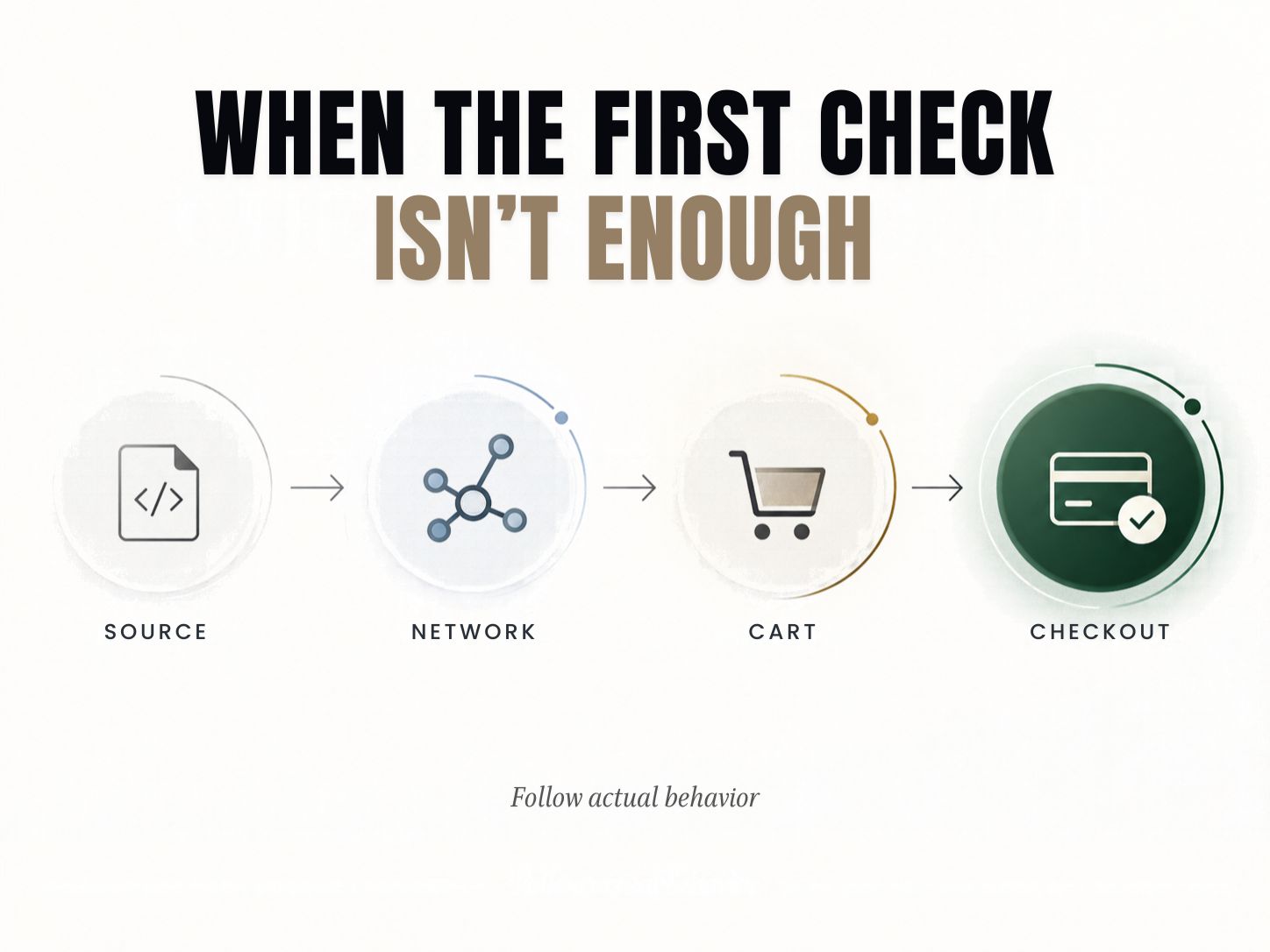
A practical workflow is:
Detector → Source/Network → Cart or Checkout → Decision
If two strong, unrelated signals point to Shopify, you normally have enough evidence.
If all you find are weak clues, keep investigating before making a conclusion.
This evidence-first approach is more useful than trying to memorize a long list of Shopify fingerprints because storefront architecture can vary considerably.
1. Search the Page Source for Shopify Signals
Page source is one of the quickest manual checks for a conventional Shopify storefront.
Open the store, right-click and select View Page Source. Search for terms such as:
shopifycdn.shopify.comshopify-section- Shopify JavaScript objects
- Shopify-related theme assets
A standard Shopify theme often leaves several related traces rather than one isolated reference.
That difference matters.
Finding Shopify repeatedly in active storefront resources is much more meaningful than finding the word once inside a marketing integration or old script.
What makes source-code evidence convincing?
Suppose you find:
- Shopify section markup
- Shopify-hosted theme assets
- Shopify-related JavaScript
- product/cart behavior consistent with Shopify
Those clues reinforce one another.
Now compare that with a page containing one Shopify script used for an embedded commerce component.
The second case tells you Shopify is present somewhere. It does not necessarily tell you Shopify powers the entire store.
Key Point: The question is not simply, “Can I find the word Shopify?”
The better question is:
“Is Shopify responsible for the store’s actual ecommerce behavior?”
2. Treat Shopify URL Patterns as Clues, Not Proof
Shopify storefronts commonly use URLs such as:
/products/product-name/collections/collection-name/cart/blogs//policies/
These patterns are convenient because anyone can check them without developer tools.
They are also weak when used alone.
Another ecommerce platform can use the same structure. A developer can create similar routes manually. A headless Shopify frontend can abandon the usual Shopify paths altogether.
So if you only discover:
the responsible conclusion is:
Possibly Shopify. Not confirmed.
That may sound cautious, but it prevents one of the most common platform-identification errors: turning a familiar pattern into a fact.
3. Inspect What the Browser Actually Loads
When source code gives you an incomplete answer, open your browser’s Developer Tools and inspect the Network panel.
Reload the page and then interact with the storefront.
Visit a product.
Add something to the cart.
Open the cart.
Continue toward checkout if necessary.
You are looking for active technical behavior rather than appearance.
Potential Shopify evidence can surface through:
- storefront assets
- JavaScript requests
- cart requests
- commerce APIs
- Shopify-hosted resources
- checkout transitions
This is especially useful when a merchant has heavily customized the visible storefront.
A homepage might reveal very little. The moment you interact with a product or cart, the underlying commerce architecture can become much easier to identify.
For similar hands-on technical workflows, WebPlatformLab’s developer utilities and engineering guides provide additional diagnostic context.
4. Does /cart.js Mean a Website Uses Shopify?
A Shopify-style /cart.js response can be strong evidence on a Shopify-hosted theme, but a failed /cart.js request does not prove the store is not Shopify.
This is an important technical distinction.
Shopify documents /cart.js as part of its Ajax API. The API can read and update cart information from Shopify-hosted themes. Shopify also explicitly states that the Ajax API cannot be used on a Shopify custom storefront. Shopify Ajax API documentation
That means:
If the endpoint behaves as Shopify documents:
You have useful Shopify evidence.
If the endpoint does not work:
You still cannot safely conclude that Shopify is absent.
The store might use a custom or headless frontend.
This is one area where a simple yes/no detector can become misleading if it does not understand the difference between a traditional Shopify theme and a custom storefront.
5. Check the Cart and Checkout Journey
Sometimes the storefront itself hides the platform better than the buying journey does.
Add a product to the cart and move toward checkout without placing an order.
Look at:
- cart requests
- checkout transitions
- domain changes
- commerce network activity
- API behavior
Do not rely on the checkout’s visual style alone.
Interfaces change, brands customize them, and visual similarities can be misleading.
What the commerce system does is more informative than what the page looks like.
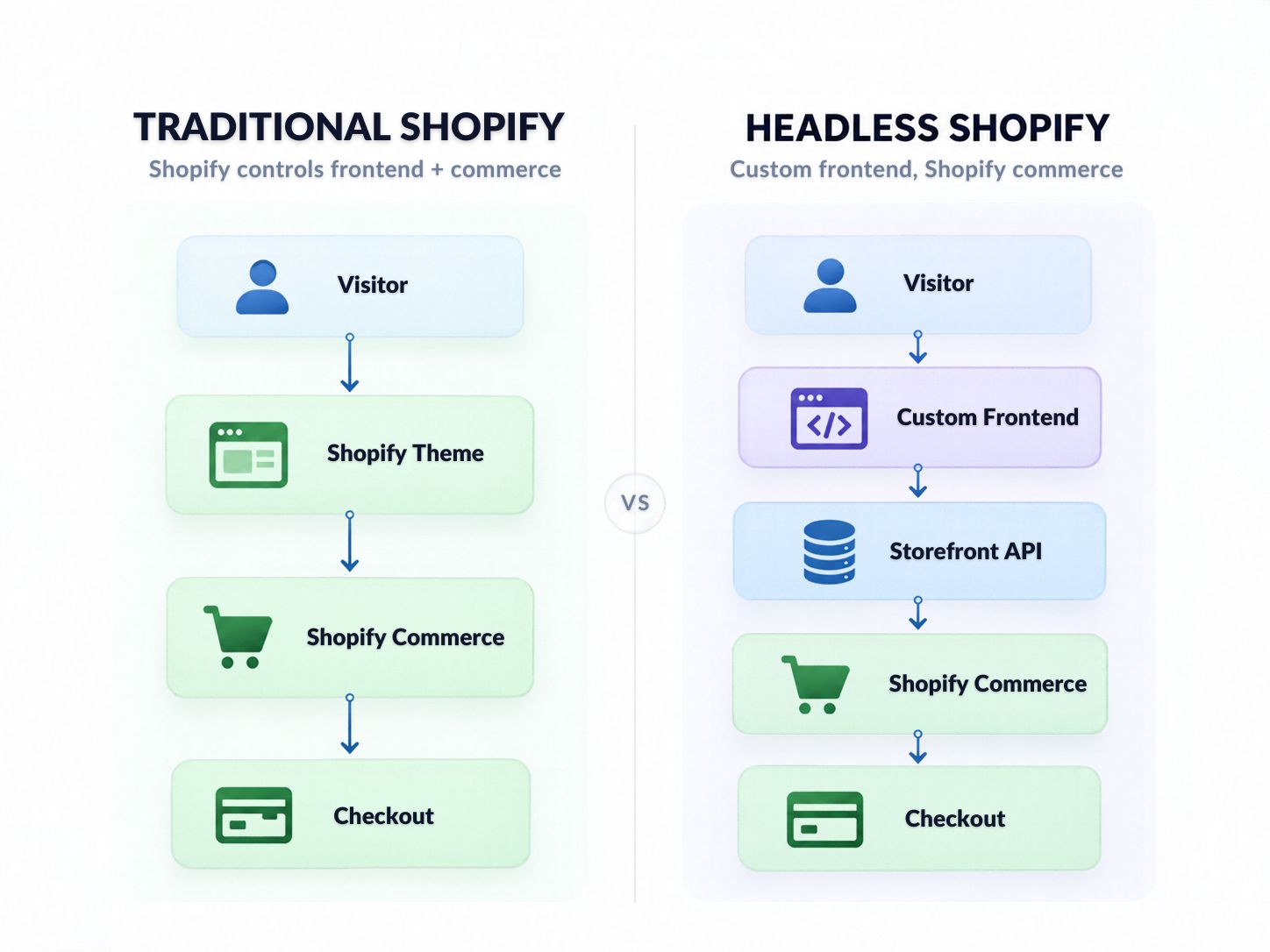
What Is a Headless Shopify Store?
A headless Shopify store uses Shopify for commerce while a separately built frontend controls the customer-facing website.
This is the main reason older Shopify-detection advice can fail.
Shopify currently describes custom storefronts as headless commerce: the normal Online Store frontend can be replaced with a custom experience while Shopify remains connected as the backend. Customers can still browse products, add items to their cart, and complete purchases through Shopify Checkout. Shopify custom storefront documentation
The frontend might therefore be built with another technology while Shopify still handles important commerce functions.
This distinction is closely related to broader frontend architecture decisions such as server-side rendering versus static islands and modern visual-development approaches such as Webflow versus Framer.
Why does headless Shopify change detection?
On a custom storefront, you might not see:
- conventional Liquid theme markup
- normal Shopify theme assets
- standard Shopify URLs
- Shopify Ajax API behavior
- familiar storefront structure
That does not mean Shopify has disappeared.
It means the architecture has changed.
Shopify’s current Storefront API provides cart functionality for custom shopping experiences, and its Cart object includes a checkoutUrl that directs buyers to Shopify’s web checkout.
That is why network and commerce-flow analysis becomes much more valuable on headless websites.
How Reliable Are Different Shopify Identification Methods?
Not every signal deserves the same confidence.
| Signal | Evidence Strength | How to Use It |
|---|---|---|
| Multiple active Shopify commerce signals | Strong | Usually enough when independent signals agree |
| Shopify cart/checkout behavior | Strong | Useful when frontend evidence is unclear |
| Shopify Ajax cart behavior | Strong for hosted themes | Positive result is useful; negative result does not rule out headless Shopify |
| Clear Shopify infrastructure relationship | Strong | Confirm with another browser-level signal when practical |
| Multiple Shopify theme/script references | Moderate–Strong | Good evidence on conventional storefronts |
| Shopify-related cookies | Moderate | Best used as supporting evidence |
| Typical Shopify URLs | Weak–Moderate | Useful for screening only |
| Shopify-looking theme | Weak | Never use as proof |
| One isolated Shopify reference | Weak | Investigate where it came from |
This hierarchy is more useful than simply counting signals.
Five weak clues do not automatically create stronger evidence than one highly specific technical behavior.
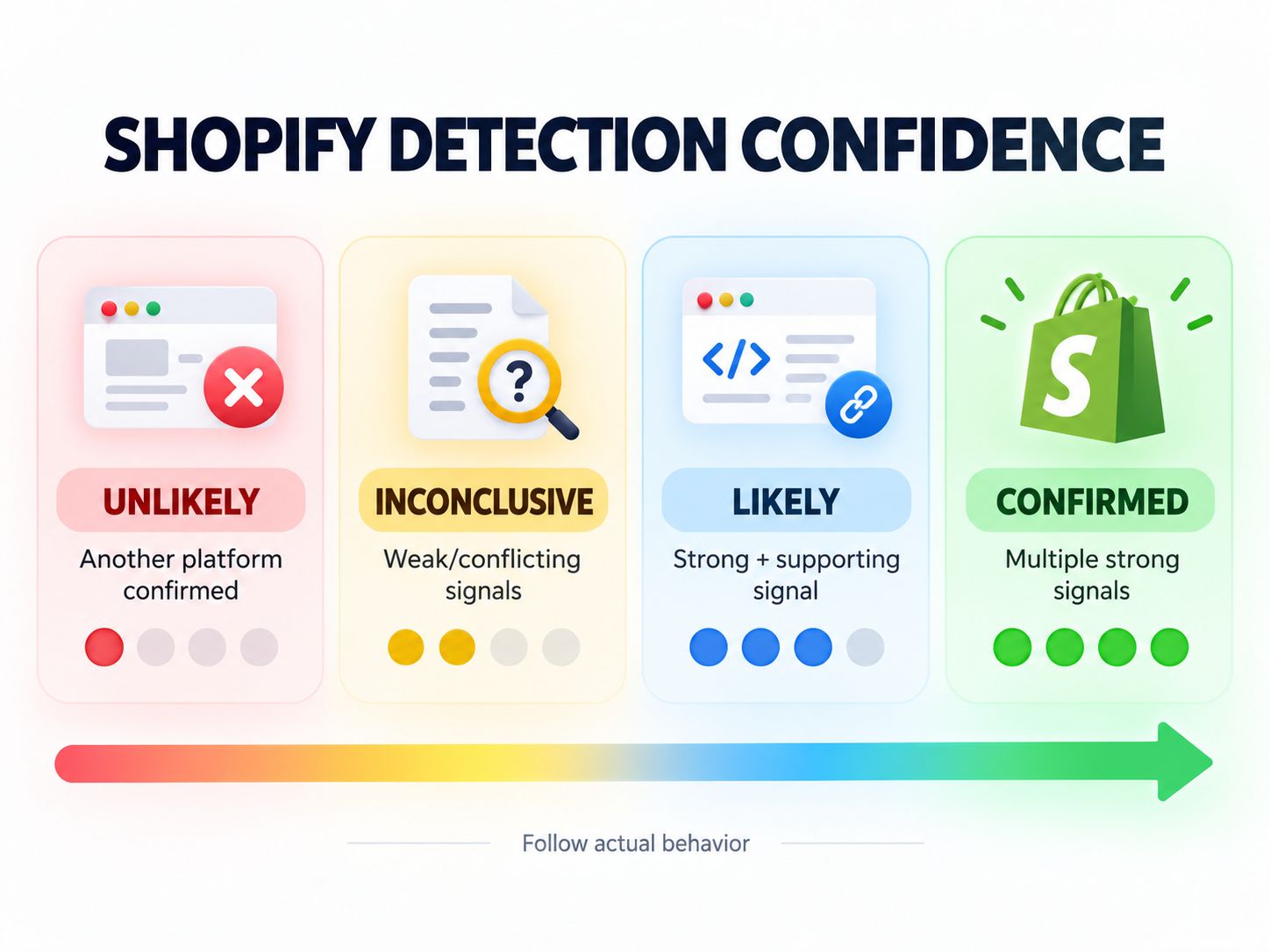
The Shopify Detection Confidence Model
Here is a simpler way to make the final decision.
Confirmed Shopify
Use this classification when you have multiple strong independent signals.
Example:
- Shopify storefront resources are actively loaded
- Shopify commerce behavior is visible in the cart or checkout
At this point, further investigation usually adds little value.
Likely Shopify
Use this when you have one strong technical signal plus supporting evidence.
For example:
- a meaningful Shopify network pattern
- several Shopify storefront references
- Shopify-compatible cart behavior
Shopify is the most reasonable classification, although another confirmation may be useful for high-stakes technical research.
Inconclusive
Use this when:
- signals conflict
- only generic Shopify-style URLs appear
- automated detection disagrees with storefront behavior
- the site appears to use a custom frontend
Do not force a yes/no answer.
Check for headless architecture first.
Probably Not Shopify
Use this when repeated checks reveal another platform’s active commerce system and you cannot find meaningful evidence that Shopify is responsible for products, cart, or checkout.
At that point, stop trying to prove a Shopify hypothesis and investigate the platform the evidence actually supports.
Blogger Tip: The most useful detector does not merely return “Shopify” or “Not Shopify.” A better tool explains why it reached that conclusion.
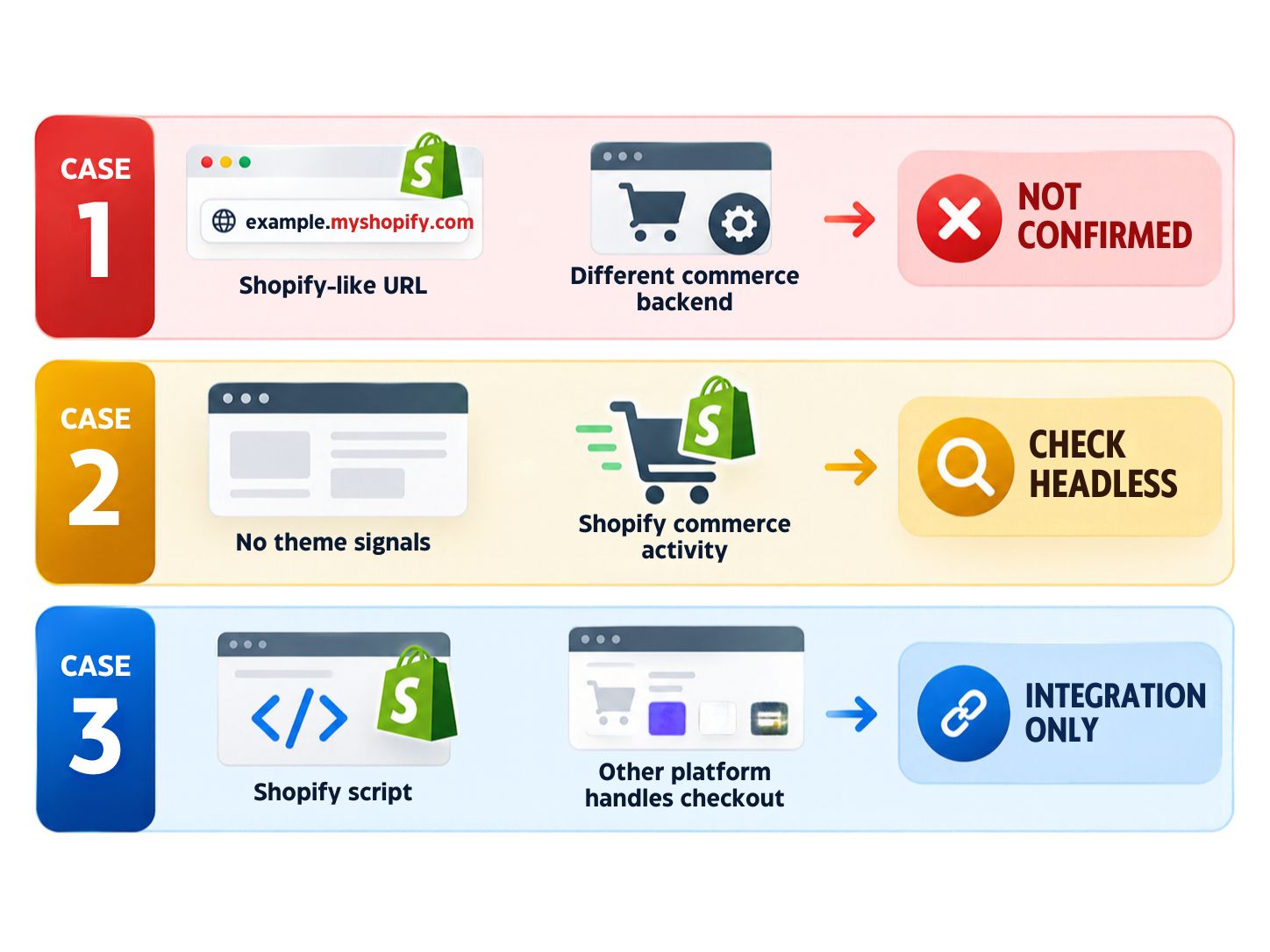
What Should You Trust When Signals Conflict?
When two tests disagree, prioritize the signal that is more closely connected to actual commerce behavior.
Situation A
The site uses /products/, but network requests clearly show another ecommerce backend.
Decision: Do not classify the store as Shopify because of the URL.
Situation B
The homepage contains almost no Shopify markup, but product/cart activity connects to Shopify commerce and the checkout journey is consistent with Shopify.
Decision: Investigate headless Shopify.
Situation C
A technology detector reports Shopify because of one script, but the site’s actual products, cart and checkout run through another system.
Decision: Shopify might be an integration rather than the primary ecommerce platform.
This is why context matters more than a fingerprint database alone.
Can a WordPress, Webflow, or Other Website Still Use Shopify?
Yes.
Finding another CMS or frontend technology does not automatically eliminate Shopify.
A website can combine multiple systems.
For example, Shopify’s custom shopping experience documentation explains that commerce can be integrated into independently built experiences rather than requiring the conventional Online Store frontend.
This is useful when you detect something such as WordPress or another frontend alongside Shopify-related commerce evidence.
If your investigation points toward WordPress rather than Shopify, WebPlatformLab also covers current WordPress architecture and related technical behavior.
For Webflow-based architecture research, see WebPlatformLab’s Webflow and Framer comparison.
The goal is not to make Shopify fit every website.
The goal is to determine which systems actually perform which jobs.
Is cdn.shopify.com Proof That a Website Uses Shopify?
It is useful evidence, but context still matters.
If numerous active storefront assets consistently load from Shopify infrastructure alongside other Shopify-specific behavior, the case becomes much stronger.
One isolated resource is different.
It could come from:
- embedded Shopify functionality
- an old integration
- cached or legacy code
- another third-party component
Always check whether the Shopify resource is part of the active storefront and commerce experience.
Can You Identify Shopify Plus From a Public Website?
Usually not with enough certainty to make the store’s commercial plan part of your detection result.
You may be able to establish that Shopify powers the store.
Determining that the merchant specifically uses Shopify Plus is a different question.
A sophisticated storefront, high-profile brand, complicated integration or unusual checkout experience does not by itself prove a particular subscription tier.
A safer result is:
Shopify detected — plan unknown
unless there is an independent, trustworthy source confirming the plan.
If your research is specifically about platform economics, WebPlatformLab’s Shopify vs WooCommerce total cost breakdown provides a useful next comparison.
How to Tell What Ecommerce Platform a Website Is Using
If Shopify evidence does not hold up, widen the investigation.
You might discover:
- WooCommerce
- Wix
- Squarespace
- Webflow
- a custom commerce stack
- another hosted ecommerce platform
The methodology stays the same:
Find a clue → verify it → examine real behavior → reach the conclusion supported by the evidence.
WebPlatformLab covers multiple website technologies because modern websites often combine builders, frameworks, CMSs and third-party commerce services rather than using one platform for everything.
If you are comparing several systems rather than diagnosing only one, the platform comparisons section can help you continue the research.
A 60-Second Shopify Verification Workflow
If you only need a practical answer, use this sequence.
First 15 seconds: Run the detector
Check whether recognizable Shopify signals appear automatically.
15–30 seconds: Inspect source or active resources
Look for several related Shopify references rather than one random string.
30–45 seconds: Check a product and cart
Commerce-specific behavior usually tells you more than the homepage.
45–60 seconds: Ask whether the store could be headless
If ordinary Shopify theme evidence is missing but commerce behavior still points toward Shopify, investigate the custom storefront possibility.
Then stop.
If independent strong signals agree, you already have the information you came for.
Share This Insight:
“Good platform detection is not about finding the most clues. It is about knowing which clues deserve your trust.”
Common Shopify Detection Mistakes
Several mistakes cause most false conclusions.
Mistake 1: Judging the theme
A store can look like Shopify without using Shopify.
A Shopify store can also be customized until it looks nothing like a standard theme.
Mistake 2: Treating /products/ as proof
URL structure is helpful for discovery, but it is not exclusive to Shopify.
Mistake 3: Treating a failed /cart.js request as a negative Shopify result
Shopify’s Ajax API is not available on custom storefronts.
This makes the test useful for confirmation on hosted themes, but unreliable as a universal exclusion test.
Mistake 4: Confusing a frontend framework with the commerce backend
A custom JavaScript frontend and Shopify can exist together.
Mistake 5: Assuming every Shopify reference means the entire website uses Shopify
Shopify can be one part of a larger architecture.
Mistake 6: Collecting more weak evidence instead of checking stronger evidence
Once the homepage becomes ambiguous, move to network and commerce behavior.
Do not spend ten minutes collecting more visual similarities.
Why Would Someone Need to Identify Shopify?
Platform detection is useful when the answer changes your next step.
Competitive research
You may want to understand which commerce architecture a competitor uses before studying its features or integrations.
Client qualification
A Shopify developer or agency can identify whether a prospect actually uses the technology they specialize in.
Migration planning
Before estimating a migration, you need to know which system currently controls products, carts, customer flows and checkout.
Technical audits
The correct platform determines which APIs, optimization techniques and troubleshooting workflow make sense.
If the project also has speed concerns, WebPlatformLab’s guide to optimizing Core Web Vitals on shared hosting provides additional performance context, while the performance category covers broader auditing topics.
Platform comparison
Sometimes detection is only the beginning. After identifying the stack, you may need to decide whether to keep it or migrate.
Do I Need a Shopify ID or Login to Identify a Public Store?
No. You do not need access to Shopify Admin simply to inspect technical information that a public storefront normally sends to a visitor’s browser.
Platform identification should remain limited to public information and ordinary storefront behavior.
That is very different from attempting to access:
- Shopify Admin
- private customer information
- merchant data
- protected APIs
- authenticated systems
You do not need those things to answer the platform-identification question.
A Practical Example: Why One Signal Is Not Enough
Imagine you inspect an ecommerce website and find /products/coffee-maker in the URL.
At first glance, Shopify seems plausible.
Then you inspect the source. There is no meaningful Shopify theme evidence.
You open the Network panel and add the product to the cart. The commerce requests point toward another platform.
The correct conclusion is not:
“It has /products/, so it must be Shopify.”
It is:
“The URL looked Shopify-like, but stronger evidence identified a different commerce system.”
Now reverse the situation.
The source contains almost no obvious Shopify theme markup, and /cart.js fails.
You might initially assume the site is not Shopify.
But network analysis shows a custom frontend interacting with Shopify commerce, and the cart ultimately provides a Shopify checkout path.
The correct conclusion changes:
This is likely a headless Shopify implementation.
That is why evidence hierarchy matters.
It turns platform detection from pattern matching into a repeatable technical decision.
What Should You Do After Detecting Shopify?
The answer depends on why you ran the check.
If you are researching a potential Shopify project, you can move into:
- theme analysis
- app/integration research
- SEO auditing
- performance assessment
- conversion analysis
- B2B requirements
- migration planning
For deeper implementation research, WebPlatformLab’s tutorials and architecture guides can help you continue from detection into implementation decisions.
If the website turns out not to use Shopify, switch your research to the actual detected platform rather than continuing to search for Shopify evidence.
That sounds simple, but it is the difference between useful technical research and confirmation bias.
Frequently Asked Questions
How to identify a Shopify site?
Start with a technology detector. If the answer is uncertain, inspect the page source or active network requests for Shopify-specific behavior and confirm the result through cart or checkout activity. Two independent strong signals are more trustworthy than appearance alone.
What type of platform is Shopify?
Shopify is a hosted commerce platform that can power both conventional theme-based online stores and custom/headless shopping experiences. In a custom storefront, another frontend can connect to Shopify as the commerce backend.
Do I need an ID for Shopify?
You do not need Shopify administrator credentials simply to inspect publicly exposed storefront technology. Protected merchant functionality and private data require proper authentication and authorization.
How to tell what ecommerce platform a site is using?
Begin with automated technology detection, then validate the result by examining active scripts, network requests, storefront behavior, cart functionality and other platform-specific signals. If the evidence contradicts your first assumption, investigate the alternative platform rather than forcing the original answer.
Is /cart.js definitive proof of Shopify?
A response consistent with Shopify’s documented Ajax cart behavior is strong evidence for a Shopify-hosted theme. Shopify states, however, that its Ajax API cannot be used on custom storefronts, so a failed /cart.js check does not rule Shopify out.
Can a headless website still use Shopify?
Yes. Shopify supports custom storefronts in which the frontend and backend are independent. Shopify remains connected as the commerce backend while customers can still use Shopify-powered carts and checkout.
Can Shopify be hidden from technology detectors?
Yes. A custom frontend can remove many conventional Shopify theme fingerprints. When automated results are unclear, inspect commerce behavior and active network traffic.
Is cdn.shopify.com enough to identify Shopify?
It is a useful signal when multiple active storefront resources consistently depend on Shopify. One isolated resource should be confirmed with another independent signal.
Can WordPress or another CMS use Shopify?
Yes. Modern sites can combine a CMS or custom frontend with Shopify commerce functionality. Detecting WordPress therefore does not automatically prove that Shopify is absent from the commerce stack.
Can you identify Shopify Plus from the storefront?
Not reliably in every case. Detecting Shopify is generally easier than proving the merchant’s exact Shopify subscription. Unless you have trustworthy independent confirmation, “Shopify detected — plan unknown” is the safer conclusion.
What is the fastest Shopify ecommerce platform identification method?
Run the automated detector first. If the result is uncertain, check one technical storefront signal and one commerce-behavior signal. That resolves many ordinary cases without requiring a full technical audit.
Final Takeaway
The most reliable Shopify ecommerce platform identification methods do not depend on one hidden trick.
They depend on knowing the difference between a clue and evidence.
Start with the detector.
If it produces a clear result supported by several Shopify signals, you can usually stop there.
If the result is uncertain, inspect what the site actually does when a customer views a product, creates a cart and moves toward checkout.
And before declaring a website “not Shopify” simply because familiar theme fingerprints are missing, consider whether you might be looking at a headless storefront.
The practical rule is simple:
Use weak signals to decide where to look. Use strong independent signals to decide what the platform actually is.
Share This Insight: Good platform detection is not about finding the most clues. It is about knowing which clues deserve your trust.
Have you found a store where Shopify was unusually difficult to detect? Share which signal finally revealed the underlying platform in the comments.