How Much Does Affordable WordPress Website Design Cost in 2026?
A basic WordPress website may cost around $75–$300 in initial cash expenses if you build it yourself. Hiring a freelancer or agency can increase the budget to several hundred or several thousand dollars, depending on what needs to be designed, developed, and tested.
The following figures are illustrative US-dollar planning ranges, not verified industry averages or quotes from individual providers.
| Website type | Illustrative initial budget | Best fit |
|---|---|---|
| DIY website | $75–$300 | Blogs, personal portfolios |
| Freelancer using an existing theme | $400–$1,200 | Small service businesses |
| Professionally designed business site | $1,000–$3,500 | Companies requiring more polish |
| Custom WordPress website | $2,500–$7,000+ | Unique branding or workflows |
| WooCommerce store | $1,500–$8,000+ | Ecommerce businesses |
These categories overlap because a site’s price depends on the work involved, not simply its label.
Consider two businesses requesting five-page WordPress websites.
The first already has a logo, written content, photographs, and a clear layout reference. The developer only needs to configure a theme, create the pages, and test the website.
The second needs a branding system, custom designs, professional copywriting, booking integration, and content migration from an existing website.
Both projects have five pages. Their costs will be very different.
The most useful question isn’t “How much does WordPress cost?” It’s “What work does my website require?”
Calculate Your WordPress Website Budget Before Hiring
A WordPress website cost calculator helps you estimate your total investment by accounting for development, hosting, domain registration, software licenses, and ongoing maintenance.
Use WebPlatformLab’s Website Cost Calculator to explore website ownership expenses and compare different project scenarios.
The five expenses you need to calculate
1. Initial design and development
This covers layout design, WordPress installation, theme setup, content implementation, custom functionality, and launch testing.
2. Hosting and domain
Hosting keeps your website accessible. A domain provides its public address. These are usually recurring expenses, although billing periods and renewal terms vary.
3. Paid themes and plugins
You may not need paid extensions at all. If your website does require them, check whether licenses renew annually and whether the designer or website owner holds those licenses.
4. Content production
Professional writing, photography, illustrations, and product data preparation may cost more than expected when they aren’t included in the original scope.
5. Maintenance and support
Budget for software updates, backups, monitoring, troubleshooting, and any technical support you cannot perform yourself.
Example: The real cost of a small-business website
Imagine a consultant launching a five-page WordPress website with a freelancer.
| Expense | Year 1 | Annual cost afterward |
|---|---|---|
| Design and development | $850 | $0 |
| Hosting | $120 | $120 |
| Domain | $18 | $18 |
| Premium software | $72 | $72 |
| Maintenance | $240 | $240 |
| Total | $1,300 | $450 |
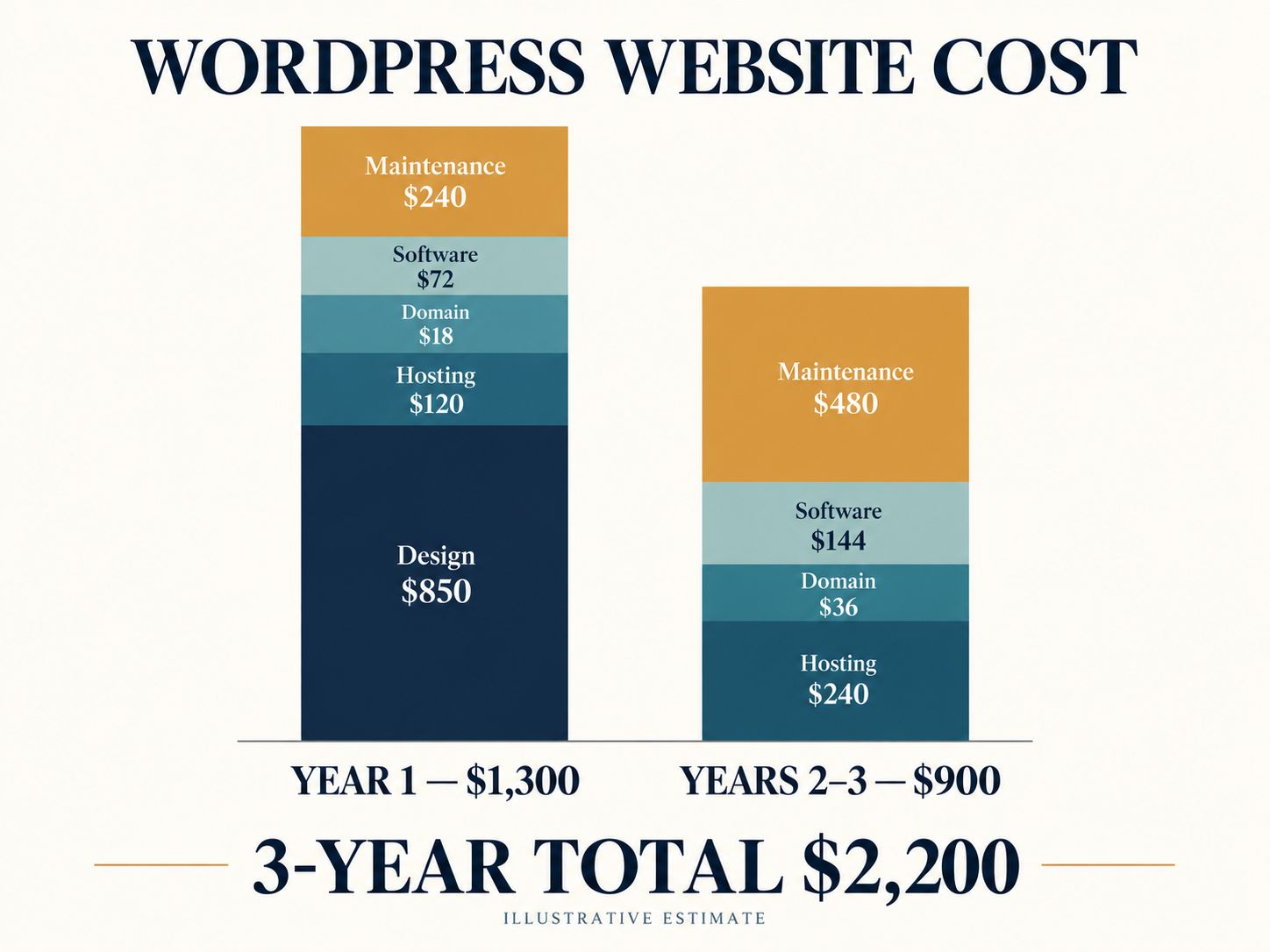
Assuming the same recurring charges:
- First year: $1,300
- Second year: $450
- Third year: $450
- Three-year total: $2,200
This calculation excludes taxes, transaction fees, price increases, redesigns, and additional features. It is a worked budgeting example, not a real client invoice or price survey.
What changes the estimate most?
For a simple website, reducing unnecessary design variations and custom features can make a meaningful difference.
For ecommerce, integrations and checkout requirements may be more important. Businesses comparing platforms can also explore the Shopify vs WooCommerce total cost breakdown when evaluating online store expenses.
For an established website, content migration, redirects, and preserving existing functionality can add significant work.
Pro Tip: Create two estimates: a minimum viable website and your ideal website. The difference reveals which features you can postpone without compromising launch goals.
Share This Insight
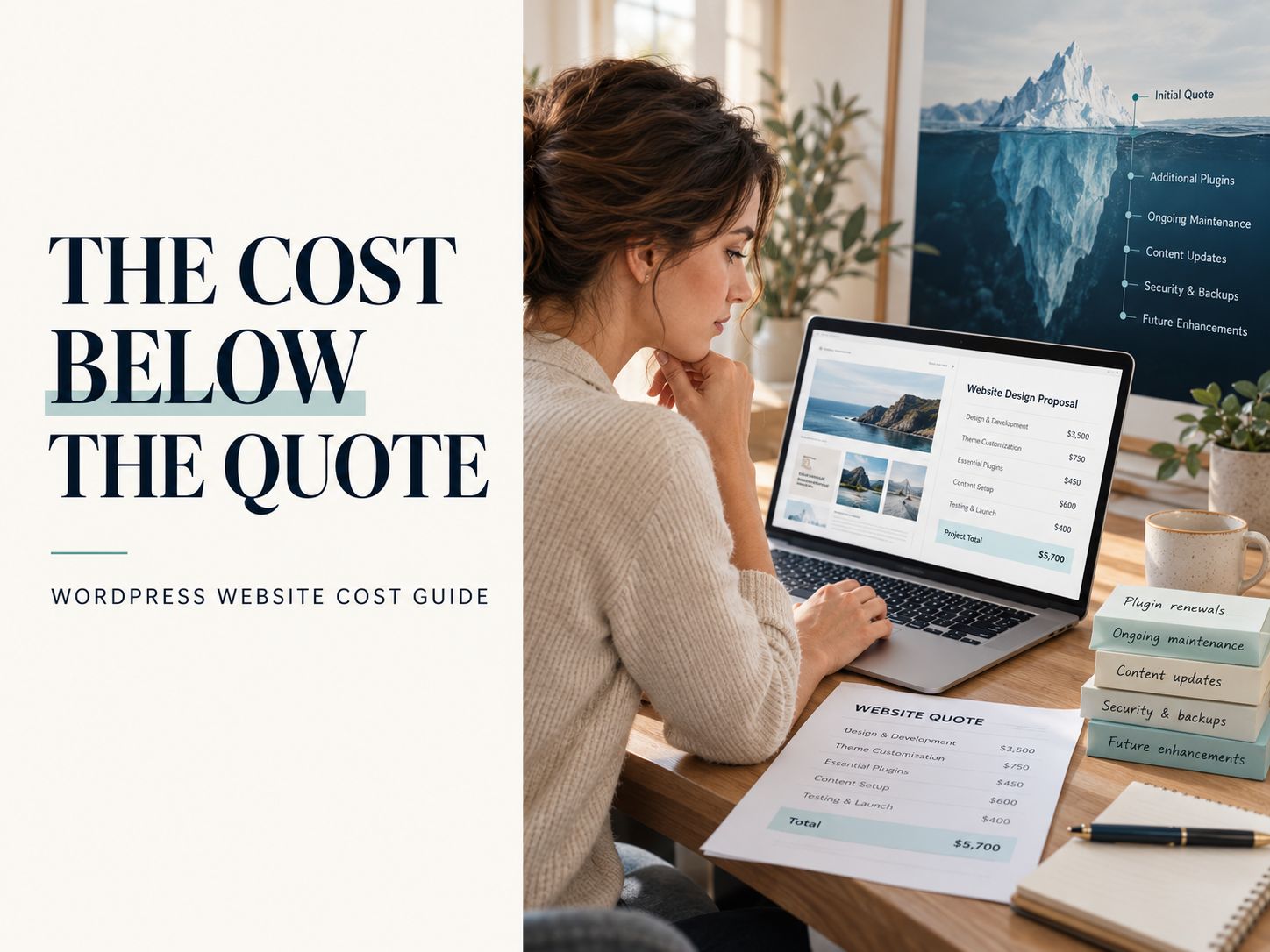
The real price of a WordPress website includes development, renewals, maintenance, and future changes—not just the launch fee.
Click to Share: X (Twitter) · Facebook · LinkedIn
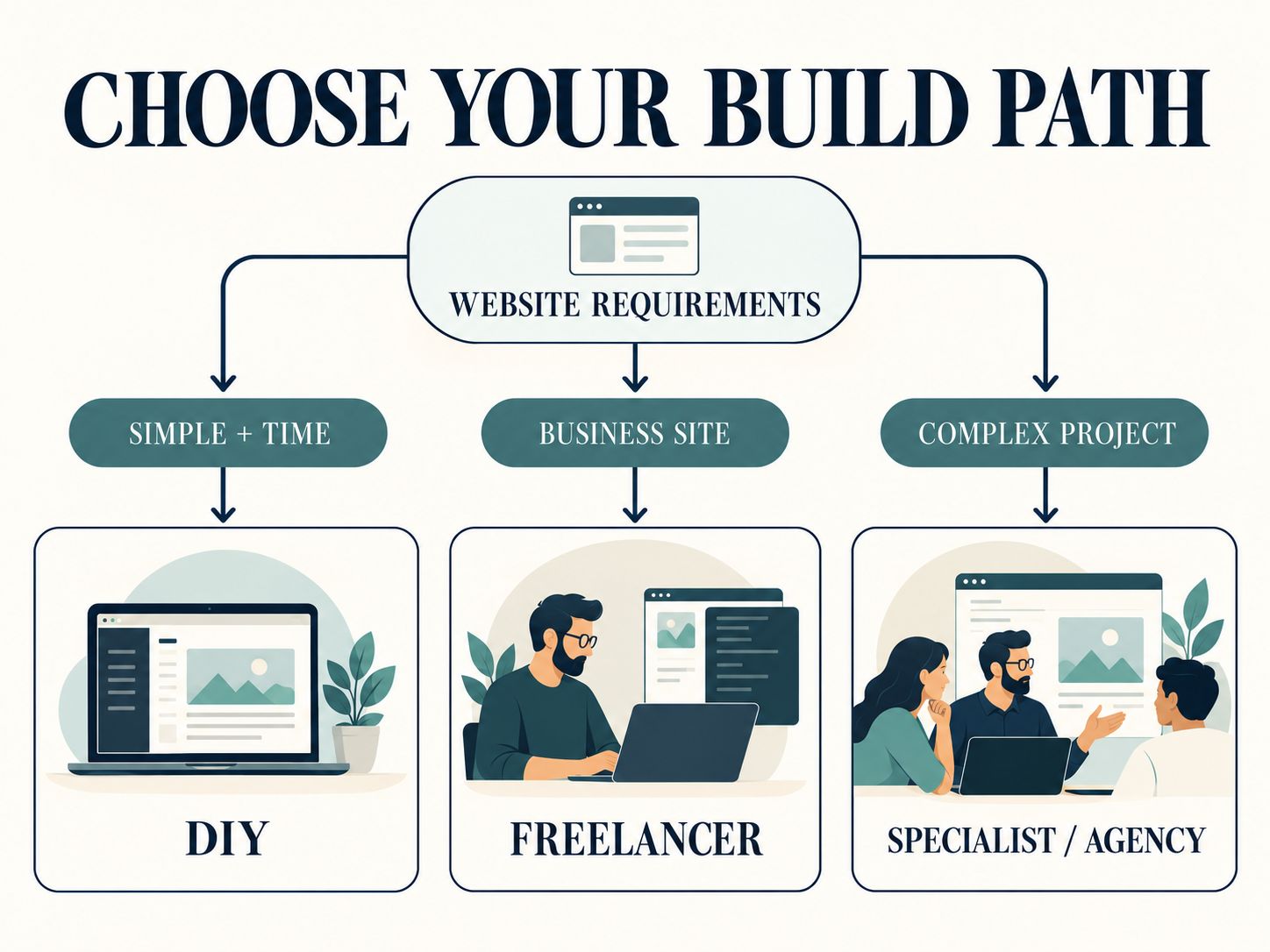
Should You Use a Free Theme, Hire a Freelancer, or Choose an Agency?
A free WordPress theme is usually the lowest-cash-cost starting point. A freelancer can handle implementation at a more flexible price, while an agency may be appropriate when the project involves multiple specialists or more complex requirements.
Choose according to your available time, technical experience, and the consequences of something going wrong.
| Your situation | Recommended approach | Why |
|---|---|---|
| Personal blog with a tight budget | DIY with a free theme | Standard content needs |
| Portfolio or brochure website | DIY or freelancer | Limited functionality |
| Local service business | Experienced freelancer | Professional setup without excessive overhead |
| Company redesign | Freelancer or agency | Migration and testing matter |
| Complex ecommerce store | WooCommerce specialist | Payments, orders, and integrations |
| Custom portal or membership website | Experienced WordPress developer | Specialized development and maintenance |
When DIY makes sense
Suppose you’re launching a photography portfolio.
You already have your photographs, written bio, and contact information. Your design requirements are straightforward, and you’re willing to learn WordPress.
Using a supported theme may be sufficient.
You can spend your budget on better photography, hosting, or promoting the finished website instead of unnecessary development.
When a freelancer makes sense
Now consider a plumbing company.
Its owner needs service pages, a mobile-friendly design, an enquiry form, and a website that can be updated without technical help.
Hiring a freelancer may be a sensible investment because the owner can spend less time configuring WordPress and more time running the business.
When an agency or specialist makes sense
If the project involves a large content migration, custom design system, complicated ecommerce requirements, or multiple departments, broader professional support may be valuable.
Don’t pay for an agency simply because an agency sounds more professional. Pay for the capabilities and coordination the project actually needs.
A useful rule: Pay for expertise when the consequences of getting something wrong are greater than the cost of professional help.
What Should Affordable WordPress Website Design Services Include?
A professional WordPress website design service should deliver a website that is responsive, usable, editable, and properly handed over to the owner.
The exact package will vary, but the fundamentals shouldn’t be vague.
| Essential deliverable | What to confirm |
|---|---|
| Responsive design | Pages tested on mobile and desktop |
| WordPress setup | Supported theme and necessary plugins |
| Content implementation | Number of pages and uploads included |
| Contact functionality | Forms tested and messages delivered |
| SEO foundation | Page structure, titles, URLs, indexing checks |
| Basic security | HTTPS, updates, access controls |
| Performance | Sensible image sizes and script loading |
| Handover | Administrator access and editing instructions |
| Support | Included period and covered issues |
One detail deserves special attention: ownership.
The person who pays for the website should know who controls the domain, hosting, files, database, and premium software accounts.
Some developers provide hosting as part of an ongoing service. That’s not inherently a problem, but it should be clear how you would move the website to another provider.
For a better understanding of the underlying technology, explore the WordPress platform guide.
Can You Create an Affordable WordPress Website for Free?
Yes. WordPress itself is free and open-source software, and you can use free themes and built-in editing features to create many kinds of websites. A self-hosted public website will normally still require hosting and a domain.
WordPress’s official documentation explains how its Site Editor works with compatible block themes to customize navigation, templates, headers, footers, and site-wide styles.
A practical free-design setup
Start with a reputable hosting environment and install WordPress.
Next, select a supported free block theme. Instead of immediately purchasing a page builder, explore the built-in editing tools.
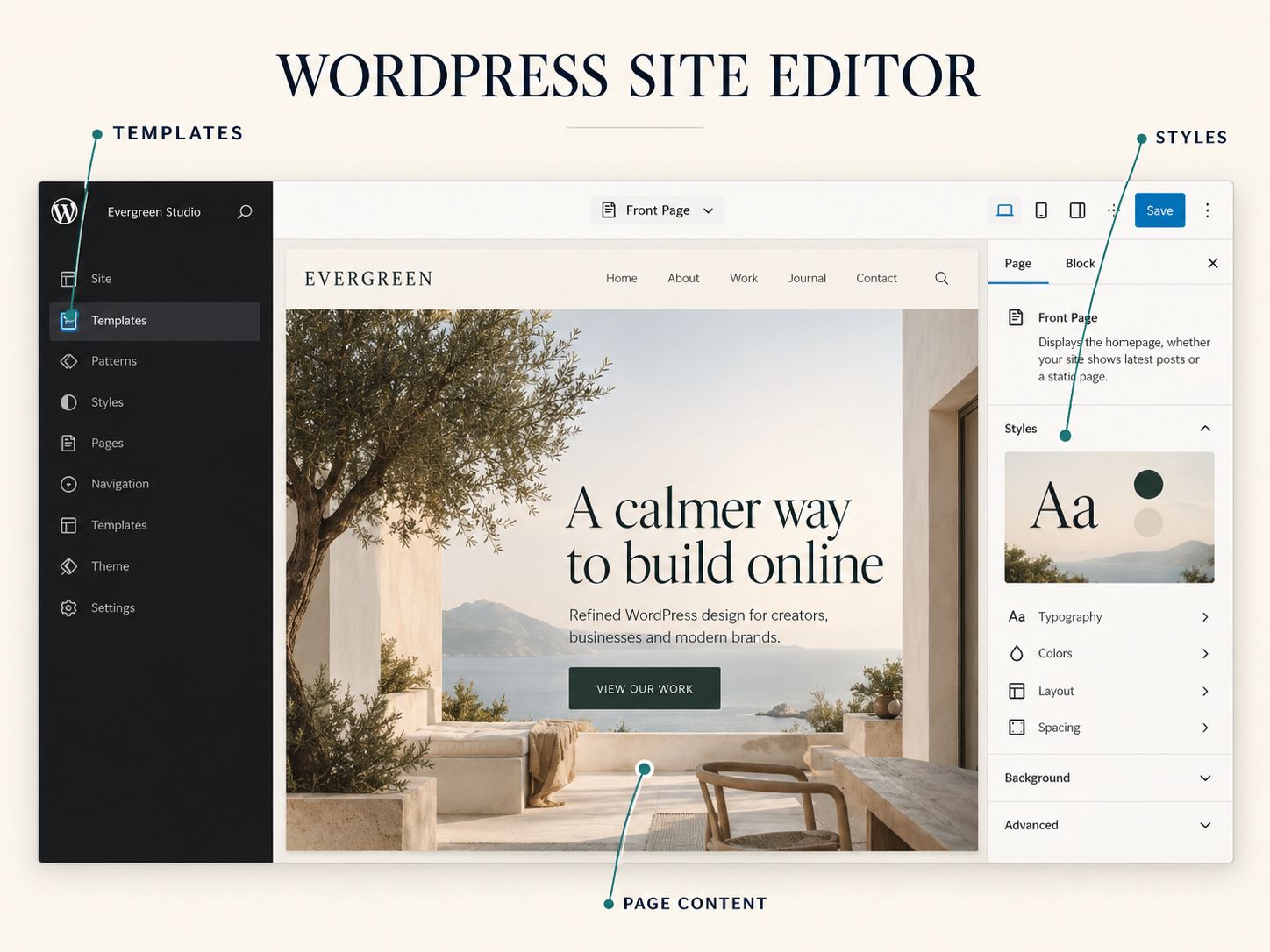
Create your essential pages, establish a consistent typography system, and keep navigation simple.
When preparing website visuals, the Aspect Ratio Calculator can help you maintain consistent dimensions. If you need a subtle CSS-based background, try the CSS Gradient Generator.
These utilities are particularly useful when creating reusable page sections without filling the website with unnecessary image assets.
Do you need Elementor Pro?
Not for every website.
If you only need standard layouts, headings, images, buttons, and content sections, WordPress’s built-in block system may be enough.
A premium page builder can still be worthwhile if you need specific design controls or features that improve your workflow.
Community Insight: Beginners often worry about purchasing too many plugins before understanding what WordPress already includes. The sensible approach is to build a small working version first and add paid software only when a requirement justifies it.
Warning: Avoid using unsupported themes or installing plugins from untrusted download sources simply to save licensing costs.
Which Affordable WordPress Website Design Template Is Best?
The best affordable WordPress website design template is the one that fits your actual layout and content needs without forcing you to purchase unnecessary extensions.
Free themes can work well for simple websites, but the editing experience varies.
| Theme option | Potential benefit | What to inspect |
|---|---|---|
| Default WordPress block theme | Native Site Editor integration | Available layouts and styles |
| Astra | Broad design ecosystem | Premium feature dependencies |
| GeneratePress | Streamlined theme approach | Layout flexibility |
| Kadence | Flexible customization | Free versus paid controls |
| Blocksy | Modern design options | Required extensions |
This is a shortlist of candidates, not a performance ranking or firsthand benchmark.
Use the 15-minute template test
Before committing to a theme, try four tasks:
- Replace the homepage heading and image.
- Create a service page using the available layout tools.
- Edit the mobile navigation.
- Change a global color or typography setting.
You aren’t measuring professional development time. You’re checking whether ordinary editing tasks feel manageable.
If a theme looks impressive in a demo but becomes frustrating when you replace its content, it may not be the right choice.
Key Point: A template saves money only when it also reduces the work required to maintain and customize your website.
How Can You Reduce WordPress Design Costs Without Compromising Quality?
Reduce unnecessary scope rather than essential quality checks. Reusable layouts, prepared content, fewer third-party dependencies, and a phased launch can reduce the amount of development work.
Here’s a realistic example.
A local consultancy initially plans a 12-page website with custom animations, several landing-page designs, booking functionality, and a resource library.
After discussing its immediate needs, the company decides to launch with Home, About, Services, Case Studies, and Contact.
It uses one reusable service-page layout and links to an existing scheduling service.
The advanced resource library can come later.
That decision reduces the initial scope without removing the site’s main purpose: helping visitors understand the business and request a consultation.
What shouldn’t you cut?
Don’t remove important mobile testing, form testing, access controls, or basic backup arrangements to reduce the quote.
Performance is also worth addressing from the beginning. Oversized images and unnecessary scripts can create avoidable problems.
For technical context, read Optimizing Core Web Vitals on Shared Hosting. Businesses can also learn more about the relationship between loading performance and commercial websites in the B2B website speed guide.
Share This Insight
A smaller WordPress website with clear content and reliable functionality is often more valuable than a larger unfinished website.
Click to Share: X (Twitter) · Facebook · LinkedIn
How Do You Compare Affordable WordPress Website Design Packages?
Compare packages using one written brief. If every provider prices a different set of deliverables, you cannot make a fair comparison.
Your brief should describe the pages, functionality, content responsibilities, design references, integrations, launch requirements, and expected support.
Example: Comparing two WordPress quotes
Imagine receiving the following offers for the same small-business project.
| Deliverable | Quote A | Quote B |
|---|---|---|
| Setup price | $600 | $1,050 |
| Five pages | Included | Included |
| Content uploads | Client responsibility | Included |
| Mobile testing | Not specified | Documented |
| Training | Not included | One session |
| Support | Not specified | 30-day defect-fix support |
| Hosting | Separate | Separate |
| Premium software | Unclear | Itemized |
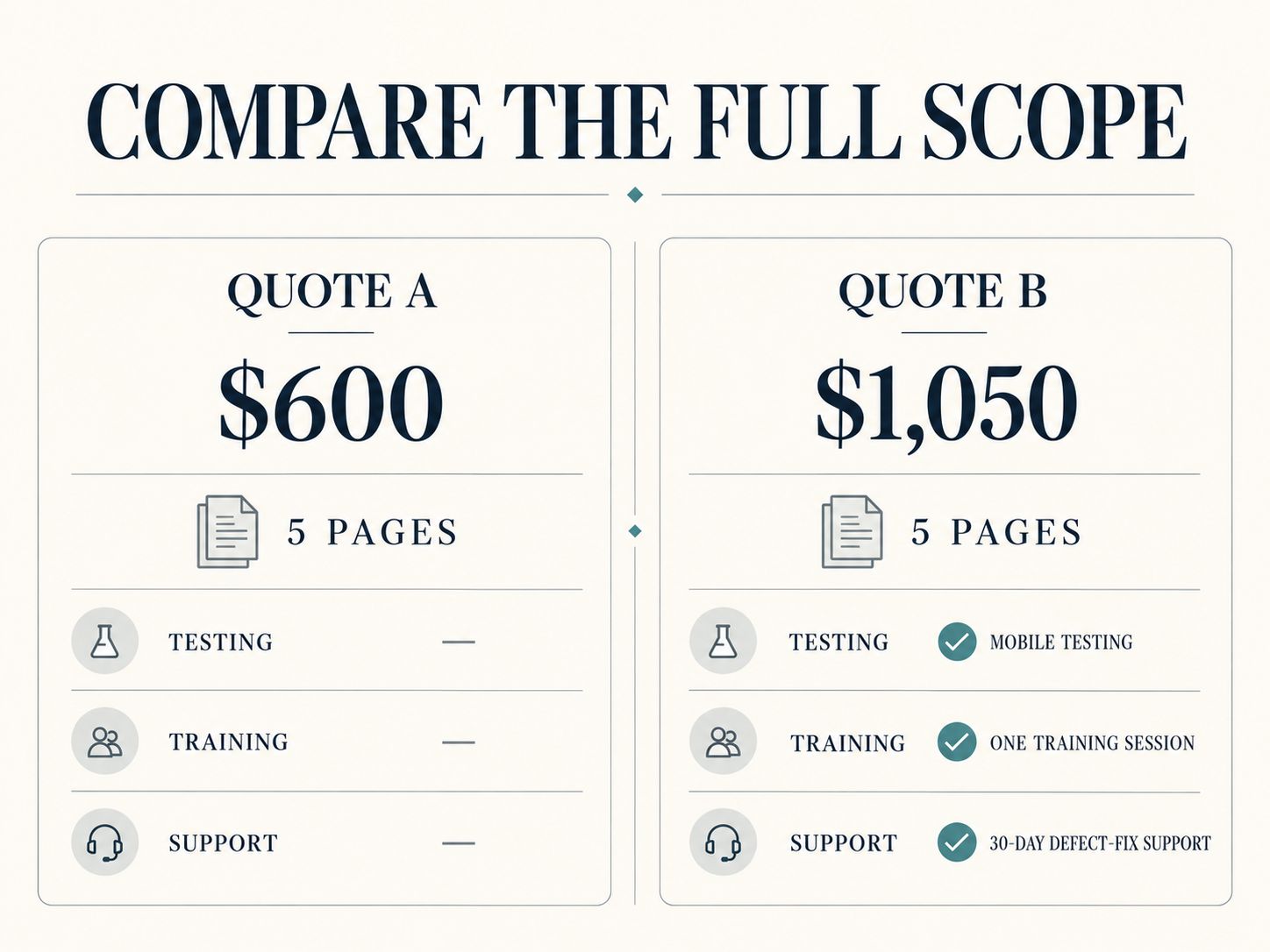
Quote A might be the better choice for an experienced website owner.
Quote B might be better for someone who needs a more complete handover.
The important issue is the value of the additional work, not which offer has the lowest number.
Seven questions to ask before hiring
- Have you built websites with similar requirements?
- Will you use an existing theme or create a custom design?
- Who provides and uploads the content?
- Which plugin licenses or subscriptions will I need?
- What tests will you perform before launch?
- Will I have full access to my domain, hosting, and WordPress installation?
- What support is included after the website goes live?
Request written answers and include important commitments in the project agreement.
Common Mistake: Never assume that “SEO included” means content strategy, keyword research, technical auditing, and ongoing optimization. Ask the provider to define the actual work.
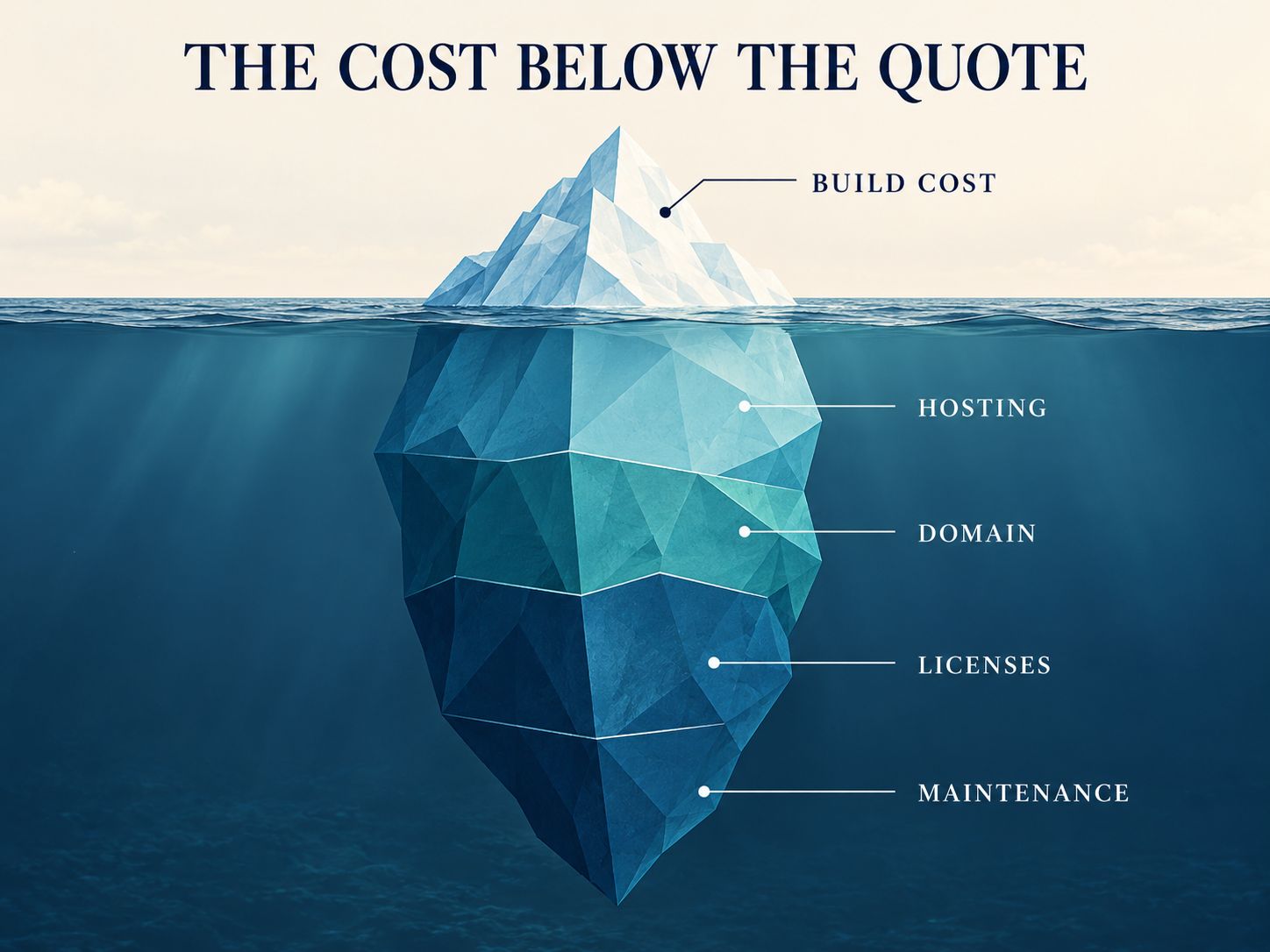
What Hidden Costs Make a Cheap WordPress Website Expensive?
Hosting renewals, paid extensions, maintenance, redesigns, and poorly planned migrations can make a low initial quote more expensive than expected.
Most of these costs are manageable when they are anticipated.
| Potential extra cost | Prevention |
|---|---|
| Hosting renewal increase | Check standard renewal pricing |
| Plugin subscriptions | List required licenses before development |
| Content revisions | Approve content and scope early |
| Unplanned features | Separate requirements from optional additions |
| Maintenance | Agree on responsibilities |
| Developer handover | Confirm access and documentation |
| SEO disruption during redesign | Plan URL changes and redirects |
Why website migration deserves special attention
If your existing site receives traffic, a redesign can affect important URLs, internal links, and search engine indexing.
Before changing URLs, document the current structure and identify which pages need permanent redirects.
The Redirect & Canonical URL Checker can help inspect redirect behavior, while the guide to 404 errors and SEO user experience explains the problems broken URLs can create.
For an additional explanation of redirect handling, review 301 redirects and their SEO implications.
What about security?
Ask who manages updates, backups, and access permissions.
For experienced administrators, WebPlatformLab provides a WordPress .htaccess Security Generator and a wp-config.php Generator.
These are technical configuration tools, not substitutes for a complete security program. Review changes and test them in a safe environment before applying them to a live website.
For projects that require a separate testing environment, the guide to WordPress staging subdomain setup provides additional implementation context.
Is Affordable WordPress Website Design Different in the USA, EU, or Australia?
The technical foundations are similar worldwide, but the right purchasing decision can depend on local business expectations, applicable privacy rules, tax treatment, accessibility obligations, language needs, and ongoing support arrangements.
Affordable WordPress website design in Vermont
For a Vermont service business, focus on clear service descriptions, authentic project photographs, business contact information, and straightforward navigation.
A local designer may understand the market, but remote developers can also deliver suitable results. Review experience and communication rather than relying on proximity alone.
Affordable WordPress website design for EU businesses
EU-facing projects may require additional consideration of data protection, consent management, accessibility, localization, and other applicable requirements.
For example, a website collecting personal information through forms should be evaluated for relevant privacy obligations.
A WordPress plugin does not automatically establish compliance with all applicable laws.
Affordable WordPress website design in Sydney, Melbourne, and Brisbane
Businesses researching affordable WordPress website design services in Sydney, Melbourne, or Brisbane should compare quotes in AUD, check whether GST applies, and clarify ongoing support arrangements.
The same applies whether the search is phrased as affordable WordPress website design Sydney or affordable WordPress website design in Melbourne or Brisbane.
Choose a provider based on deliverables, technical experience, and support—not simply their city.
Is WordPress Still Worth It in 2026?
Yes. WordPress remains a practical choice for businesses that need flexible content management, control over hosting, and the ability to extend website functionality.
WordPress is actively developed, and modern block-based editing provides substantial design capabilities without requiring a separate page builder for every project.
However, its flexibility introduces maintenance responsibilities.
Before choosing hosting, check the current WordPress technical requirements. As of this review, WordPress recommends PHP 8.3 or newer, MariaDB 10.11 or newer or MySQL 8.0 or newer, and HTTPS.
Older software environments may remain technically compatible, but using outdated server software can introduce security risks.
Is there a cheaper option than Wix?
Self-hosted WordPress may be cheaper than Wix in some cases, particularly when you use free themes and affordable hosting.
Wix includes hosting and much of the technical platform management in its subscription model.
WordPress allows more direct control over hosting and site configuration but may require more maintenance.
If you want to explore the hosted alternative, review the Wix platform overview.
Neither platform is always cheaper. Compare the plans, features, and recurring costs you actually need.
Can ChatGPT Design a WordPress Website?
ChatGPT can assist with website planning, design ideas, content drafting, code generation, and troubleshooting. It can reduce repetitive work, but it cannot guarantee that generated code or design decisions are secure, accessible, or suitable for production.
For a basic website, AI can help prepare page outlines, suggest headings, draft service descriptions, and produce CSS examples.
For a more complex website, developers can use AI to explore technical approaches or review implementation ideas.
However, generated output must be tested.
The guide How to Build a Website with AI for Beginners explains the broader process.
AI Insight: Use AI to accelerate planning and implementation, but let real user requirements and verified testing determine what goes live.
What Should You Check Before Publishing Your WordPress Website?
Before launch, confirm that the website works for visitors and that you can operate it without unnecessary dependence on the original developer.
Use this checklist:
- The website clearly explains the business and its services.
- Mobile navigation and layouts work correctly.
- Forms have been tested with real submissions.
- Important buttons and links work.
- Page titles and headings accurately describe the content.
- Images are appropriately sized and have suitable alternative text.
- HTTPS and indexing settings are correct.
- Backups and recovery procedures are documented.
- Administrator and hosting access have been transferred as agreed.
- Licenses and recurring costs are documented.
- The owner knows how to update essential content.
For image accessibility and search optimization, review Does Alt Text Help SEO?.
For a broader technical evaluation, the WordPress website quality control guide provides relevant additional guidance.
Don’t stop at looking at the homepage. Try using the website as a real customer would: find a service, open a contact page, submit an enquiry, and navigate back.
If that journey is confusing, the site may need further work regardless of how attractive it looks.
Which WordPress Website Design Option Should You Choose?
Choose the simplest reliable solution that supports your present goals and leaves room for reasonable growth.
If your budget is under $300 and your requirements are basic, DIY WordPress may be the most appropriate route.
If you have a budget of roughly $500–$1,500 and need a modest business website, a carefully scoped freelancer engagement may be a useful starting point.
If the project involves substantial branding work, custom integrations, complex ecommerce, or migration risk, a larger budget and specialist help may be justified.
These are decision guidelines, not rigid market price categories.
My recommendation
From a WordPress development perspective, I would invest first in a clear content structure, dependable hosting, maintainable design, good mobile usability, and essential testing.
I would delay decorative features and complicated integrations until they solve a demonstrable problem.
Most importantly, I would not select a provider until the deliverables, ownership arrangements, and recurring expenses were understood.
That is what makes a WordPress website genuinely affordable—not simply a low advertised price.
Frequently Asked Questions About Affordable WordPress Website Design
How much does it cost to design a WordPress website?
A basic DIY website may require under a few hundred dollars in initial expenses, while a professionally built business website can cost hundreds or thousands of dollars. Features, content, design, and support determine the actual quote.
Can I build a professional WordPress website for $500?
Yes, a simple website can sometimes fit a $500 budget if you use an existing theme, supply the content, and limit customization. Confirm what’s included before hiring.
Is WordPress completely free?
The WordPress software is free and open source. Hosting, domain registration, paid extensions, and professional services can cost money.
Is WordPress still worth it in 2026?
Yes. It’s suitable for many business websites, blogs, and ecommerce projects. Its greatest advantages include flexibility and hosting control, although maintenance remains important.
Can ChatGPT design a website?
ChatGPT can help plan layouts, write content, generate code, and provide development guidance. Its output still needs implementation, review, and testing.
Is there a cheaper option than Wix?
Self-hosted WordPress can be cheaper depending on your hosting, premium software, maintenance, and required features. Compare the total cost rather than introductory prices.
What is the best affordable WordPress website design template?
There is no single best template. Choose a maintained theme that supports your required layouts and allows comfortable editing without unnecessary paid extensions.
How long does it take to build a WordPress website?
A simple site with prepared content may take several days. Custom design, extensive content production, integrations, and ecommerce requirements can extend development to weeks or longer.
Should I hire a local WordPress developer?
Local familiarity can help, but the developer’s portfolio, relevant technical experience, communication, and support commitments are more important than location alone.
Can an affordable WordPress website rank on Google?
Yes, but affordable development does not guarantee rankings. Useful content, technical quality, indexing, competition, and ongoing SEO work all influence search performance.
Who should pay for premium WordPress plugins?
Either the developer or website owner may purchase the licenses, depending on the agreement. Clarify ownership, renewal payments, and what happens if the relationship ends.
How much should I budget for maintenance?
The amount depends on site complexity, update frequency, hosting, and whether you perform maintenance yourself. Budget separately for routine work and unexpected repairs.
Final Thoughts: A Good WordPress Website Should Fit Your Budget and Your Business
Affordable WordPress website design is about making sensible choices, not stripping away everything that costs money.
Start with the pages and features your visitors actually need. Compare DIY and professional options, calculate ongoing expenses, and request clear proposals before spending.
A small, well-planned WordPress website can be a better investment than a complex design that creates unnecessary maintenance work.
Before choosing a developer or purchasing a premium theme, use the Website Cost Calculator to estimate your initial and recurring expenses.
Affordable WordPress design isn’t about the cheapest quote. It’s about building a website that meets your needs and stays affordable to maintain.
What kind of WordPress website are you planning, and what budget do you have in mind? Share your goals, questions, or experiences in the comments. Your situation could help another reader make a more informed decision.