Business growth through website improvements starts with understanding what your customers need and what prevents them from taking action. Your website might need better search visibility, clearer service pages, faster loading, or a simpler way to request a quote. Sometimes the solution is a redesign. Often, it is something much smaller. This guide shows you how to find those opportunities, decide what deserves your budget, and measure whether your website is helping your business grow.
How Does a Website Help a Business Grow?
A website supports business growth by helping potential customers find your company, understand its services, evaluate its credibility, and take action. It can also support existing customers through bookings, account access, product information, and customer service.
Consider two local roofing companies.
Both appear in search results. The first website shows a phone number and a brief description of roofing services. The second explains residential and commercial work, displays authentic project photographs, describes the quotation process, and offers an easy way to request an inspection.
A customer comparing providers has more information to work with on the second website.
That does not guarantee the second company will win the job. Its pricing, reputation, availability, and service quality still matter. But the website has made the buying decision easier.
That is what a useful business website should do.
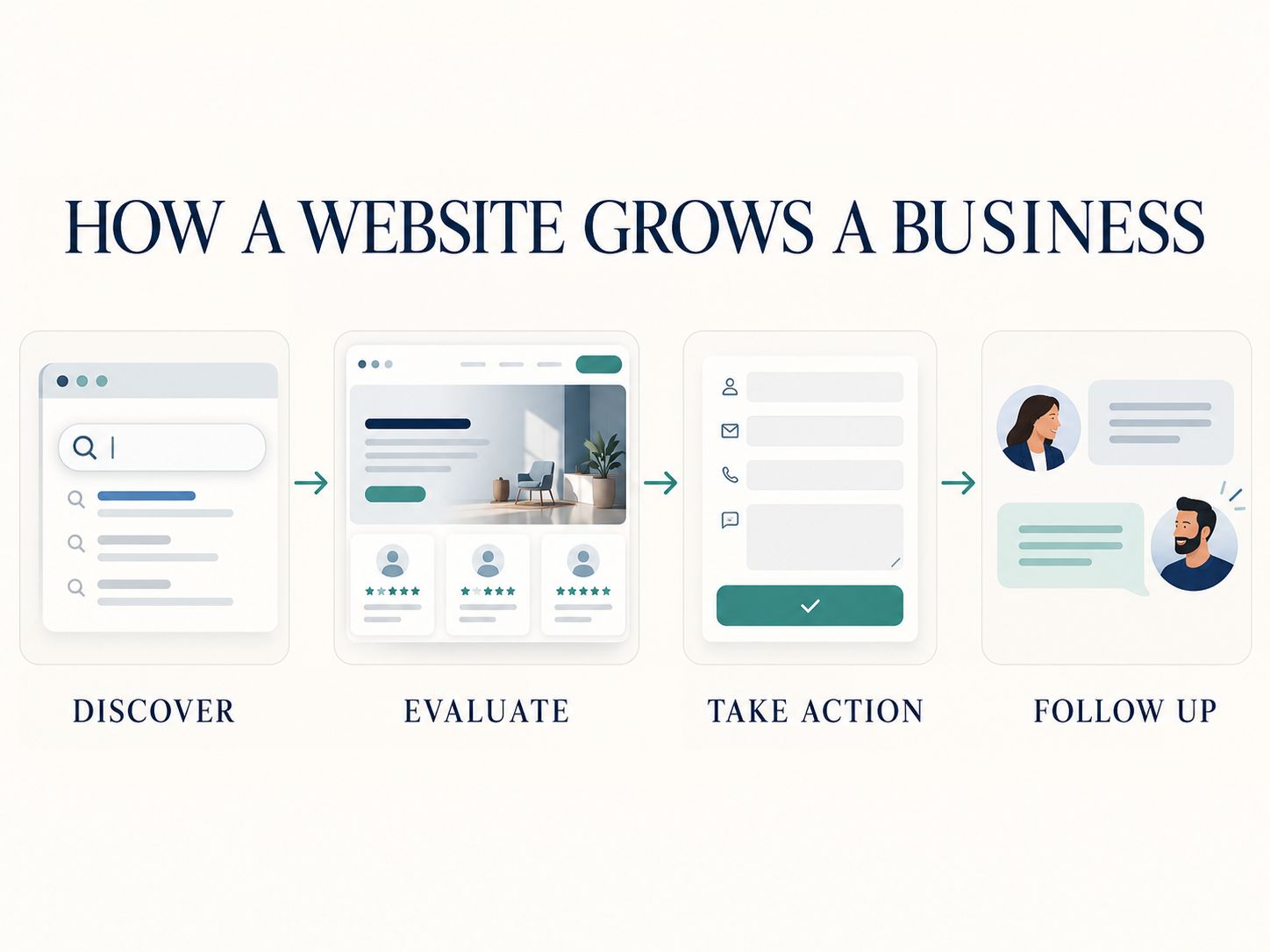
It connects four activities:
Discovery → Evaluation → Action → Follow-up
Discovery brings potential customers to the website. Evaluation helps them decide whether the business is suitable. Action gives them a way to enquire or buy. Follow-up connects that interest to an actual sale or ongoing relationship.
If one part is missing, spending more money on the others may deliver disappointing results.
Why Is Your Website Getting Visitors but Not Customers?
A website can attract visitors without generating much business because the traffic is irrelevant, the offer is unclear, the experience creates friction, or inquiries are not handled effectively.
The first mistake is assuming that traffic automatically means opportunity.
Imagine a business selling accounting services to US startups. One article attracts thousands of people searching for free accounting worksheets, while its startup bookkeeping service page receives only a handful of visits.
The blog has traffic. The service page has commercial relevance.
Neither number is enough on its own to judge success.
Before making changes, identify where potential customers are getting stuck.
| What you notice | What might be wrong | What to investigate first |
|---|---|---|
| Almost no visitors | Limited search visibility or promotion | Indexing, search demand, content relevance |
| Traffic but few inquiries | Weak offer or difficult customer journey | Landing pages, calls to action, form experience |
| Many inquiries but few qualified leads | Audience or messaging mismatch | Traffic sources, offer, qualification |
| Qualified leads but few sales | Pricing, sales process, or follow-up issues | Response quality, objections, lead handling |
| People abandon checkout | Purchasing friction | Payment flow, shipping costs, errors |
| Mobile visitors struggle | Usability or performance problems | Navigation, form controls, speed |
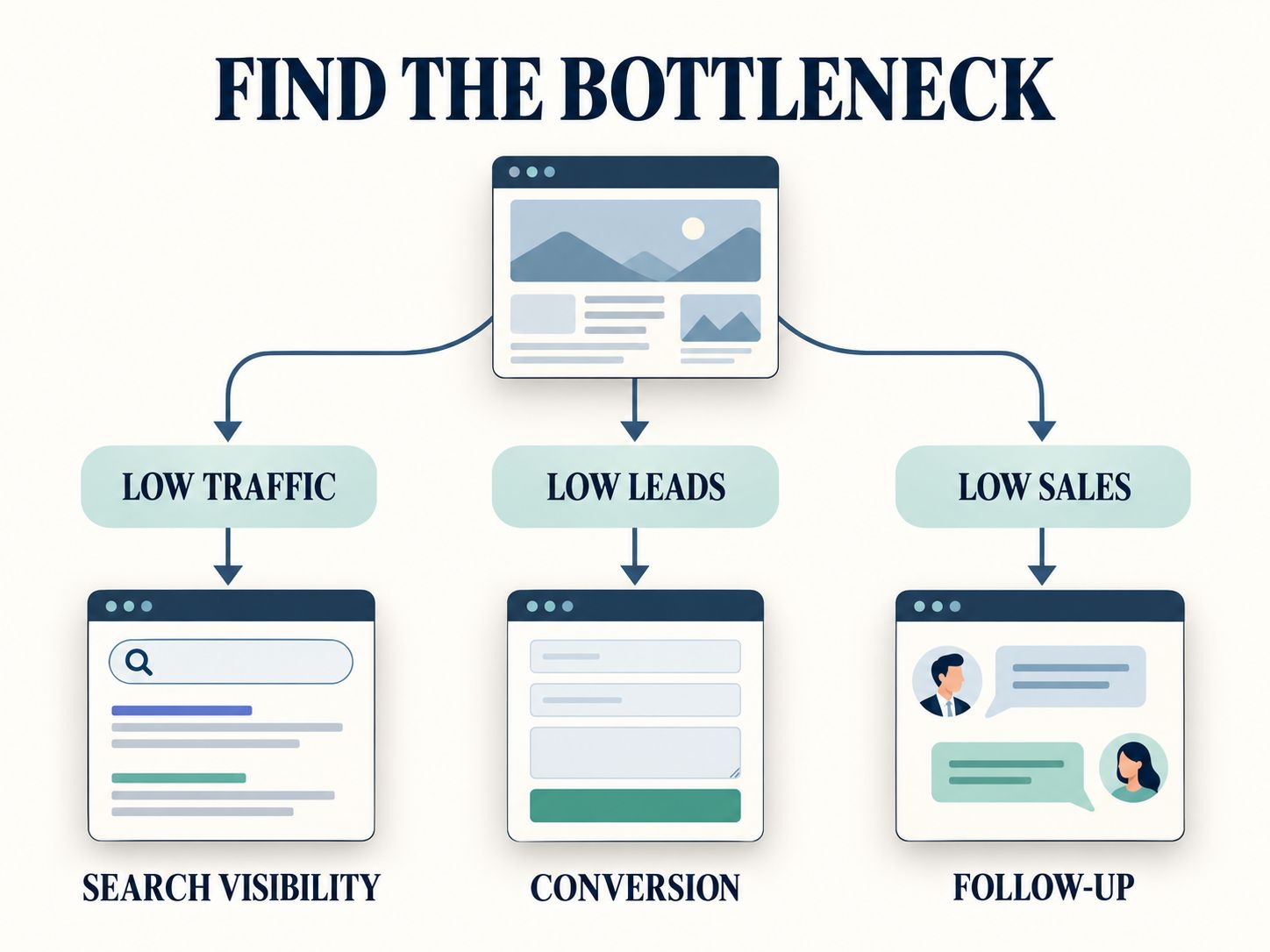
These are starting hypotheses, not automatic diagnoses.
For example, a low inquiry rate might reflect unclear messaging, but it could also reflect visitors comparing options before returning later.
Use the evidence available before spending money.
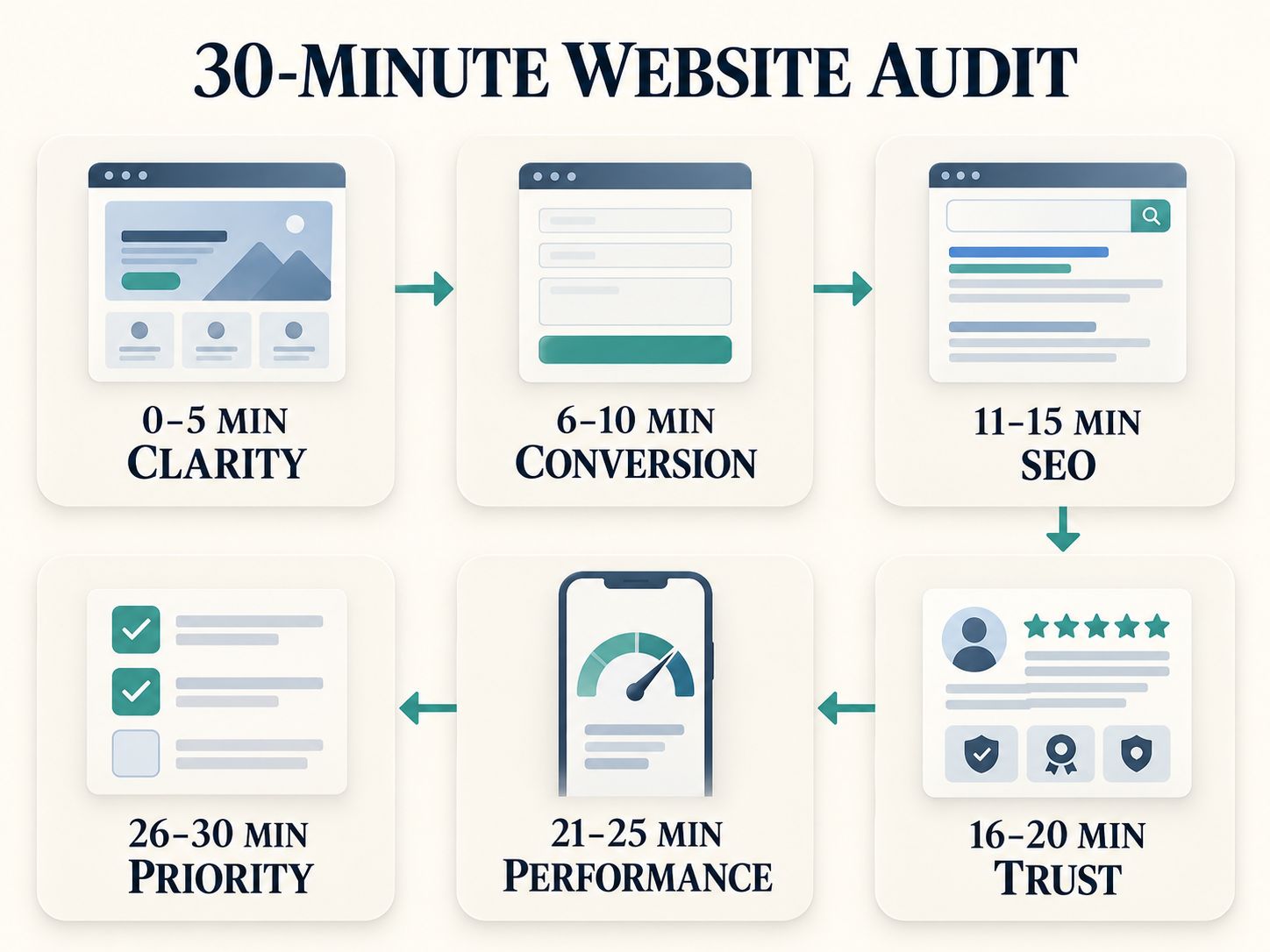
How to Audit Your Website for Growth Opportunities in 30 Minutes
A short website audit will not replace a professional technical or marketing assessment. However, it can uncover obvious problems that are worth fixing immediately.
You need a smartphone, access to your website, and whatever analytics or customer inquiry data your business already collects.
Minutes 1–5: Look at Your Website as a New Customer
Open your homepage without thinking like its owner.
Can you identify the main service within a few seconds? Is the target customer clear? Do you understand what happens after clicking the main button?
Now look at the website on your phone.
Check whether the most important information is readable and whether the next step is easy to find.
If the homepage requires visitors to understand internal company terminology, rewrite it in customer language.
For example, “Strategic Business Transformation Solutions” tells a visitor less than “Bookkeeping and Payroll Support for Growing Businesses.”
Minutes 6–10: Test the Path to an Inquiry or Sale
Choose your most important service or product.
Start from the homepage and try to complete its intended action.
Count the steps. Notice confusing instructions, unnecessary fields, broken buttons, unexpected charges, and unclear confirmation messages.
If the goal is a contact form, submit a test inquiry and verify that it reaches the correct inbox.
If it is an ecommerce checkout, use an approved test-payment method rather than placing an unnecessary live order.
This simple exercise can reveal issues that ordinary visual inspections miss.
Minutes 11–15: Check Search Visibility
Search for your business name and examine what appears.
Then review whether your important commercial pages are indexed and whether their titles accurately describe their content.
Use Google Search Console if it is configured.
Focus on searches relevant to your business rather than celebrating unrelated traffic.
For more technical checks, investigate metadata using the SEO metadata tools and inspect relevant page redirects with the guidance in 301 Redirect SEO Penalty.
A page can be perfectly designed and still fail to contribute much if the right people cannot find it.
Minutes 16–20: Review Trust and Clarity
Look at your website from the perspective of someone about to spend money.
Does it explain what is included? Is the business identifiable? Are contact details and important policies accessible?
For service businesses, authentic project examples and a clear process can be especially valuable.
For online stores, customers may need shipping information, return policies, accurate product specifications, and total costs before ordering.
Remove unsupported claims such as “guaranteed best results” unless you can explain and substantiate them.
Minutes 21–25: Check Mobile Speed and Technical Reliability
Open your most important pages on a normal mobile connection.
Check for oversized images, unstable page layouts, long delays, and buttons that fail to respond.
Google uses Core Web Vitals to describe important aspects of loading, responsiveness, and visual stability.
| Metric | Good threshold |
|---|---|
| Largest Contentful Paint (LCP) | 2.5 seconds or less |
| Interaction to Next Paint (INP) | 200 milliseconds or less |
| Cumulative Layout Shift (CLS) | 0.1 or less |
These thresholds are useful performance targets, not guaranteed conversion benchmarks.
See our B2B Website Speed Guide for additional technical context. The website performance resources can also help investigate heavy pages, including guidance on optimizing Core Web Vitals on shared hosting.
Minutes 26–30: Choose One Priority
Write down the three most serious issues you discovered.
Choose the one that is most likely to interfere with a valuable customer action.
A broken inquiry form should generally take priority over a new homepage animation. A slow checkout deserves more immediate attention than publishing another general blog post.
Do not attempt to fix everything in a single afternoon.
The purpose of the audit is to leave with a clear next step.
What Are the Most Effective Ways to Grow a Business Through a Website?
The strongest strategies improve either the quality of visitors reaching your website or the likelihood that those visitors will become customers.
A practical website growth strategy usually combines the following activities.
1. Attract the Right Customers Through SEO
Search engine optimization helps your website appear for relevant searches.
For a small business, the objective should be to reach people with a genuine interest in its products or services—not to rank for every remotely related keyword.
A commercial cleaning company, for example, should make its office cleaning service pages useful and discoverable before investing heavily in unrelated high-volume articles.
Build pages around the questions prospective customers ask.
Include accurate service details, clear headings, helpful explanations, and natural internal links.
Google’s SEO Starter Guide provides foundational guidance on creating search-friendly websites.
Where appropriate, the SEO metadata and structured data resources can support structured-data implementation. Structured data should describe content that actually exists on the page and does not guarantee enhanced search appearances.
Practical decision: If your website receives little relevant organic traffic, improve search visibility before investing heavily in conversion experiments.
2. Explain Your Offer Without Making People Guess
Your website should clearly answer what you provide, who benefits, and why someone should contact you.
That sounds obvious, yet many websites describe their company with language that visitors would never use themselves.
A potential customer does not necessarily care that your company delivers “integrated digital excellence.” They care whether you can solve a particular problem, how long it might take, and what they should expect.
Use direct headlines and specific descriptions.
For service businesses, explain scope, process, availability, and next steps.
For ecommerce, show clear product information, accurate images, delivery details, and an understandable purchasing process.
Strong messaging reduces the work customers must do to understand your business.
3. Create Landing Pages for Specific Customer Needs
A homepage cannot explain every service in equal detail.
Dedicated landing pages allow you to address particular customers and problems.
A WordPress agency, for example, might need separate pages for website development, maintenance, WooCommerce support, and speed optimization.
Each page should explain the relevant service rather than repeating the same generic company description.
Use a clear next step that matches the visitor’s intent.
Someone investigating an expensive project may prefer a consultation. Someone purchasing a straightforward digital product may prefer immediate checkout.
If you collect inquiries through forms, our Landing Page and CRM Integration Guide provides relevant implementation background.
4. Use Proof That Helps People Trust Your Business
Customers want reassurance before committing money or sharing their information.
Authentic reviews, useful case studies, transparent policies, professional credentials, and clear contact information can reduce uncertainty.
A good case study does not require dramatic numbers.
It might explain a difficult implementation problem, how the work was approached, what was delivered, and which limitations remained.
When discussing website development, demonstrate the actual work wherever possible.
Screenshots, annotated interfaces, and real examples can make technical explanations more credible than general claims about expertise.
However, do not fabricate customer testimonials or performance gains.
A modest, verifiable example is more useful than an extraordinary claim without evidence.
5. Reduce Friction in Contact Forms and Checkout
Every additional decision can make a customer journey more complicated.
Look for forms that request unnecessary information, unclear error messages, hidden purchasing costs, and confusing calls to action.
A consultation form might need a name, contact details, service interest, and a short project description.
A complicated quotation process may require more information, but ask only for details that serve a specific purpose.
Make errors easy to correct and tell people what happens after they submit their information.
For online stores, test the full purchase journey, including payment methods, delivery information, and confirmation messages.
6. Respond to Inquiries Effectively
A website-generated lead is not the same as a customer.
If your team receives twenty relevant inquiries but takes several days to respond, improving website traffic alone may not solve the problem.
Establish a process for receiving, assigning, and following up on leads.
Make sure the appropriate person receives each inquiry and that the prospective customer knows what to expect.
A CRM may help manage larger inquiry volumes. Small businesses can begin with a simpler workflow as long as inquiries are not lost.
Track qualified leads and completed sales separately.
7. Improve Speed, Accessibility, and Reliability
A website should work for real customers across supported devices and browsers.
Performance improvements can reduce unnecessary delays, while accessible navigation and forms allow more people to complete important tasks.
Keep your CMS and software dependencies maintained.
Test backups, forms, checkout, and security-sensitive features regularly.
For WordPress businesses, selecting a maintainable implementation is often more important than collecting large numbers of features.
You can learn more about the platform in our WordPress Architectural Deep Dive and explore related website architecture articles.
8. Connect Content, Email, and Marketing Campaigns
Your website should support the channels where customers discover your business.
That may include organic search, email, referrals, social media, paid campaigns, and partnerships.
Choose landing pages that match the original message.
An advertisement promoting a particular service should lead to relevant information about that service, not an unrelated homepage section.
Publish useful content that answers real customer questions. Link it naturally to the relevant service or product when that connection helps the reader.
Do not create content only because a keyword tool reports search volume.
9. Measure Qualified Leads and Revenue
A traffic increase is encouraging only if the visitors contribute to meaningful business outcomes.
Track the metrics most relevant to your business model.
| Metric | Why it matters |
|---|---|
| Relevant visits | Shows potential customer interest |
| Visitor-to-lead rate | Measures initial conversion effectiveness |
| Qualified leads | Separates genuine opportunities from low-value inquiries |
| Lead-to-customer rate | Connects inquiries with sales performance |
| Revenue per visit | Relates traffic to commercial results |
| Acquisition cost | Shows what customer acquisition requires financially |
An ecommerce business may focus on transactions, revenue, and repeat purchases.
A B2B consultancy may care more about qualified consultations and contracts.
The right metrics depend on the business.
10. Improve What Matters, Not Whatever Looks Outdated
You do not need a complete redesign every time your website stops growing.
Sometimes a redesign is justified. Other times, targeted improvements deliver a more appropriate solution.
Ask what is actually broken before replacing it.
If visitors cannot understand your services, improve messaging. If search demand exists but your service pages are missing, address the content gap. If checkout regularly fails, fix its functionality.
A redesign should solve identifiable problems rather than simply deliver a different appearance.
Should You Improve Your Existing Website or Build a New One?
Improve your existing website when its foundation is stable and the major problems are limited to content, conversion, performance, or selected features.
Consider rebuilding when the underlying architecture is unsuitable, maintenance is excessively difficult, or important business requirements cannot be met reliably.
| Situation | Usually the better starting point |
|---|---|
| Outdated text and weak service descriptions | Update existing pages |
| Poor search metadata and internal linking | Improve SEO implementation |
| Slow images or heavy scripts | Performance optimization |
| Broken forms or confusing checkout | Targeted functionality repair |
| Inconsistent design across a few pages | Focused design improvements |
| Unsupported platform or serious architectural limitations | Assess migration or rebuild |
| Major change in business model | Reevaluate website structure |
A rebuild can be expensive and may introduce new technical or SEO problems if improperly managed.
Before approving one, ask for an explanation of the limitations of the existing website, the proposed scope, migration risks, testing arrangements, and ongoing maintenance.
For project budgeting, you can explore the website calculators and estimators and our guide to Affordable WordPress Website Design. For larger rebuild projects, reviewing website migration agency selection and WordPress website quality control can help clarify technical requirements.
The decision should be based on requirements and total cost, not simply whether a new design looks more fashionable.
How Much More Revenue Could Website Improvements Generate?
The potential revenue impact depends on your traffic, visitor-to-lead conversion rate, lead-to-customer close rate, and average revenue per customer.
Use this simplified example.
A service business receives 5,000 website visits each month. Two percent of visits become inquiries, and 20% of those inquiries turn into customers.
Each new customer generates $500 in initial revenue.
| Calculation | Result |
|---|---|
| Monthly visits | 5,000 |
| Visitor-to-lead conversion rate | 2% |
| Leads | 100 |
| Lead-to-customer rate | 20% |
| New customers | 20 |
| Revenue per customer | $500 |
| Estimated initial gross revenue | $10,000 |
Now suppose the visitor-to-lead conversion rate increases from 2% to 3%, while everything else stays the same.
That produces 150 leads, 30 customers, and $15,000 in estimated initial gross revenue.
The difference is $5,000.
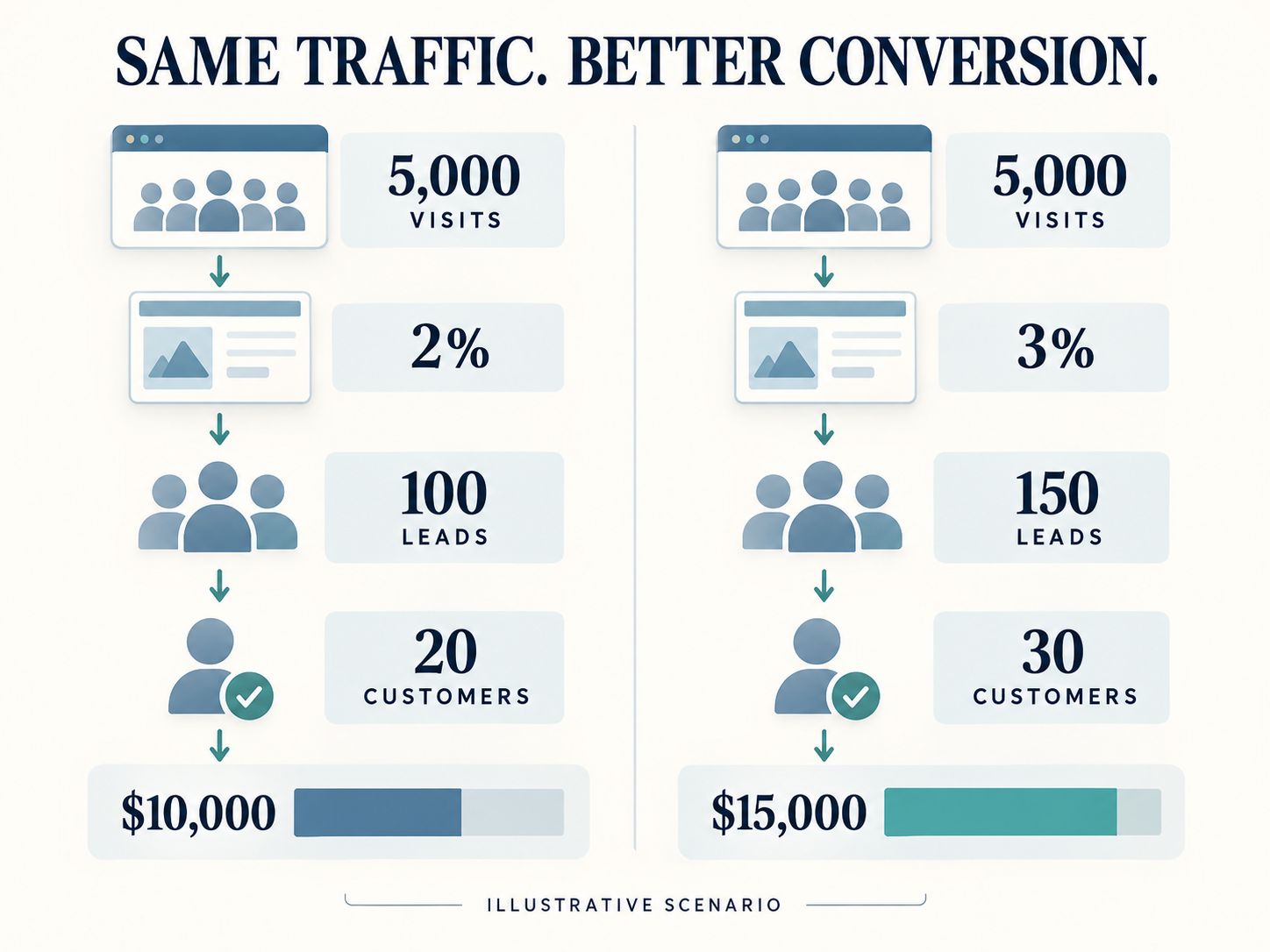
This is a hypothetical demonstration, not a prediction.
In practice, more leads may require additional sales resources, and lead quality could change as conversion rates increase.
To understand profitability, deduct relevant acquisition, fulfillment, staffing, website, and operating costs. For subscription businesses, consider retention and recurring revenue instead of evaluating only initial purchases.
Important takeaway: Sometimes improving the customer journey is more valuable than purchasing additional traffic.
What Is a Realistic 90-Day Website Growth Plan?
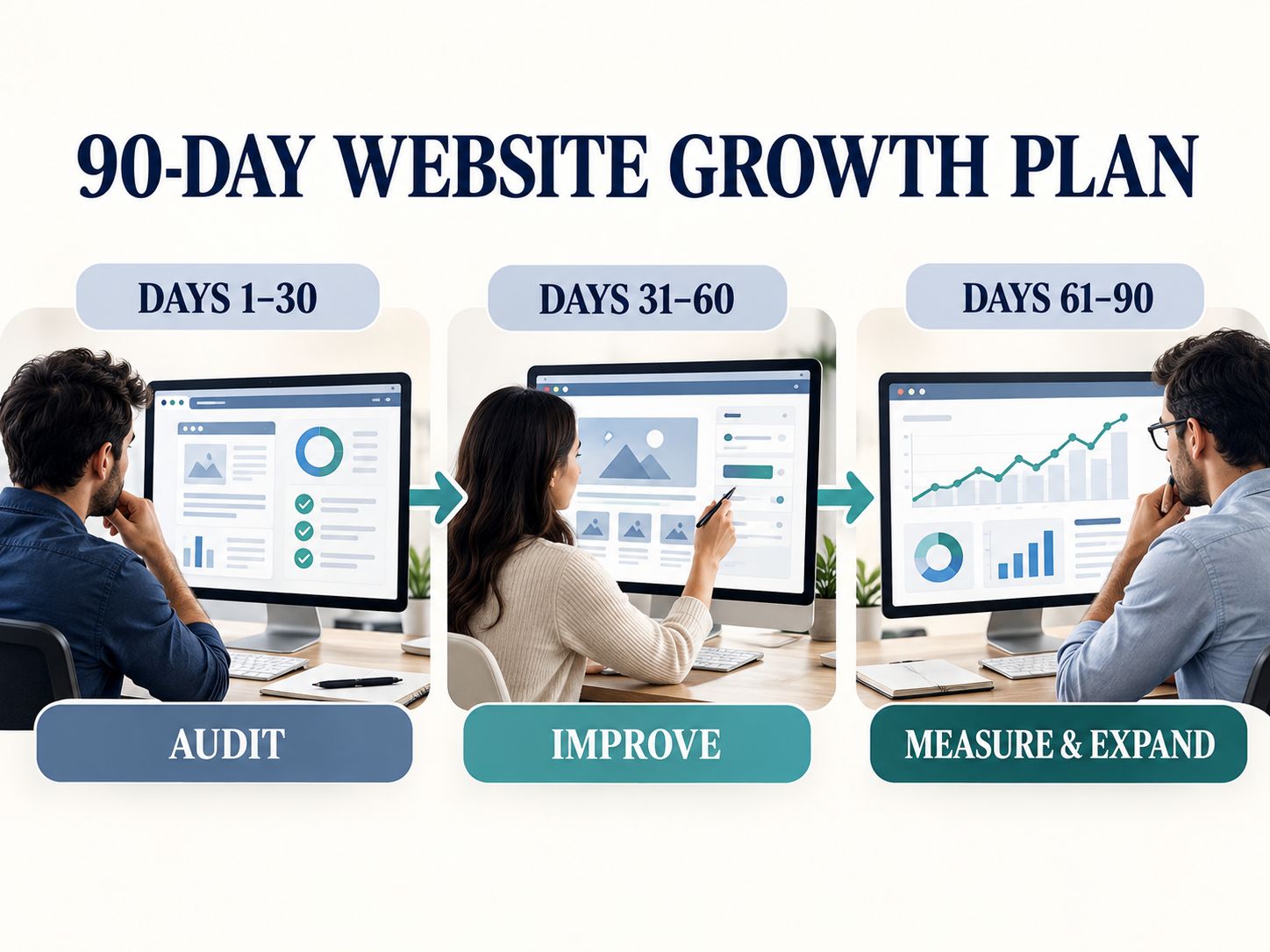
A 90-day plan gives your business a useful period to audit, improve, and measure important website activities. It does not guarantee that SEO traffic or sales will increase within three months.
Days 1–30: Identify the Bottleneck
Audit the website, test critical functions, review existing analytics, and speak with the people who handle customer inquiries.
Record the most important baseline measurements.
Choose two or three problems that directly affect customers.
Avoid making major changes without understanding the current situation.
Days 31–60: Fix the Highest-Impact Problems
Improve the pages most closely connected to sales.
This may involve rewriting service descriptions, simplifying forms, fixing mobile usability, improving speed, or strengthening genuine trust signals.
Test changes after implementation.
For businesses planning more substantial WordPress support, the guide to Dedicated WordPress Outsourcing discusses relevant development arrangements.
Days 61–90: Review Results and Expand Carefully
Compare the new results against your baseline.
Look at qualified leads, completed sales, important conversion actions, and customer feedback.
If a change appears promising, investigate whether the improvement is consistent and whether other factors could explain it.
Expand the activities that show meaningful evidence of value.
Do not treat three months as an SEO deadline. Some changes require longer measurement periods, especially on low-traffic websites.
How Should Businesses in the USA and EU Approach Website Growth?
Businesses targeting the United States and European Union should account for local customer expectations, languages, currencies, accessibility, and applicable data protection requirements.
A US-focused local business may need strong city or regional service pages.
A company targeting several European countries may need localized content, suitable language navigation, appropriate pricing information, and regional customer support details.
Privacy requirements also deserve attention.
For EU audiences, certain nonessential cookies and similar tracking technologies generally require consent before they are used. The precise requirements depend on the technology and applicable law.
The European Commission’s cookie guidance provides a useful official reference for understanding cookie purposes and user choices.
Businesses serving US consumers should consider relevant state and federal privacy requirements rather than assuming the same obligations apply everywhere.
Make privacy and accessibility part of website planning, especially when implementing analytics, advertising pixels, customer accounts, and lead forms.
What Should a Small Business Prioritize With a Limited Budget?
Start with changes that directly affect customer access, trust, or the ability to buy.
If your website is already functional, you may not need additional software immediately.
A sensible priority is:
- Repair broken customer journeys.
- Make the main offer understandable.
- Improve the most valuable service or product pages.
- Establish meaningful measurement.
- Address technical performance and search visibility problems.
- Expand marketing once the website can reliably support new visitors.
This order may change depending on your situation.
If customers cannot find the business at all, search visibility may need earlier attention. If you already have substantial traffic but a broken checkout, fixing checkout is more urgent.
Spend according to the bottleneck, not a generic marketing checklist.
Frequently Asked Questions
Can a website help a small business grow without paid advertising?
Yes. A small business can attract customers through organic search, referrals, email, useful content, and direct visits. However, growth depends on customer demand, discoverability, credibility, and the ability to convert interest into sales.
How much traffic does a business website need?
There is no universal requirement. A specialist consultancy may be profitable with a modest number of highly qualified visitors, while an advertising-supported publisher may need much larger traffic volumes.
What is the 3-3-3 rule in sales?
There is no single universally accepted 3-3-3 rule in sales. Different trainers and teams use the name for different routines involving prospecting, conversations, or follow-up. Ask which specific framework is intended before applying it to a sales process.
What are the 7 stages of business growth?
One useful seven-stage planning model is validation, launch, customer acquisition, operational stability, expansion, scaling, and maturity or renewal. These are illustrative stages rather than a universal business classification.
What is the 80/20 rule in SEO?
The 80/20 rule applies the Pareto principle to prioritization. It suggests that a relatively small share of pages, search queries, or improvements may account for a substantial portion of results. It is a heuristic, not a guaranteed numerical relationship.
How can I get 1,000 website visitors per day?
Start with market research, useful content, relevant service or product pages, technical SEO, and appropriate distribution. One thousand visits per day is roughly 30,000 visits over a 30-day month. Reaching that level depends on demand, competition, authority, and promotion; no publication schedule guarantees it.
Is SEO or website design more important for business growth?
SEO helps customers discover your website. Design, content, and usability help them understand your business and complete important actions. The immediate priority depends on where your current customer journey is failing.
Should I redesign my website if sales are low?
Not automatically. First investigate traffic quality, conversion issues, pricing, customer demand, and sales follow-up. Redesigning may be appropriate if the existing structure or experience is unsuitable, but smaller changes can sometimes solve the actual problem.
What is the best conversion rate for a business website?
There is no universal best rate. A purchase, newsletter signup, consultation request, and enterprise sales inquiry represent very different actions. Compare your performance with a relevant baseline and focus on the quality and commercial value of conversions.
How long does business growth through a website take?
Some technical and usability improvements can produce measurable changes relatively quickly when there is enough traffic. Building organic search visibility can take several months or longer. Results depend on the business, competition, existing audience, and work completed.
Final Thoughts: Make Your Website Useful Before Making It Bigger
A website does not need more pages, more animations, or more marketing tools simply because the business wants to grow.
It needs to make important customer decisions easier.
Start by understanding how people find your business, what they need to know before buying, and where they encounter problems.
Then make the smallest meaningful improvements that address those problems.
If the website already attracts relevant visitors, focus on conversion and follow-up. If visitors cannot find it, improve discoverability. If customers struggle to use it, fix the experience before investing in more promotion.
For additional technical checks, explore the WebPlatformLab developer utilities and performance auditing tools.
Shareable Insight: A website does not grow a business simply by attracting more visitors. It grows a business by helping the right visitors become customers.
What is currently preventing your website from contributing more to your business: attracting the right visitors, generating inquiries, or converting those inquiries into sales? Share your experience or questions in the comments.