If you are trying to understand why the ACF render_block_preview action fires after preview rendered, the timing is usually correct. ACF renders or replaces the block preview first, then fires the JavaScript action so your code can initialize the newly created DOM.
The real troubleshooting question is therefore not simply “Why does the hook fire afterward?” It is:
Do you need new HTML, or do you only need JavaScript to initialize the HTML that ACF has already rendered?
Once you separate those two jobs, most ACF block preview problems become much easier to diagnose.
What Should You Do First?
Start by identifying what is actually broken.
| What you see | Most likely cause | What to investigate |
|---|---|---|
| Callback never runs | Wrong action name, block type, script loading, or old implementation | Confirm block registration and the event name |
Callback runs but $block contains no target |
Wrong selector, unusual wrapper, or InnerBlocks structure | Inspect the rendered preview DOM |
| Correct HTML appears but slider/tabs do not work | JavaScript initialization problem | Initialize from render_block_preview |
| HTML remains old after another value changes | Rendering/state problem | Make sure the changed value participates in block rendering |
| Component initializes twice | Non-idempotent initializer | Detect or destroy an existing instance |
| Code works on frontend but not editor | Editor lifecycle or iframe assumption | Scope initialization to the rendered block |
| Old forum workaround seems necessary | Version-specific historical behavior | Reproduce the issue on your installed ACF version first |
That table is the practical distinction many older forum answers never make.
For broader WordPress block-development context, WebPlatformLab collects related architecture, tools, and implementation material.
Why Does render_block_preview Fire After Rendering?
Because its job is post-render initialization.
During editing, an ACF Block preview can be rendered more than once. When that happens, the previous HTML is discarded and replaced. JavaScript state attached to elements inside the old preview disappears with it.
ACF therefore provides a JavaScript action that runs against the newly rendered block:
ACF’s own documentation describes this lifecycle: a preview may be replaced through the rendering process, the previous DOM is lost, and render_block_preview/type={$type} gives developers a point to initialize the new elements. ACF block scripting documentation
A useful mental model is:
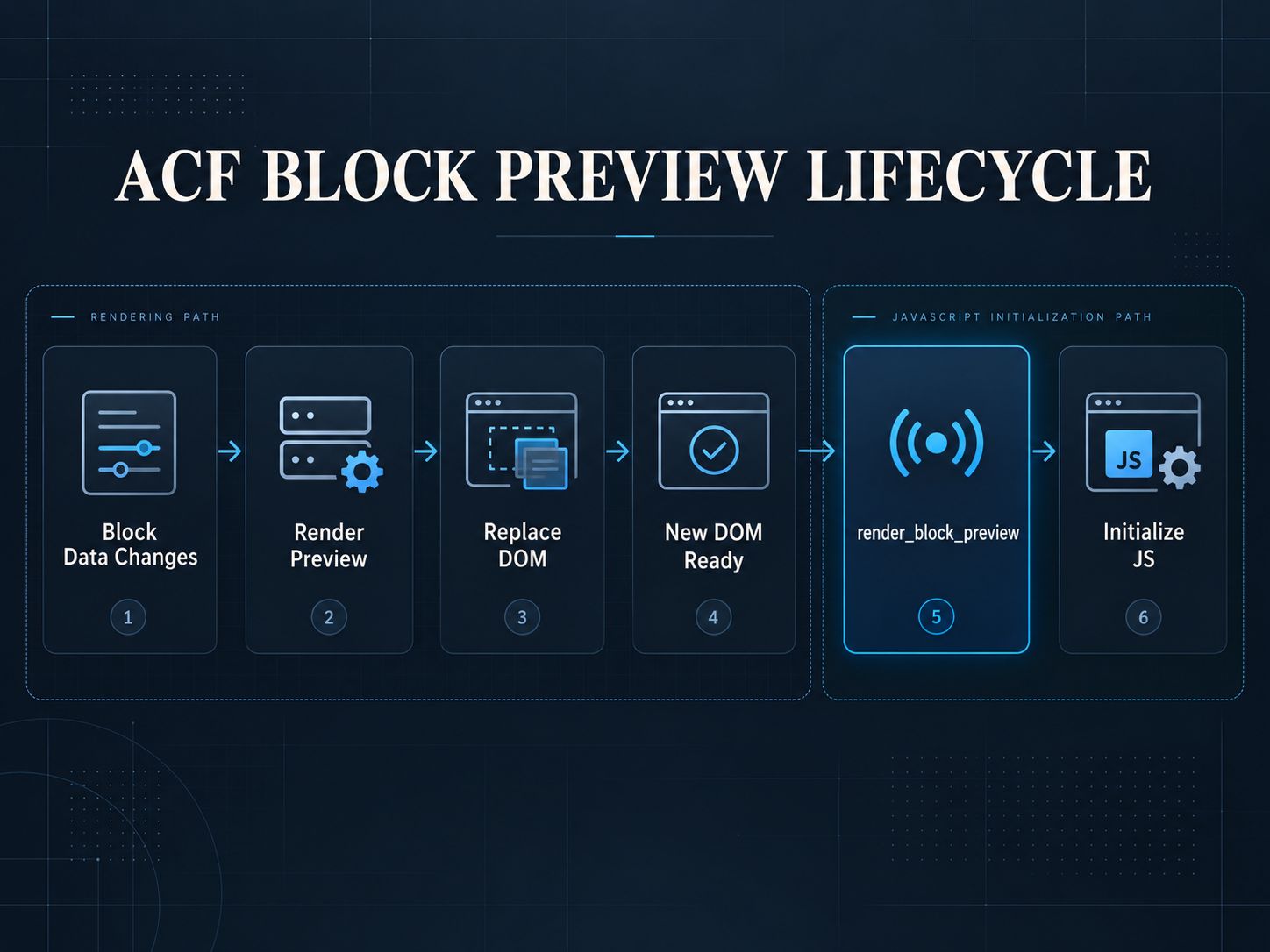
The block preview is rendered first. The render_block_preview action then gives your JavaScript a chance to initialize that new DOM.
A Five-Minute Test to See What Your Block Is Actually Doing
Before changing your implementation, log the lifecycle.
Add this temporarily to your block script:
Now open the WordPress editor and perform three actions: insert the block, change one of its ACF fields, and trigger any editor action that causes the preview to be shown again.
Watch the console.
You are trying to establish three facts:
- Did the event fire?
- Did
$blockcontain the new preview? - Was the HTML different when you expected it to change?
Those answers tell you which layer is failing.
This is more useful than immediately adding setTimeout() because it gives you evidence.
When debugging configuration alongside JavaScript, the WordPress wp-config.php Generator can also help you review common WordPress debug-related settings.
What Is the Correct Initialization Pattern?
Use one function that receives the block being rendered and scopes its work to that block.
The important detail is scoping.
This is risky:
Inside a block callback, this is safer:
The second version targets the block ACF has just rendered instead of touching every matching slider in the editor.
If the block includes a large frontend bundle, it is also worth checking whether that script is unnecessarily heavy. The Page Size & Weight Analyzer can help identify large JavaScript assets, while the Core Web Vitals optimization guide explains the performance cost of unnecessary main-thread work.
Why Does the Script Sometimes Run Before My Target Element Exists?
The JavaScript file loading and the block preview rendering are separate events.
Imagine your script contains this at file load:
The script can execute successfully while .testimonial-slider does not yet exist.
Later, ACF inserts the preview.
Your JavaScript does not automatically go back and rerun itself.
That produces the familiar situation where the slider works on the frontend but appears as plain markup inside Gutenberg.
Hooking your initializer into render_block_preview solves the lifecycle problem because initialization now follows preview creation.
Should You Use setTimeout()?
Not as the normal fix.
Code such as:
does not know whether the preview took 50 milliseconds, 900 milliseconds, or 1.4 seconds.
It only guesses.
A timeout can be useful as a temporary debugging experiment: if adding one suddenly makes the component work, you have learned that timing is involved. That does not mean the timeout is the correct production architecture.
If the ACF callback has already fired and the element exists but a library needs the browser to complete layout before measuring dimensions, requestAnimationFrame() can be a better fit:
That handles browser layout timing, which is different from waiting for ACF to render the block.
Does acf.doAction(‘render_block_preview’) Force ACF to Render Again?
No.
This is probably the most important misconception to remove.
Calling:
runs callbacks attached to that ACF action.
It does not automatically perform the complete process of sending current block state through the PHP rendering path, receiving new markup, and replacing the preview.
In practical terms:
It does not mean:
If the HTML itself is stale, rerunning the initializer cannot fix stale HTML.
How Do You Know Whether the Problem Is Rendering or JavaScript?
Inspect the markup before touching the initializer.
Suppose an ACF field changes the number of slides from three to four.
After changing the field, inspect the preview.
If four slide elements are now present but the carousel still behaves as a three-slide carousel, your rendering worked and your JavaScript initialization is wrong.
If only three slide elements remain, JavaScript initialization is not yet the main problem. The preview output itself did not update as expected.
That gives you a very simple diagnostic rule:
Correct HTML + broken behavior = JavaScript problem.
Old HTML = rendering/state problem.
This distinction prevents hours of debugging the wrong layer.
The same separation between server-rendered markup and interactive JavaScript appears in broader web architecture. WebPlatformLab’s server-side rendering versus static islands guide covers that idea at a larger architectural level.
What If the Component Initializes Twice?
Assume previews can be rendered repeatedly.
A JavaScript initializer should therefore be safe to run again.
A simple component can use an initialization marker:
For sliders, charts, editors, and maps, check the library’s API. Some libraries should be destroyed before being initialized again; others expose an existing instance you can reuse.
Global event listeners need similar care.
Repeatedly running this:
can attach the same delegated handler multiple times.
A namespaced pattern gives you control:
The goal is not merely to make the first preview work. It is to make the tenth preview work exactly the same way.
Why Do Old ACF Threads Describe Different Behavior?
Because some of them are describing older ACF versions.
There were genuine historical cases where developers found that preview redisplay did not trigger render_block_preview the way they expected.
ACF later changed this behavior. ACF 6.0 documented a fix so the JavaScript event is fired whenever a block preview is displayed rather than only on its first display.
That means an old Stack Overflow answer can accurately describe what happened on an older installation and still be the wrong solution for a current site.
The practical rule is simple:
Check your installed version and reproduce the problem before adopting a historical workaround.
For general WordPress release and architecture context, see the WebPlatformLab platform material and its technology coverage.
What Changes With ACF Blocks V3 and WordPress 7.1?
This is now important for new ACF Block development.
WordPress 7.1 moved the post editor fully into an iframe. ACF Blocks V3 was designed for that modern editor architecture.
ACF PRO 6.8.9 also changed the default behavior: when WordPress 7.1 or later is running, ACF Blocks that do not explicitly declare a block version are registered as V3 blocks. Blocks explicitly set to V1 or V2 keep their declared version. ACF PRO 6.8.9 release details
Why does this matter for JavaScript?
An iframe has its own document and window. Code written around the assumption that the editor canvas and the surrounding WordPress admin are one shared DOM can fail.
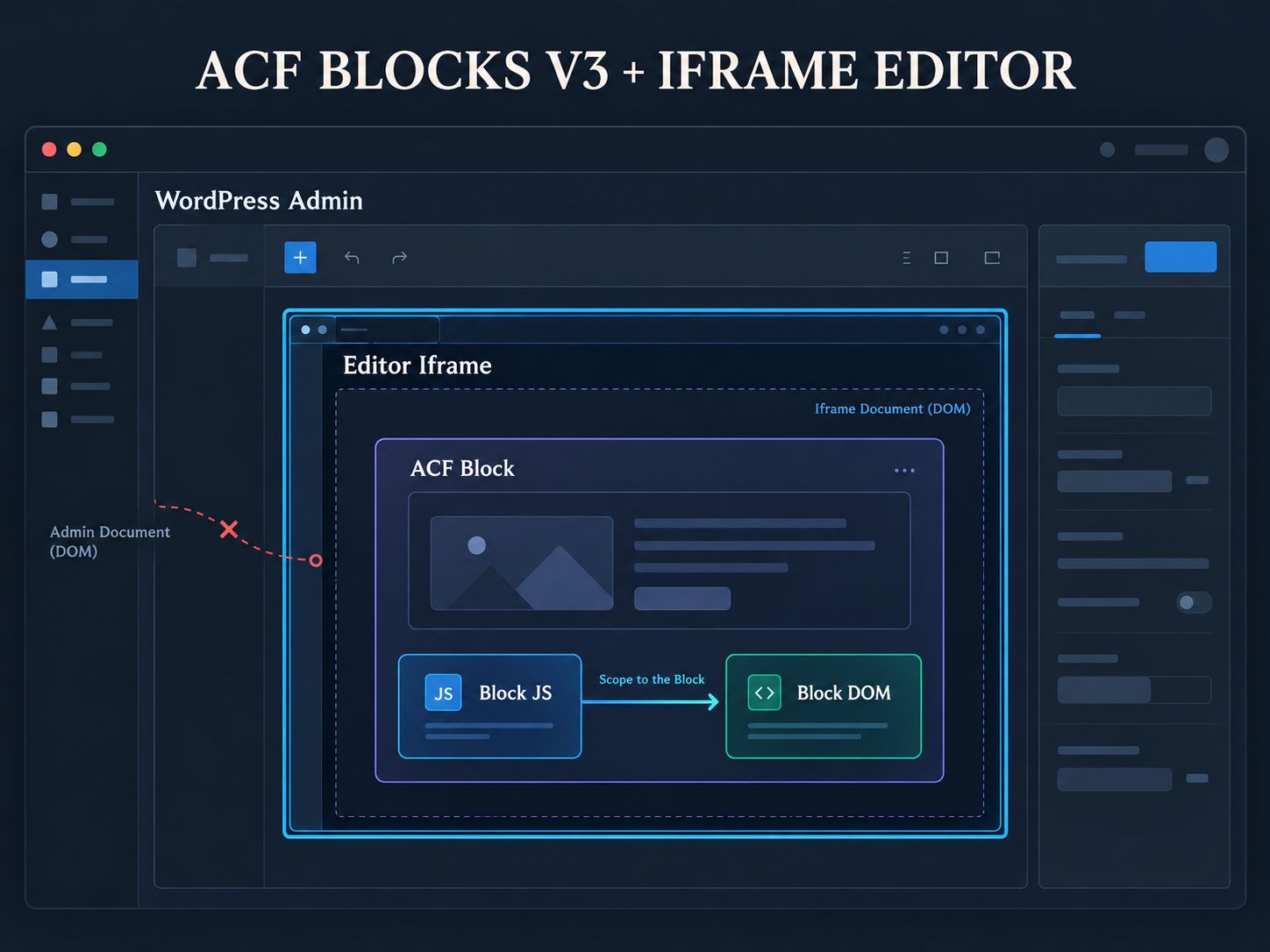
This makes several development habits increasingly important:
- Prefer block-scoped selectors.
- Do not reach into the canvas through an assumed global document.
- Register scripts through modern block mechanisms.
- Treat preview markup as replaceable.
- Test the block inside the actual WordPress editor, not only on the frontend.
For related Gutenberg architecture, WebPlatformLab’s WordPress Block Bindings architectural guide provides additional background.
Should Modern ACF Blocks Use block.json?
Yes, for new development that is generally the direction you should follow.
ACF has recommended block.json registration since ACF 6.0, and its older acf_register_block_type() documentation now explicitly points developers toward the modern registration format.
A simplified block could look like this:
Do not blindly copy that example into an existing production block. Compare it with the block’s current registration, supported ACF version, existing saved content, and migration requirements first.
What If You Use a Custom Block Namespace?
Pay attention to the registered block name.
A normal ACF-namespaced block is commonly targeted like this:
If you deliberately register the block under another namespace, the callback can require the full block type:
So when a callback never fires, do not immediately assume there is an ACF timing bug.
Confirm the block name first.
You can inspect the wider WordPress stack with the Website Technology Checker when auditing an unfamiliar installation.
What About InnerBlocks?
InnerBlocks deserves separate treatment because the preview structure can be more complicated than a simple block wrapper.
If your callback fires but $block.length is 0, or the elements you expected are missing, inspect the actual markup:
Then inspect the block’s PHP output and the DOM Gutenberg eventually produces.
Do not automatically translate an empty $block into “the action fired too early.” It can also indicate that the wrapper you expect does not exist in the rendered structure.
This is one reason a small lifecycle diagram and an actual editor screenshot are more useful here than another paragraph of theory.
Developers working with similarly nested WordPress relationships may also find the JetEngine child category troubleshooting guide useful for understanding how dynamic structures can complicate expected output.
Can $is_preview Replace render_block_preview?
No. They solve different problems.
$is_preview is available on the PHP rendering side. It lets you decide whether the block should output different markup while being previewed in the editor.
render_block_preview is a JavaScript action used after the preview markup exists.
For example, you might intentionally avoid loading a complicated interactive map inside Gutenberg:
That can be better than spending hours forcing a complex frontend application to behave perfectly inside the editor.
Sometimes the right fix is not better initialization.
Sometimes the right fix is a simpler preview.
A Practical Pre-Publish Test
Before deploying a block fix, test the behavior that content editors will actually use.
- Confirm initial insertion.
- Confirm field editing.
- Confirm repeated field changes.
- Confirm preview redisplay.
- Confirm block duplication.
- Confirm several copies of the same block on one page.
- Confirm save and reload.
- Confirm frontend rendering.
- Confirm any nested-block behavior your component uses.
Do that on staging rather than discovering lifecycle problems on production. WebPlatformLab’s staging guide explains the isolation principles, and the WordPress website quality-control guide provides a wider QA workflow.
If the component adds substantial JavaScript, also review the site’s delivery and security configuration rather than solving the editor problem in isolation. The WordPress .htaccess Generator and the main developer tools collection are available for those adjacent checks.
First-Hand Development Perspective
When I work with custom WordPress blocks, I find it much easier to debug them when I treat the preview DOM as disposable.
I separate the block into three responsibilities:
ACF and WordPress manage editor state.
PHP decides what HTML should exist.
JavaScript enhances that HTML after it exists.
If the HTML is wrong, I stay on the rendering side.
If the HTML is correct and the interaction is broken, I move to the JavaScript initializer.
That sounds obvious when written down, but mixing those two layers is exactly what makes this particular ACF problem confusing.
I also avoid treating delays as architecture. A timeout can prove that timing is involved; it does not prove that a timeout is the right fix.
Frequently Asked Questions
Does render_block_preview fire after ACF renders the block?
Yes. That is the intended lifecycle. It gives JavaScript access to the newly rendered preview DOM.
Is render_block_preview supposed to create the preview?
No. It is an action fired around the preview lifecycle so JavaScript callbacks can work with the rendered block.
Why does my block work on the frontend but fail in Gutenberg?
The frontend element may already exist when your ordinary initialization runs. In Gutenberg, ACF can create or replace the preview later, so the component needs to be initialized against the new preview.
Can I manually call render_block_preview?
You can manually execute the action, but doing so only runs listeners. It does not automatically create fresh PHP-rendered block HTML.
Why is my slider initialized twice?
Your block is probably being rendered more than once and the initializer is creating a second instance. Make the initialization repeat-safe or destroy the existing library instance before rebuilding it.
Should I use setTimeout?
Not as the default fix. First use the block lifecycle. A timeout is more useful as a diagnostic clue than as permanent architecture.
Why do older tutorials say the action fails when returning to preview mode?
Some older reports describe behavior from previous ACF releases. Verify the problem against your current ACF version before copying an old workaround.
Does ACF Blocks V3 change this problem?
It changes the surrounding editor architecture significantly, especially with WordPress 7.1’s iframe-based post editor. That makes properly scoped scripts and modern block registration more important.
Should I migrate an existing V2 block immediately?
Not blindly. Check how its editing interface works, whether it relies on V2 edit mode, its saved content, and the current ACF/WordPress versions. Test the migration on staging before changing production blocks.
What should I inspect first when the callback fires but nothing works?
Inspect the actual preview HTML. If the correct HTML exists, troubleshoot JavaScript initialization. If the HTML is stale or incomplete, troubleshoot rendering and block state first.
Final Takeaway
The fact that ACF render_block_preview fires after preview rendered is usually not the bug.
It is the clue.
render_block_preview exists because the block’s new DOM has already been produced and your JavaScript now has an opportunity to initialize it.
So diagnose the problem in this order:
Once you keep those two problems separate, you stop trying to fix stale PHP output with JavaScript events—and you stop trying to solve JavaScript initialization failures by forcing unnecessary rerenders.
If your block still fails after following that distinction, the most useful debugging details are the ACF version, WordPress version, block registration, console output from render_block_preview, and the actual rendered preview markup.