
A 301 redirect SEO penalty is a common concern when a website loses traffic after changing URLs. But Google doesn’t penalize a website simply for using a 301 redirect. Problems usually come from what happens around the move: the wrong destination, inaccessible pages, conflicting redirect rules, or changes to the content itself. Here’s how to identify the difference, check your redirects, and choose the right fix.
Do 301 Redirects Cause an SEO Penalty?
No. A properly implemented 301 redirect does not automatically cause a Google SEO penalty or PageRank loss. Google recommends permanent redirects when pages move to new URLs and confirms that they don’t inherently reduce PageRank.
So why do website owners sometimes lose rankings after setting them up?
Because changing a URL often involves more than the redirect itself.
Imagine moving an article from /seo-guide-2025/ to /seo-guide/. You configure a 301 redirect, preserve the article’s useful content, update the internal links, and confirm that the replacement page loads correctly.
That’s a normal migration.
Now imagine redirecting the same article to a generic homepage because you deleted its original content. The HTTP response might still be 301, but the destination no longer answers the original search query.
The problem isn’t the number 301. It’s what the new page offers, whether Google can index it, and whether the website’s signals remain consistent.
There is another distinction worth understanding: Google’s spam policies address deceptive redirects, including cases where users are unexpectedly sent to misleading content. Legitimate website moves are explicitly different from these practices.
Bottom line: A 301 is a technical instruction, not a guarantee of rankings and not an automatic penalty.
Check Your 301 Redirect Before Making Changes
If you’re concerned about a redirect’s effect on SEO, start by examining the actual HTTP response.
Your first task is to determine whether the old URL reaches the intended destination and whether that destination returns a successful response.
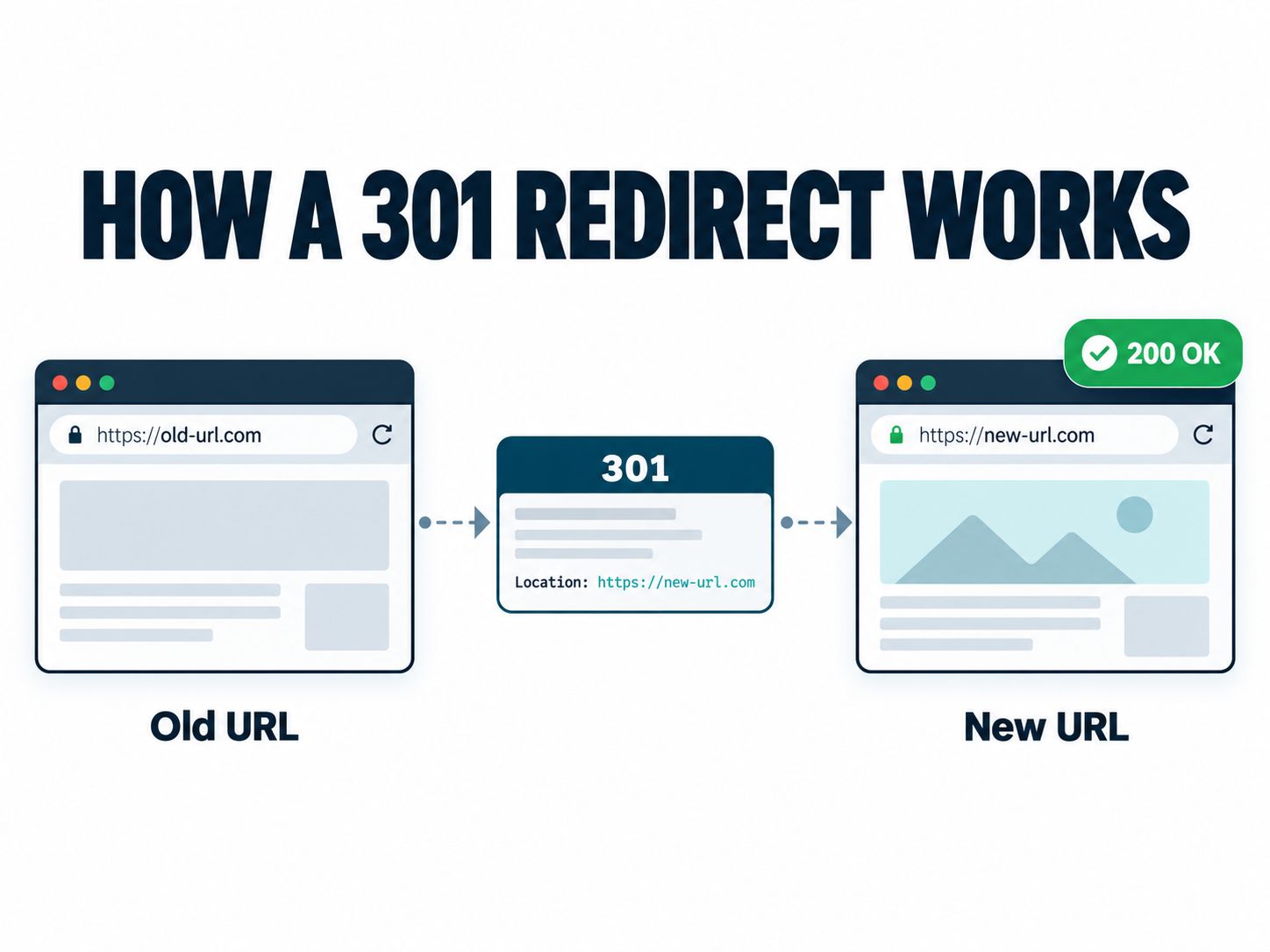
What a healthy permanent redirect looks like:
example.com/old-guide → 301 → example.com/new-guide → 200 OK
A result like 301 → 200 is a good starting point. However, it doesn’t prove that the destination is indexable, that Google selected it as canonical, or that all ranking signals have been consolidated.
Test a redirect using cURL
You can check response headers from a terminal:
curl -I https://example.com/old-guideFor a correctly configured permanent redirect, an illustrative response is:
HTTP/2 301
location: https://example.com/new-guide
To follow the entire redirect sequence:
curl -L -I https://example.com/old-guideThe -L option follows redirects. The -I option requests response headers rather than the full page body.
One technical caveat: HEAD requests aren’t always handled identically to GET requests. If the results seem inconsistent, repeat the test with GET.
For example:
curl -L -sS -o /dev/null \
  -w 'Status: %{http_code}\nFinal URL: %{url_effective}\n' \
  https://example.com/old-guide
This reports the final HTTP status and effective destination URL.
If you’re publishing this article inside an online redirect-checker tool page, the actual checker should appear directly below the introduction. It should show the initial status, intermediate redirects, final URL, and any detected loop or failure—not just a green success message.
Which HTTP Redirect Result Is Good or Bad for SEO?
An HTTP code only tells you what the server did. To decide whether it’s correct, you also need to know whether the move is permanent and whether the destination is useful.
| Result | What it tells you | Next action |
|---|---|---|
301 → 200 |
Permanent redirect reaches a page | Check destination relevance and indexability |
308 → 200 |
Permanent redirect reaches a page | Usually appropriate for a permanent move |
302 → 200 |
A temporary redirect reaches a page | Confirm the move really is temporary |
301 → 301 → 200 |
Redirect chain | Point directly to the final destination where possible |
301 → 404 |
Replacement is missing | Correct the target or recover the page |
301 → 500 |
Destination has a server error | Fix the server-side failure |
A → B → A |
Redirect loop | Remove conflicting rules |
404 or 410 |
Page is unavailable or intentionally gone | Appropriate when no useful replacement exists |
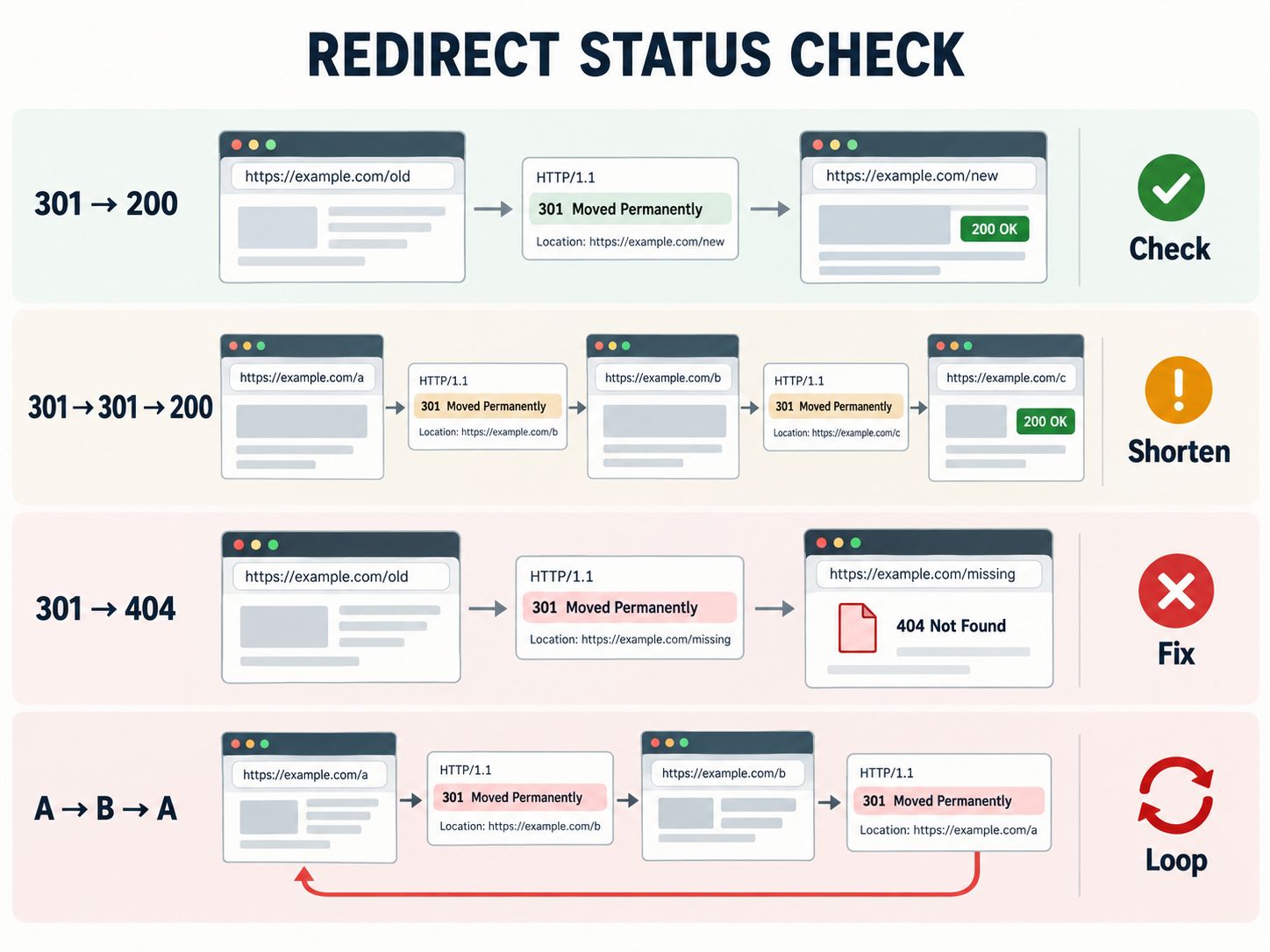
The last row matters. Not every removed URL needs a redirect.
Google recommends a real 404 or 410 when content is permanently unavailable and has no comparable replacement. If the content has moved, use an appropriate permanent redirect instead.
An example: A discontinued product
Suppose your store once sold a particular running shoe.
If the manufacturer releases a direct replacement, redirecting the old product page to the new model may help shoppers find what they wanted.
But if the product is discontinued and your store sells nothing comparable, sending everybody to the homepage might be frustrating.
Sometimes the better decision is to leave the old URL as a useful discontinued-product page. In other cases, removing it with a 404 or 410 makes more sense.
You don’t make that decision from the HTTP code alone. You make it from the visitor’s needs and the site’s content.
This is particularly relevant when working with Shopify collection SEO, where product availability, collection URLs, and customer search intent can affect the usefulness of a destination.
Does a 301 Redirect Pass PageRank and Backlink Value?
Yes, legitimate permanent redirects can pass ranking signals, including PageRank, to the destination URL.
Google’s site-move documentation explicitly says permanent redirects do not cause PageRank loss. That corrects an old misconception that every 301 inevitably discards a fixed percentage of link value.
Still, that doesn’t mean rankings will remain identical.
A backlink is only one of the signals involved in search visibility. Google must also evaluate the new content, its relevance to the query, and how the replacement fits into the website.
For example, if a detailed guide about WordPress caching moves to a new URL with the same useful information, the relationship between the old and new pages is straightforward.
If you redirect the guide to a broad web-hosting sales page, the destination serves a different purpose.
Both might receive a permanent redirect, but you shouldn’t expect them to perform the same way in search.
Avoid tools or services that promise an exact percentage of “SEO juice” transfer for every migration. That number is not a reliable way to predict future rankings.
For related website-performance considerations, see our guide to optimizing Core Web Vitals on shared hosting.
301 vs. 302 vs. 307 vs. 308: Which Redirect Should You Choose?
You should choose the redirect status that matches your intention, not whichever one you believe will produce the fastest ranking increase.
| Redirect | Type | Best use |
|---|---|---|
| 301 | Permanent | Moving an article or domain permanently |
| 308 | Permanent | Permanent redirects where the original request method must be preserved |
| 302 | Temporary | Temporarily sending visitors elsewhere |
| 307 | Temporary | Temporary redirects preserving the request method |
| 303 | See Other | Redirecting a client to another resource, commonly after a form submission |
Google uses permanent redirects as a signal toward the destination being canonical. Temporary redirects are treated differently, although other signals can still influence canonical selection.
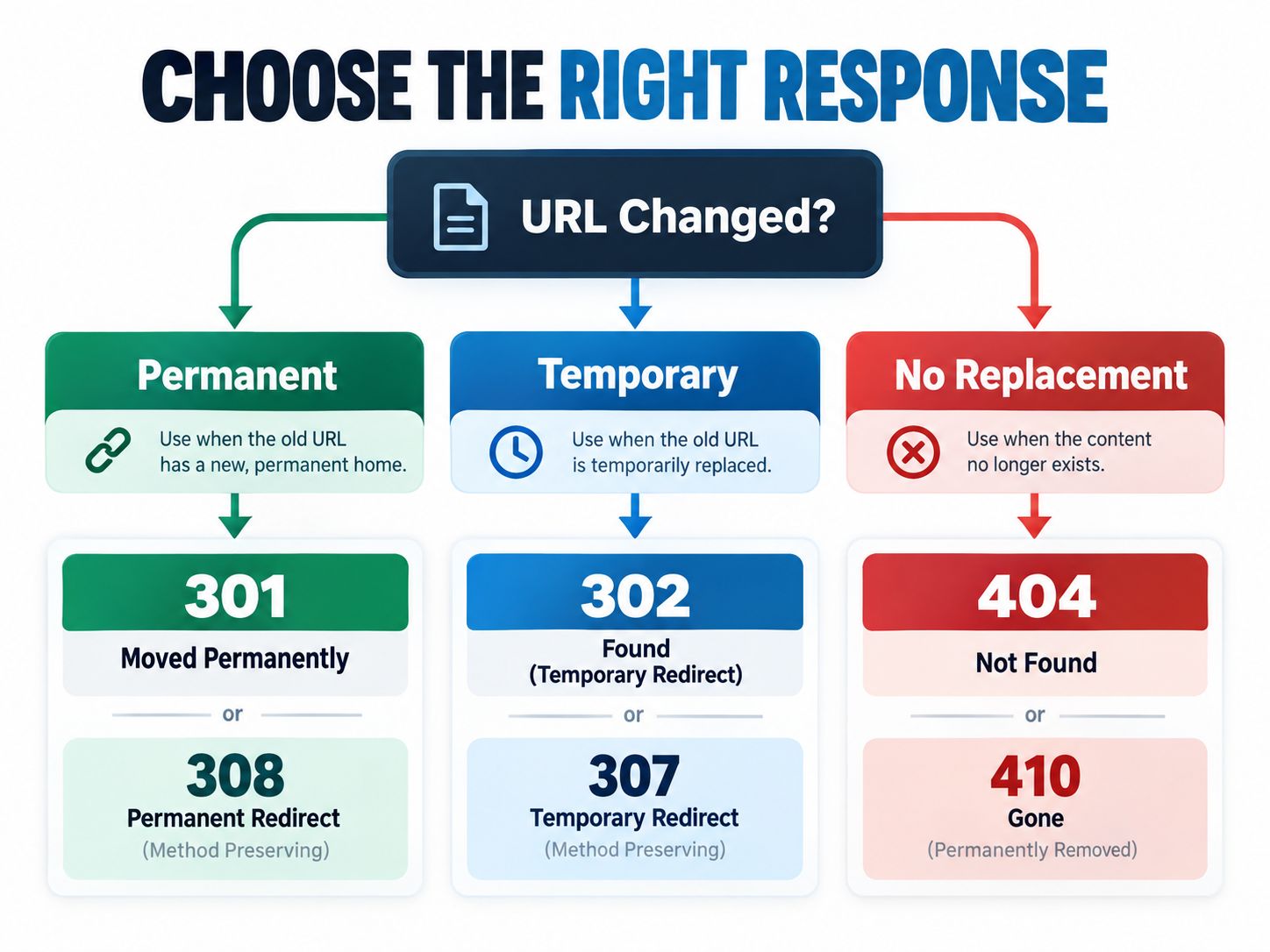
A simple rule for deciding
If the original URL is permanently retired and has a relevant replacement, use a 301 or 308.
If the original URL is expected to return, use a temporary redirect when appropriate.
If the resource is permanently gone and no useful alternative exists, consider 404 or 410 instead of sending visitors somewhere unrelated.
For most ordinary webpage moves, 301 remains a practical and widely supported choice.
Why Rankings Sometimes Drop After a 301 Migration
When traffic falls after a migration, the timing can make the redirects seem guilty. But there are several other explanations to investigate.
1. The new page is less relevant than the old one
Suppose your old article answered several questions in depth. During a redesign, you replace it with a short overview and redirect the original URL.
The redirect may work perfectly, but the content no longer serves the same search intent.
Fix: Compare the old and new pages. Restore important information or redirect to a closer replacement.
2. Several old pages redirect to the homepage
This is common during hurried website migrations.
Instead of mapping URLs individually, every old article or product is redirected to the homepage.
The homepage might not satisfy visitors who expected a detailed product description or troubleshooting guide.
Fix: Build a URL mapping spreadsheet and match important source pages to the most appropriate destinations.
Where no meaningful replacement exists, use the response that accurately describes the resource’s state.
3. Your redirect chain contains unnecessary hops
Consider this route:
/old-guide
    ↓ 301
/guide-2025
    ↓ 301
/new-guide
    ↓ 200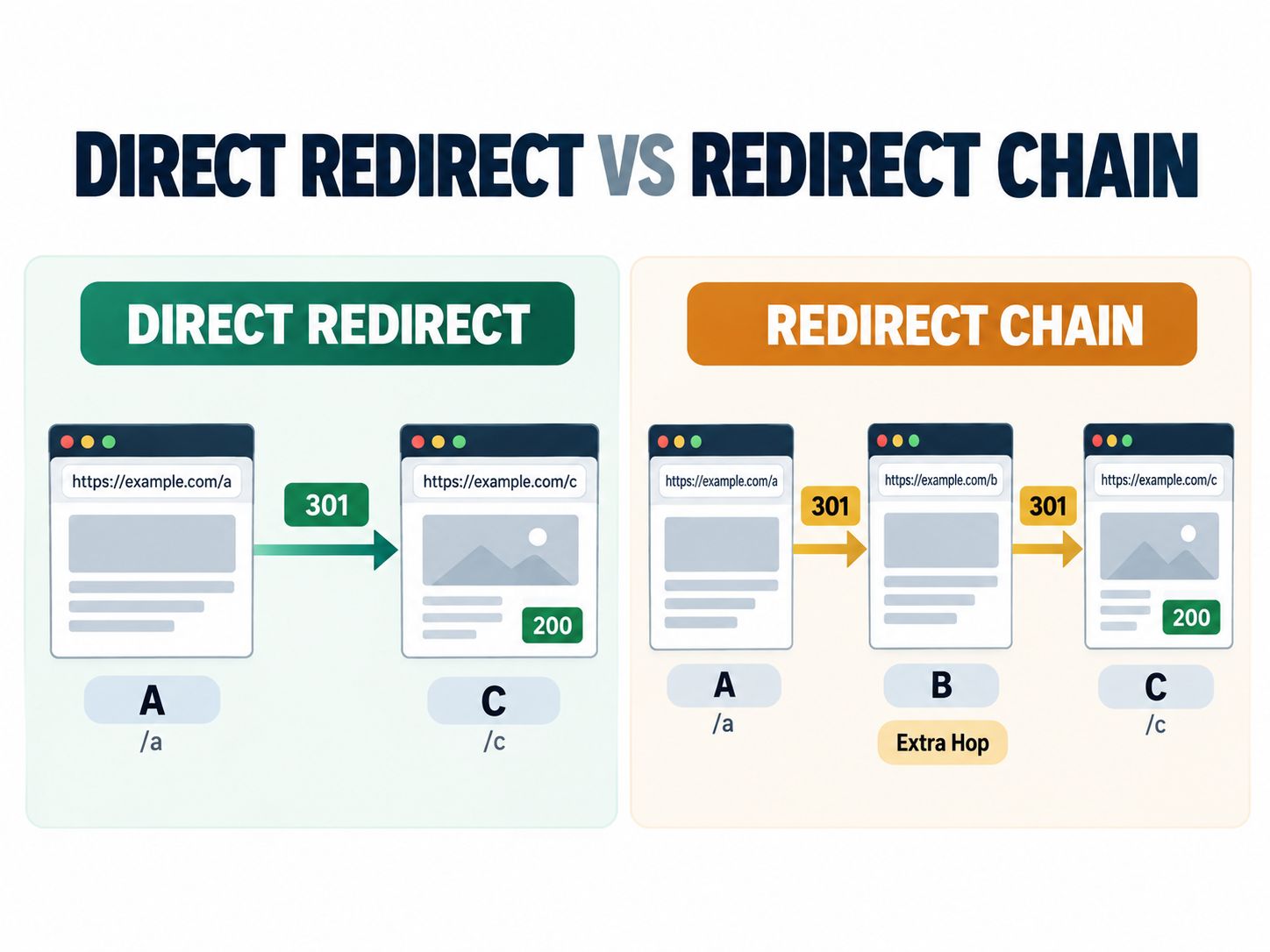
Google can follow redirect chains, but additional hops create avoidable delays and potential failure points.
Google recommends direct redirects where possible and advises keeping chains short.
Fix: Redirect /old-guide directly to /new-guide.
4. Your server and WordPress plugin disagree
A WordPress redirect plugin might send a URL from A to B. Meanwhile, a hosting or CDN rule sends B back to A.
The result is a loop.
This often requires inspecting more than one configuration layer rather than simply deleting the most recently added rule.
Fix: Identify where each redirect is managed and resolve the conflicting instructions.
For related WordPress configuration and testing practices, see our WordPress website quality control guide and WordPress staging subdomain setup tutorial.
5. The destination page isn’t indexable
Perhaps the new page contains noindex, uses the wrong canonical tag, or cannot be accessed reliably by Googlebot.
A browser may still show the page, making the problem less obvious.
Fix: Inspect the destination in Google Search Console. Check indexability, canonical signals, and the returned HTTP response.
You can also explore our SEO and metadata tools for related technical SEO tasks.
6. The site migration changed important content
A redesign may alter headings, navigation, internal links, templates, and page content at the same time URLs change.
If rankings decline, isolate those changes before assigning a cause.
Fix: Compare representative old and new pages and investigate which changes affect the lost queries.
This is especially relevant during CMS migrations, including an Umbraco to WordPress migration, where platform changes can introduce additional technical considerations.
How to Find Out Whether Google Actually Penalized Your Website
A drop in organic traffic is not the same as a confirmed Google manual action.
To investigate:
- Open Google Search Console and check Security & Manual Actions → Manual actions.
- Review whether Google has reported a specific problem.
- Check Performance for the affected pages and queries.
- Inspect the new URLs for indexing and canonicalization issues.
- Compare the timing of the decline with the migration and any other major website changes.
If Google reports a manual action, investigate the stated violation and follow the relevant remediation process.
If no manual action is reported, do not automatically assume there is a hidden redirect penalty. A website may lose traffic because of technical problems, content changes, or broader changes in search performance.
| Evidence | Reasonable conclusion |
|---|---|
| Manual action reported | A confirmed policy-enforcement issue needs attention |
| Loop or destination error | An identifiable technical redirect failure exists |
| New pages excluded from indexing | Investigate indexing and canonicalization |
| Rankings dropped, redirects healthy | Investigate content and other SEO changes |
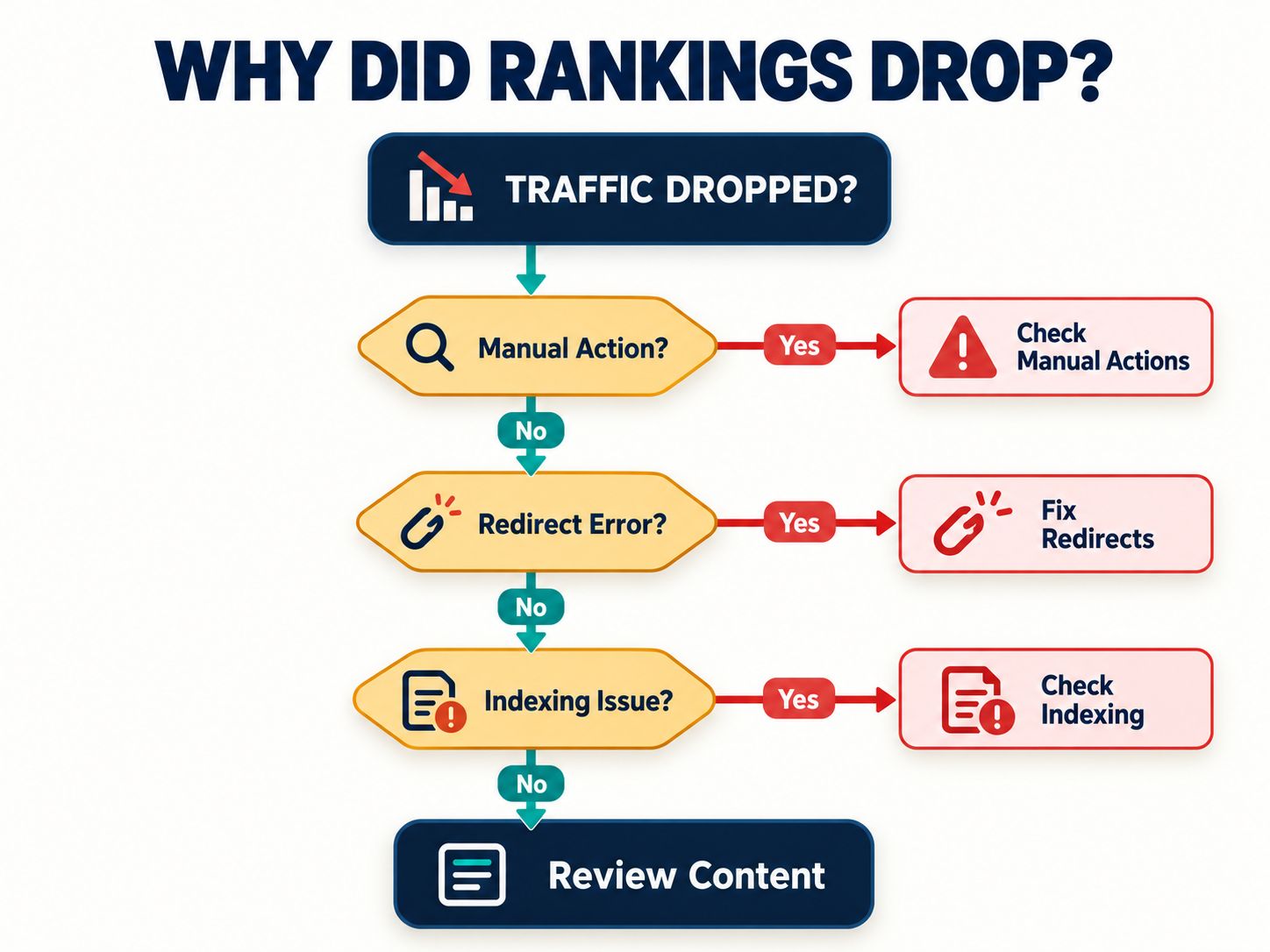
This distinction helps you avoid making unnecessary redirect changes when the problem lies somewhere else.
How to Create an SEO-Friendly 301 Redirect
A server-side redirect is generally the recommended approach for a permanent URL move. The configuration depends on the software handling your requests.
Before adding a new rule, check whether the redirect is already configured in your web server, CDN, hosting dashboard, or CMS.
Apache .htaccess
For a simple URL move on a compatible Apache configuration:
Redirect 301 /old-page https://example.com/new-pageTest the destination after saving the change. Existing rewrite rules may affect the result.
Nginx
For a specific path:
location = /old-page {
    return 301 https://example.com/new-page;
}
Validate the configuration before reloading the server.
PHP
For a PHP-controlled redirect:
<?php
header('Location: https://example.com/new-page', true, 301);
exit;
The redirect header must be sent before page output.
WordPress
On WordPress, redirects may be handled through a dedicated plugin, server configuration, or the hosting provider.
The approach matters less than the result: an appropriate status code, the correct destination, no conflicts, and minimal unnecessary hops.
Avoid creating duplicate redirect rules in several places unless you have a specific reason to do so.
For additional platform-specific context, our WordPress architecture deep dive and server-side rendering versus static islands comparison cover related aspects of how websites deliver content.
How Long Should You Keep a 301 Redirect?
Google recommends maintaining redirects for as long as possible, generally at least one year, during a site move. Keeping them longer can be useful when old URLs still receive visitors or backlinks.
There is no universal date when every website migration is fully processed.
Google says a medium-sized site move may take a few weeks or more for new URLs to replace old ones in search results. Larger migrations can take longer.
That doesn’t mean every page will recover its previous ranking after a particular number of days.
Monitor the important URLs, resolve confirmed problems, and give search engines time to discover the changes.
Can a 301 Redirect Transfer an SEO Penalty From an Expired Domain?
This is a more complicated question than whether a normal permanent redirect is safe.
Some website owners acquire expired domains because those domains previously attracted backlinks. They then redirect the domains to existing websites, hoping to gain search visibility.
A redirect does not guarantee that those historical links will produce a ranking benefit.
The old website’s subject matter, previous content, link context, and the reason for the move all matter.
Google’s spam policies distinguish legitimate redirects from manipulative practices. They also address expired-domain abuse where domains are repurposed primarily to manipulate rankings with low-value content.
Before redirecting an acquired domain, investigate its history and whether its content has a meaningful relationship with your current website.
Community discussions about redirecting penalized domains are useful for generating questions, but they don’t prove that every negative ranking signal automatically transfers from one website to another.
Likewise, replacing a 301 with a temporary redirect is not a guaranteed way to protect a new website from problems associated with an old domain.
Practical recommendation: If the purpose of the redirect is a legitimate rebrand, consolidation, or content move, document that purpose and map the URLs carefully. If the only motivation is to exploit historical backlinks, reconsider the strategy.
301 Redirect SEO Audit Checklist
Before treating a migration as complete, work through the checks below.
- Old URLs redirect to relevant replacement pages.
- Permanent moves use an appropriate 301 or 308.
- Important final destinations return HTTP 200.
- Redirect chains are minimized.
- No redirect loops exist.
- Replacement pages are indexable.
- Canonical signals identify the intended URLs.
- Internal links point directly to replacement URLs.
- XML sitemaps list the intended canonical URLs.
- Search Console reports have been reviewed.
- Important traffic and ranking changes are monitored.
For larger migrations, use a spreadsheet or crawler to track the actual HTTP response and destination for each important URL. Testing a handful of pages is not sufficient evidence that thousands of URLs have been migrated correctly.
For broader review, explore our performance auditing tools, website engineering guides, and technical tutorials.
Frequently Asked Questions
Are 301 redirects bad for SEO?
No. Legitimate 301 redirects are standard for permanent URL moves. Incorrect destination mapping, redirect loops, and inaccessible replacement pages can create SEO problems, but the 301 status itself is not an automatic penalty.
Does a 301 redirect lose link juice?
Google says 301 and other permanent redirects do not inherently cause PageRank loss. However, a redirect cannot guarantee that the replacement page will retain every previous keyword ranking.
Can a 301 redirect cause a soft 404?
An irrelevant redirect destination can contribute to a soft 404 classification. For example, redirecting many unrelated articles to a generic homepage may not provide a meaningful replacement for the original content.
Should I use 301 or 302 for SEO?
Use 301 when the move is permanent and 302 when it is temporary. The correct choice depends on what you intend to happen to the original URL.
Can too many 301 redirects hurt SEO?
A large number of legitimate direct redirects is not inherently harmful. The bigger concerns are redirect chains, loops, incorrect destinations, and unnecessary requests.
Should I redirect every deleted URL?
No. If a page has a clear replacement, a permanent redirect is often appropriate. When the content is permanently unavailable and there is no suitable replacement, a 404 or 410 may be better.
Can I recover rankings after fixing a bad redirect?
Possibly, but there is no guaranteed recovery timeline or outcome. Correcting a technical error allows search engines to process the intended URL relationship, while rankings still depend on the destination and other search factors.
What is the difference between a redirect checker and Google Search Console?
A redirect checker examines HTTP behavior, such as status codes, destination URLs, and chains. Google Search Console provides information about how Google discovers, indexes, and displays pages in search results. They solve different parts of the same investigation.
Does a permanent redirect work differently for USA and EU websites?
The underlying HTTP status behavior is the same. International websites should also review language-specific destinations, canonical relationships, and hreflang where appropriate.
Final Verdict: Don’t Blame the 301 Until You’ve Checked the Evidence
A 301 redirect is not an SEO penalty. It’s a normal way to send visitors and search engines from an old URL to its permanent replacement.
If your rankings have dropped after a migration, the useful question isn’t simply whether you used a 301. It’s whether the new URL provides the expected content, loads correctly, remains indexable, and receives consistent signals from the rest of your website.
Check those fundamentals first. Fix genuine redirect errors, but avoid changing perfectly valid redirects based on speculation.
For further technical reference, use Google’s official redirect documentation and site migration guide.
Shareable insight: A 301 redirect tells Google where a page moved. A successful SEO migration also requires relevant content, accessible destinations, correct canonical signals, and consistent internal links.
Have you seen rankings change after a website migration? Share which redirect responses you found and what happened after checking the destination pages. Specific examples can help other readers diagnose similar problems.