
Hiring a website migration agency should make moving your website less risky, not more complicated. Yet a surprisingly important question often gets lost in the sales process: what exactly is the agency responsible for protecting?
Your website isn’t just a collection of pages. It may contain years of search visibility, customer records, product data, integrations, and links that bring people to your business. Move those pieces incorrectly, and a website that looks perfectly fine can still lose enquiries or stop taking orders.
This guide helps you decide whether you need professional migration services, compare agencies, understand what your quote should include, and check whether your new website is actually ready to launch.
Written by: Md Zubayer Al Hasan
Updated: October 13, 2026
Focus: Website development, WordPress migration, technical SEO, and quality assurance
Do You Need a Website Migration Agency or Just a Developer?
You need a website migration agency when the project requires several types of expertise, carries significant business risk, or involves systems that must remain operational during the move. A smaller hosting transfer may only need an experienced developer or assistance from the hosting provider.
The distinction becomes clearer when you look at real project requirements.
Consider a local consulting website with twelve pages and one enquiry form. Its owner wants to move WordPress to faster hosting without changing the domain or URLs. With suitable backups and testing, a developer can often handle that job.
Now consider an online store with subscriptions, customer accounts, live orders, and hundreds of product URLs. It is moving to a different ecommerce platform. The team must preserve product relationships, coordinate payment integrations, manage active transactions, and protect important search landing pages.
That is a much bigger assignment.
Which Option Fits Your Situation?
| Your Project | Most Suitable Starting Point |
|---|---|
| Small website moving to new hosting | Hosting provider or experienced developer |
| WordPress website with custom functionality | WordPress migration specialist |
| Established website changing domain | Developer plus technical SEO expertise |
| Ecommerce platform change | Ecommerce migration team |
| Redesign with many URL changes | Development and SEO team |
| Multiple international websites | Agency with multilingual and international migration experience |
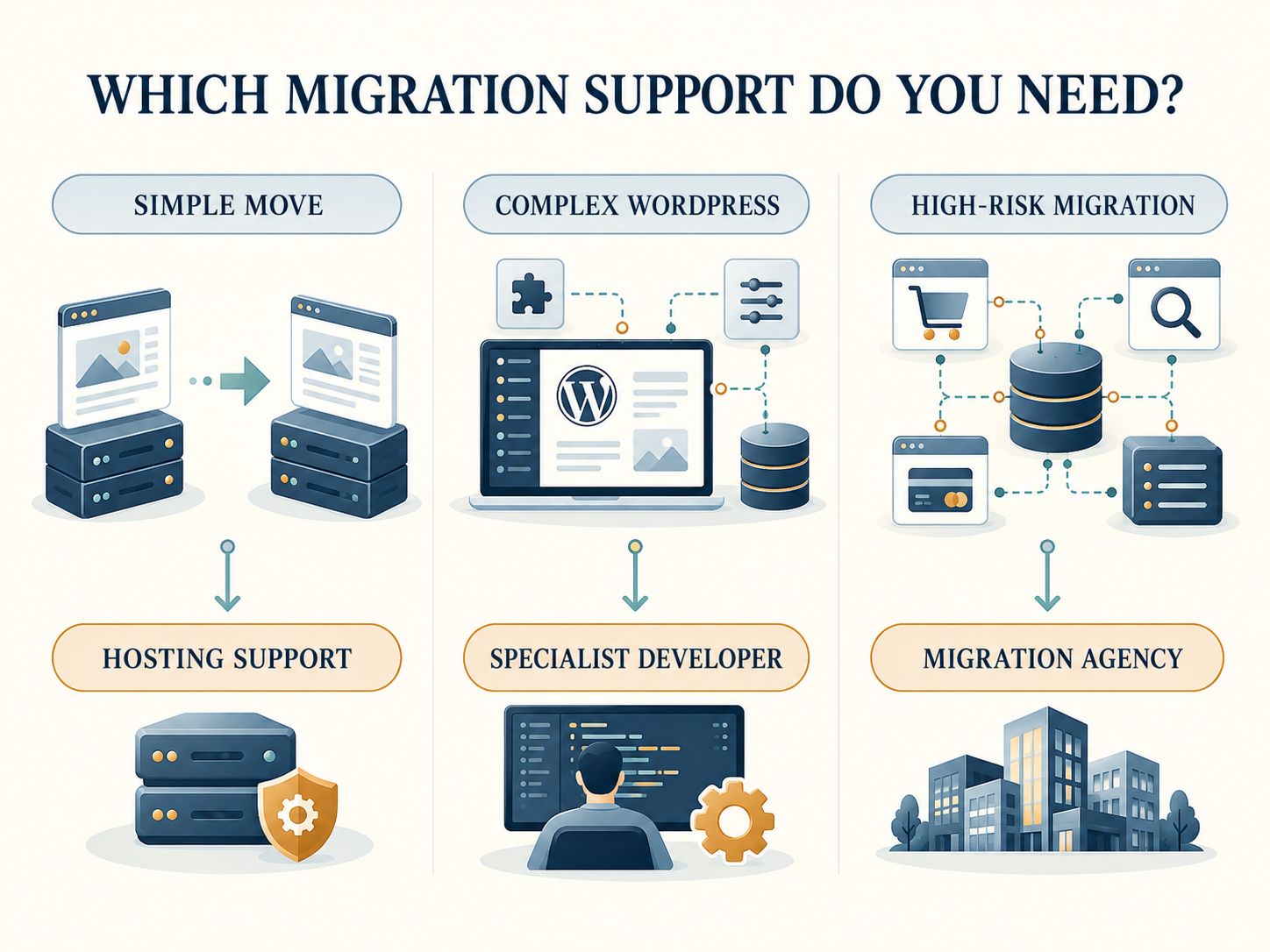
An agency is not automatically better than a freelancer. The important factor is whether the people doing the work can handle every critical dependency.
If you are choosing between platforms rather than simply moving hosting, start by comparing their capabilities. WebPlatformLab publishes website platform guidance, including a comparison of Webflow vs. Framer, an overview of WordPress architecture, and a Shopify vs. WooCommerce cost comparison.
Key takeaway: Don’t hire an agency because website migration sounds technical. Hire one when the complexity and potential business impact justify specialist support.
What Does a Website Migration Agency Actually Do?
A website migration agency manages the planning, transfer, testing, and launch of a website moving between technical environments, domains, or platforms.
A complete service should extend beyond copying the database and uploading files.
The Migration Services Worth Paying For
| Service | What You Should Receive |
|---|---|
| Website discovery | Inventory of pages, databases, integrations, and risks |
| Migration planning | Timeline, responsibilities, staging plan, and success criteria |
| Content transfer | Mapped pages, assets, metadata, and structured data |
| Technical implementation | Hosting, CMS, themes, templates, and integrations |
| SEO migration | URL map, redirects, canonical checks, and crawl testing |
| Quality assurance | Documented functional and technical test results |
| Deployment | Approved launch plan and named responsible staff |
| Recovery planning | Backup, incident response, and rollback procedures |
| Post-launch support | Monitoring, defect resolution, and handover |
Before signing a contract, clarify which services are included and which are excluded.
For instance, an agency might agree to move the WordPress site but exclude reconfiguring a third-party CRM. That exclusion may be reasonable, but it must be documented before the CRM stops receiving leads.
For projects involving lead-generation workflows, the landing page CRM integration guide provides additional context on connections that may need testing.
Hosting Migration Versus Domain Migration
These are different projects.
A hosting migration changes the infrastructure serving the website without necessarily changing the public URLs. A domain migration changes the addresses people and search engines use to reach the content.
Google treats these situations differently. When the visible URLs remain unchanged, the focus is on preparing the new infrastructure, switching traffic, and checking that the new hosting responds correctly.
When URLs change, redirect mapping and search-engine discovery become central requirements.
This distinction matters because a good migration proposal should not charge for unnecessary work or omit work that your particular move requires.
How Does a Website Migration Agency Protect SEO?
An SEO website migration agency identifies which pages already contribute search traffic and makes sure search engines can discover, access, and understand their intended replacements.
That means investigating the old website before anyone begins deleting pages or changing URL structures.
First, Find Out What Could Be Lost
Ask the agency to prepare an SEO baseline containing:
- Important organic landing pages
- Search clicks and impressions
- Existing indexed and indexable URLs
- Pages with valuable external links
- Current canonical settings
- Organic conversions and enquiries
- Existing XML sitemaps and internal link structures
A website with 800 URLs doesn’t necessarily have 800 equally important pages.
A few service pages may attract most of its enquiries. Those deserve special attention during planning and testing.
What a Proper URL Map Looks Like
Suppose a company reorganizes its services.
| Existing URL | New URL | Decision |
|---|---|---|
/website-design/ |
/services/web-design/ |
Permanent redirect |
/contact-us/ |
/contact/ |
Permanent redirect |
/blog/seo-checklist/ |
Unchanged | Preserve existing URL |
/outdated-promo/ |
No relevant replacement | Review before removal |
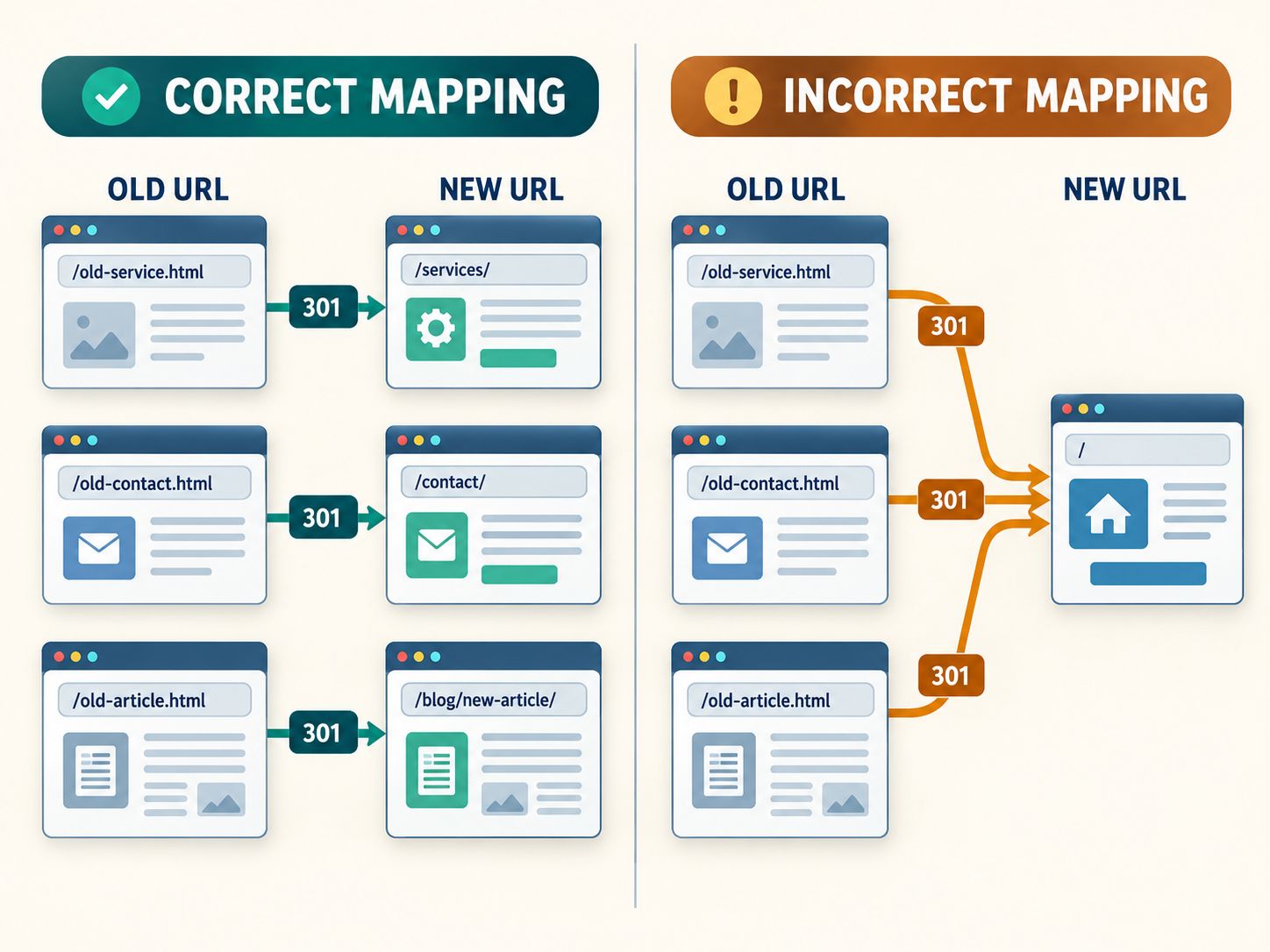
The agency should create equivalent mappings for the real site, using a crawl and relevant performance data.
For permanent URL moves, Google recommends server-side permanent redirects such as 301 or 308 whenever technically possible. Its official site move documentation explains how to plan, implement, and monitor migrations involving URL changes.
Avoid redirecting unrelated old pages to the homepage. Redirects should lead to appropriate destinations, and genuinely removed content without a replacement may need to return a proper 404 or 410 response.
If you want a deeper explanation of redirect behavior, read 301 Redirect SEO Penalty and the guide covering 404 errors, SEO, and user experience.
How Long Should Redirects Remain Active?
Don’t remove redirects as soon as the new site appears in Google.
Google generally recommends maintaining site-move redirects for at least one year and as long as practical. Keeping useful redirects longer can also protect visitors following old bookmarks or external links.
This is especially important after a domain change.
What Else Must Be Checked?
Redirects alone are insufficient.
The agency should review production noindex directives, robots.txt, canonical URLs, internal links, structured data, XML sitemaps, and crawlable content.
If the migration changes a domain or URL structure, the corresponding Search Console procedures should also be reviewed.
Important: No reputable SEO migration agency can guarantee that rankings and traffic will remain exactly the same. Even a well-executed move can involve temporary fluctuations while search engines process the changes.
What Makes a WordPress Website Migration More Complicated?
WordPress migration becomes more complicated when the website relies on custom themes, plugins, custom fields, ecommerce features, user accounts, or external systems.
A simple WordPress blog may be transferred with standard migration tools. A heavily customized installation requires more planning.
Database and Content Relationships
WordPress stores information across interconnected tables, metadata, taxonomies, and plugin-managed structures.
A migration must preserve those relationships, not merely copy visible pages.
Developers should also use appropriate methods when changing URLs stored inside serialized WordPress data. An ordinary text replacement can corrupt certain stored values.
Websites using advanced custom fields or dynamic relationships may need additional verification. For related technical examples, explore the guides on JetEngine child categories and ACF block preview behavior.
Themes, PHP, and Plugin Compatibility
Moving servers may introduce a different PHP environment, database version, caching system, or file-permission configuration.
The migration team should identify compatibility requirements and test critical features before switching production traffic.
WordPress owners evaluating more advanced custom development can explore WebPlatformLab’s WordPress architectural guide and the Umbraco to WordPress migration guide.
WooCommerce Stores Need Special Protection
Think about what happens if a store receives an order while developers are preparing the new database.
If the team later overwrites production with an older database copy, the new order could disappear from the active data.
The solution depends on the project. It may require a controlled maintenance window, an appropriate synchronization process, or another carefully tested cutover strategy.
At minimum, test products, carts, checkout, payment processing, email notifications, stock management, and customer accounts.
Subscriptions, memberships, and custom order integrations require their own checks.
Security and Configuration
Verify permissions, administrator access, secrets, SSL configuration, and security-related server settings.
Configuration files should never expose database credentials or private keys in public documentation, screenshots, or staging environments.
A migration that works visually but introduces a security weakness is not finished.
If your migration requires a separate testing environment, the guide to setting up a WordPress staging subdomain on Blacknight provides a relevant practical example.
How Do You Choose the Best Website Migration Agency?
The best website migration agency for your project is the one that can demonstrate relevant platform experience, clear testing procedures, an accountable launch process, and reliable support afterward.
Don’t judge candidates only by the number of websites shown in their portfolios.
A team that builds attractive marketing websites may have limited experience preserving subscription data or managing complicated domain migrations.
Ask These Eight Questions Before Hiring
- Have you completed migrations involving our current and destination platforms?
- Can you provide a relevant case study or reference?
- Who prepares and verifies the old-to-new URL map?
- Which integrations and customer journeys will you test?
- How will you protect new data created while staging is being developed?
- What happens if a serious problem appears after launch?
- Who owns post-launch SEO monitoring and defect resolution?
- What deliverables will we receive before final payment?
The answers should be specific.
For example, “We test the website thoroughly” is not as useful as “We will run test orders using the payment gateway’s test mode, confirm email notifications, review the redirect inventory, and document the results.”
A Practical Agency Evaluation Scorecard
Use these weights to compare proposals consistently.
| Evaluation Factor | Weight |
|---|---|
| Relevant CMS and technical experience | 20 |
| SEO migration capabilities | 20 |
| Testing and quality assurance | 20 |
| Backup and recovery planning | 15 |
| Relevant project evidence | 10 |
| Communication and ownership | 10 |
| Transparent scope and pricing | 5 |
| Total | 100 |
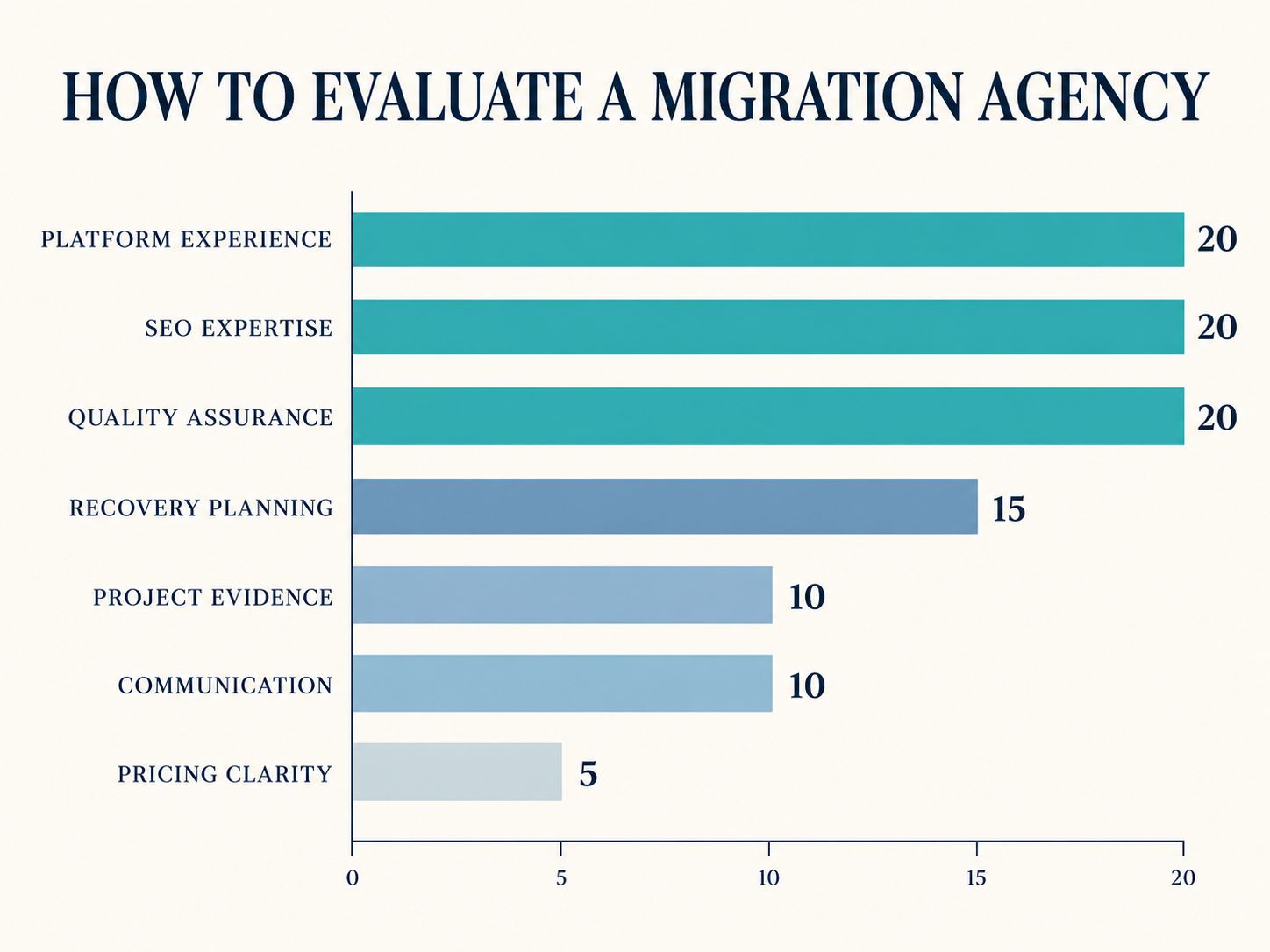
This is an editorial decision framework, not a formal certification.
Score each factor according to the evidence you receive. If an agency refuses to explain its testing process, treat that as a serious concern even if its quoted price is attractive.
For an additional technical review framework, see the WordPress website quality control guide.
Which Website Migration Agencies Are Worth Considering?
Start with agencies that publicly describe migration work relevant to your platform and priorities.
Here are several providers from the competitor landscape:
| Agency | Published Focus | Why It May Be Relevant |
|---|---|---|
| Axon Garside | B2B website and HubSpot-related services | Marketing-led CMS projects |
| Marcel Digital | CMS, hosting, domain, and SEO migrations | Projects combining development and SEO |
| FINN Partners | SEO migration and multidisciplinary support | Search-sensitive redesigns and domain moves |
| POLARIS | Technical SEO migration services | Migration projects needing dedicated search expertise |
| Eastern Standard | Website migration and digital development | Projects combining technical and website changes |
These are research starting points, not tested recommendations or a ranked list. A provider’s published marketing material does not independently verify the quality of a specific future engagement.
To shortlist them fairly, send each candidate the same project description and request comparable deliverables.
A WordPress-only migration should be judged differently from a multinational domain consolidation.
How Much Should a Website Migration Agency Cost?
Migration pricing depends on how much content must move, which systems are involved, whether URLs change, how much testing is necessary, and the level of post-launch support.
There isn’t one responsible price estimate that fits every website.
What Drives the Cost?
| Cost Factor | What Increases the Work |
|---|---|
| Page count | Large-scale content and URL mapping |
| Platform change | New templates and data transformation |
| Ecommerce | Products, customers, orders, and payments |
| Integrations | CRM, ERP, subscriptions, and custom APIs |
| SEO requirements | Significant URL restructuring or domain changes |
| Multilingual content | Regional mappings and localization testing |
| Custom functionality | Additional engineering and regression testing |
| Support | Longer monitoring and defect-resolution obligations |
A small hosting transfer may be handled by the hosting provider or a freelance developer. A complex business migration may require a project team.
Ask for a written quote that identifies the implementation work, testing, launch responsibilities, exclusions, and post-launch support.
Avoid comparing quotes using the headline price alone.
For additional budgeting context, explore the WordPress website design cost guide or the more specialized law firm website design cost breakdown.
A Simple Way to Compare Two Proposals
Imagine Agency A offers a lower price but excludes SEO checks and post-launch support.
Agency B costs more but includes a redirect inventory, testing evidence, launch coordination, and a defined support period.
Neither is automatically the better choice.
The correct comparison is the total scope, the work you still need to purchase, and the risk your business will retain.
Can a Website Migration Agency in NYC, London, or Overseas Handle Your Project?
Yes. A website migration agency can often work remotely, provided it has the necessary expertise, secure access, and availability during critical deployment periods.
For a business seeking SEO website migration agency services in NYC, the important factors include technical search expertise, reporting, coordination with marketing teams, and launch-day coverage.
The same principles apply when evaluating agencies in London, Norwich, Norfolk, Nottingham, or the Philippines.
Location may matter for contractual requirements, time-zone overlap, or in-person workshops. It should not replace technical evaluation.
What About International Migrations?
A global or international website migration agency may need to manage multiple languages, country-targeted content, regional domains, and different operational requirements.
Ask about hreflang implementation, localized URLs, regional redirects, content parity, currency settings, and relevant data protection obligations.
If you’re operating across the USA and EU, confirm which party is responsible for privacy and data-transfer compliance. Website migration planning is not a substitute for legal review where one is required.
What Should Be in a Website Migration Agency Case Study?
A useful SEO website migration agency case study shows the original technical situation, the changes made, the checks performed, and what happened afterward.
It should distinguish observable results from marketing claims.
Example: A Migration That Looks Successful but Isn’t
Consider a fictional WordPress business website moving to a new domain with a redesigned navigation structure.
After launch, the homepage looks correct. The menus work. Visitors can browse the site.
But the original service-page URLs return 404 responses, the contact form has stopped sending emails, and several production pages still contain noindex directives copied from staging.
Visually, the website appears complete.
Operationally, the launch has failed important acceptance tests.
This example is illustrative, not a documented client project.
A meaningful case study would show how such risks were identified, tested, resolved, and measured over a defined period.
For example, a project using WordPress form plugins should verify the actual submission workflow. The SureForms configuration guide covers a related aspect of WordPress form implementation.
How Can You Tell Whether Your Website Is Ready to Launch?
A website is ready to launch when its critical functionality, content, search accessibility, and recovery procedures have passed agreed tests.
A checklist should produce a clear decision, not merely a reassuring percentage.
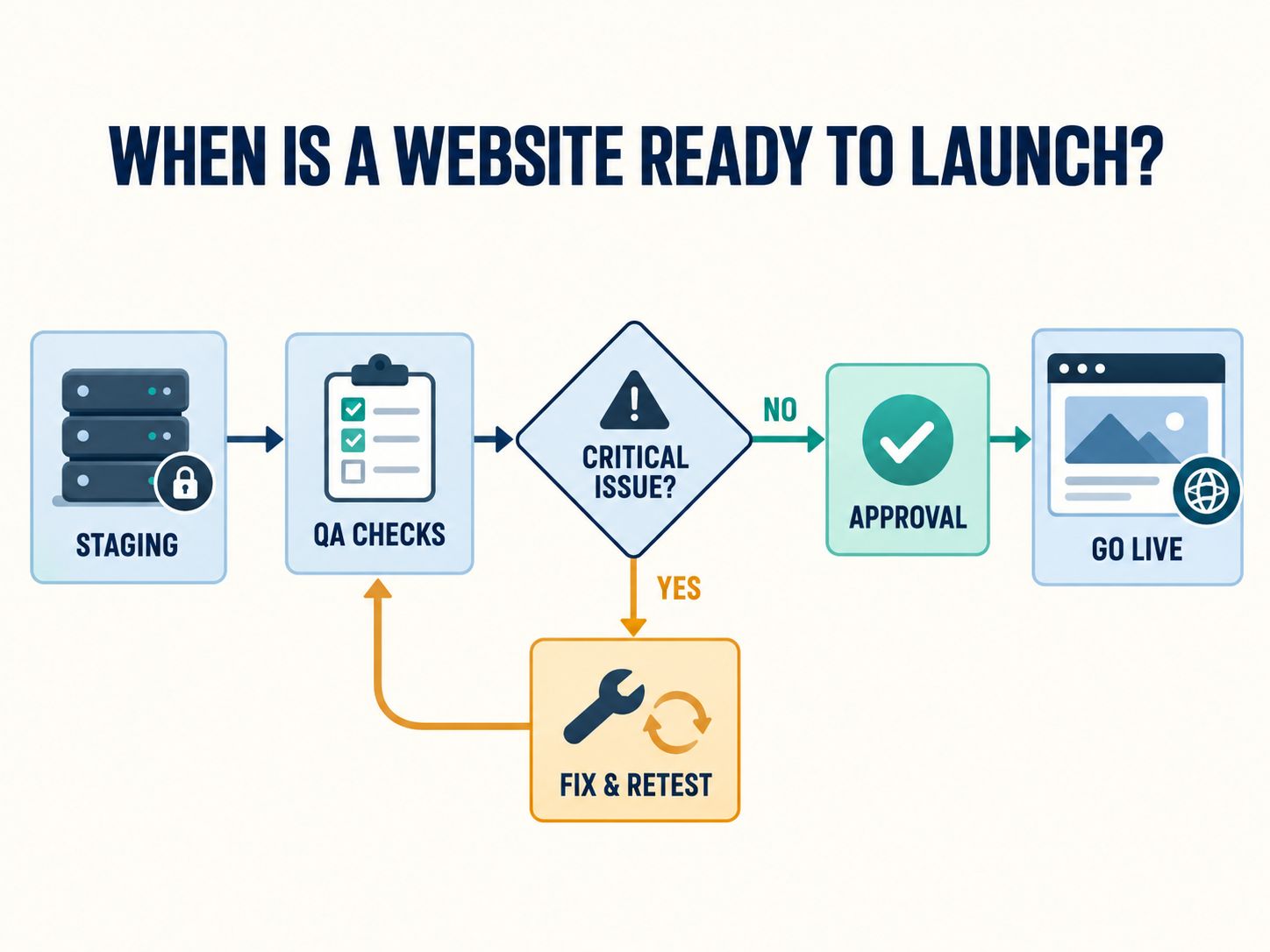
Website Migration Readiness Checker
Use the checklist below to assess your planned migration.
For every item, mark it complete only if there is supporting evidence. An unchecked critical requirement is a reason to investigate before approving launch.
- Backup and recovery: A recent backup exists, restoration has been tested, and a recovery owner is assigned.
- URL mapping and redirects: Important changed URLs have correct destinations and have been tested.
- Production indexability: Robots rules, noindex, canonicals, and key URLs have been reviewed.
- Critical business functionality: Enquiry forms, checkout, login, and required integrations work.
- Active data preservation: New orders, submissions, and account changes will not be overwritten.
- Content and media: Priority pages, downloads, images, and metadata are correct.
- Performance and mobile QA: Key templates have been tested on relevant devices.
- Analytics and conversions: Events and conversion tracking have been validated.
- Launch responsibilities: Named owners and go/no-go authority are documented.
- Post-launch monitoring: Monitoring period, support contacts, and escalation rules are agreed.
Do not approve launch if critical requirements are incomplete. Successful completion of most checks does not compensate for a missing backup, broken checkout, incorrect indexing directives, or lost customer data.
What Should Happen Immediately After Launch?
The agency should test the most important live pages, redirects, forms, customer journeys, and tracking.
Search Console, analytics reports, server logs, and crawl results can then help identify problems that were not visible during staging tests.
If the move changed URLs, submit the appropriate sitemap and keep the old domain and necessary redirects functioning.
For hosting-only migrations, monitor traffic arriving at the old and new infrastructure before decommissioning the old environment.
Website speed should also be reviewed after deployment. The guides on optimizing Core Web Vitals on shared hosting and B2B website speed provide relevant performance considerations.
How Long Should Monitoring Continue?
The appropriate duration depends on the migration’s size and risk.
Critical functionality should be checked immediately. Technical errors and business performance need continued monitoring afterward. Search visibility may take weeks or longer to settle following substantial URL changes.
The support period should be agreed before the migration begins.
What Should You Do if SEO Traffic Drops After Migration?
Start by checking whether the decline is real and which pages are affected.
Compare Google Search Console data with your pre-migration baseline. Look at clicks, impressions, pages, and queries, using comparable periods where possible.
Then investigate the affected URLs.
If old URLs no longer work, check their redirect destinations. If new pages are not indexed, inspect their status codes, indexing directives, and canonical configuration.
If pages remain indexed but perform differently, compare their content, internal links, and relevance with the originals.
Also make sure analytics tracking still works. A broken tracking implementation can make traffic appear to vanish even when visitors continue reaching the website.
Avoid treating every post-migration fluctuation as a technical disaster. But don’t dismiss genuine errors as normal either.
A good agency should be able to explain what it is checking, what it discovered, and how it plans to resolve the issue.
For hosting moves without URL changes, Google’s hosting migration guidance provides additional information about preparing the new infrastructure, switching traffic, and monitoring the transition.
My Perspective: What Separates a Safe Migration From a Risky One?
The most important question in a migration isn’t whether the files arrived at the destination.
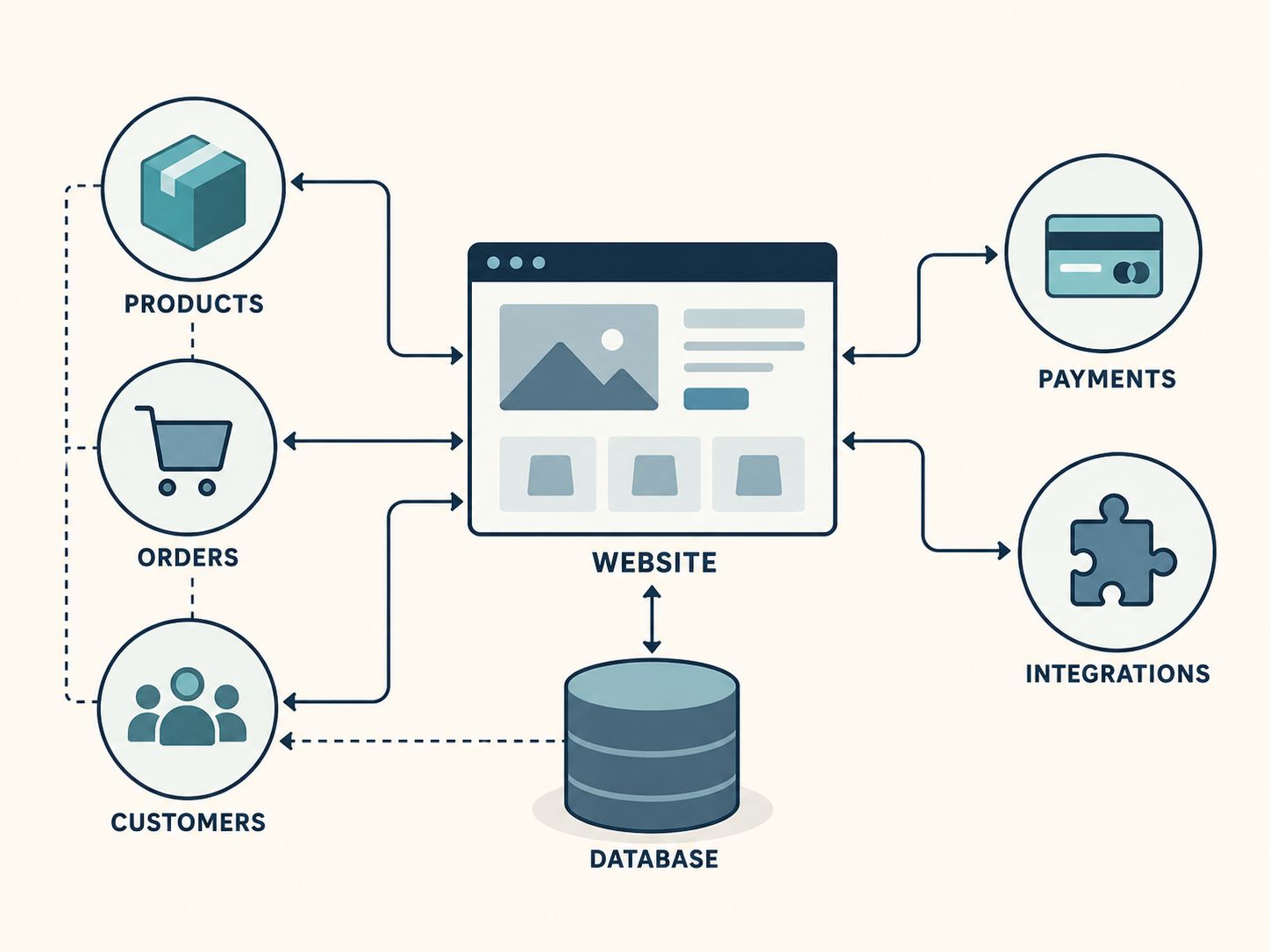
It’s whether the relationships between the website’s components still work.
A product page depends on product data, images, variations, cart behavior, and payment handling. A service page depends on navigation, links, forms, and search visibility. A membership website depends on permissions, authentication, subscriptions, and user records.
These dependencies are easy to underestimate when everyone is focused on approving a new design.
From a WordPress development perspective, I would approach migration planning around three decisions.
First, identify what must be preserved. This includes business-critical data, functional workflows, and valuable pages.
Second, identify what is intentionally changing. If URLs, templates, integrations, or hosting settings change, those differences need documented tests.
Third, define what would stop the launch. Missing orders, nonfunctional checkout, important redirect failures, or an unusable production site should trigger immediate action rather than being left for routine post-launch cleanup.
This approach makes it easier to judge the work objectively, whether you’re hiring a freelance developer, a WordPress specialist, or a full-service agency.
For businesses planning continued technical support after a migration, the dedicated WordPress outsourcing guide explores another way to organize ongoing development work.
Frequently Asked Questions
What is a website migration agency?
A website migration agency helps transfer a website to a new domain, hosting environment, CMS, or technical structure while managing content, functionality, SEO, and deployment risks.
Can an agency migrate WordPress without losing SEO?
A specialist can reduce avoidable SEO risks through URL mapping, redirects, content preservation, and technical validation. However, no provider can guarantee unchanged search rankings or traffic.
How long does a website migration take?
A simple hosting move may be relatively quick, while a complex ecommerce or enterprise CMS migration can require extensive planning, development, and testing. The timeline should come from a project-specific audit.
Should I hire an SEO agency or a web development agency?
For migrations with major URL or content changes, both SEO and development expertise are valuable. What matters is whether the chosen provider covers every required responsibility.
Is it better to hire a local website migration agency?
Local availability can help with meetings, time-zone alignment, and contractual requirements. Remote agencies can also perform migrations successfully when communication, security, and technical expertise are appropriate.
Can I migrate my website without an agency?
Yes. Simpler migrations can often be managed with a hosting provider or qualified developer. Complex ecommerce, international, or SEO-sensitive migrations generally benefit from specialist planning.
What should I send when requesting a migration quote?
Provide your current and destination platforms, approximate number of pages, important integrations, ecommerce or membership requirements, expected URL changes, and preferred launch window.
Can I change my domain and CMS at the same time?
Yes, but changing several major systems together can make testing and troubleshooting more difficult. Plan simultaneous changes carefully and consider separating them when practical.
How long should old URL redirects stay active?
For URL-changing site moves, Google generally recommends keeping the redirects for at least a year and longer when practical.
What should I do before paying the final migration invoice?
Review the agreed deliverables, test critical functionality, confirm SEO checks, receive necessary access and documentation, and understand the remaining support arrangements.
Final Verdict: Choose the Agency That Can Prove the Website Is Ready
The right website migration agency is not necessarily the biggest company, the nearest office, or the cheapest quote.
It’s the team that understands your existing website, identifies its critical dependencies, explains what will change, and can demonstrate that the new site works as intended.
For a simple hosting transfer, you may not need an agency at all. For a website that generates important sales, enquiries, or organic traffic, specialist support can be a sensible way to manage risk.
Before you sign, ask for a clear scope and testing plan. Before you launch, request evidence that the important checks have passed.
And after launch, keep monitoring.
Final key takeaway: Choose a migration team based on its ability to protect your website’s content, functionality, customer data, and search visibility—and to demonstrate that the essential checks have passed before launch.
Have you moved a website or worked with a migration agency? Share what went smoothly, what caused problems, or which part of your next migration concerns you most. Your experience could help another website owner make a better decision.